act: Run Your GitHub Actions Locally Before You Push
Stop pushing 'fix CI' commits. act runs your GitHub Actions workflows in local Docker containers, so a formatting or lint failure shows up in seconds, and no commit is needed.


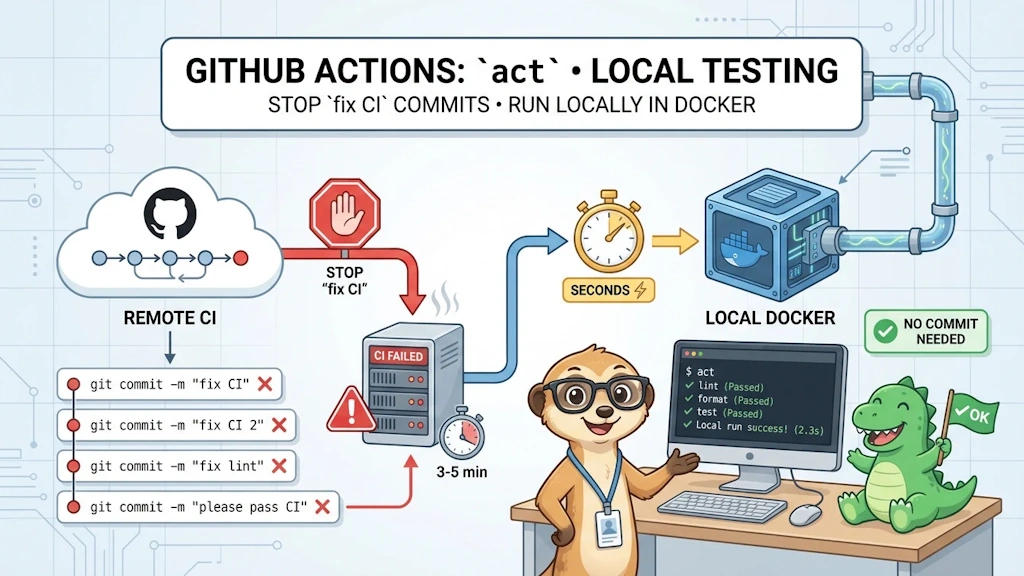
Testing a GitHub Actions workflow normally means committing, pushing and waiting, then doing it all again for every small mistake. act reads your .github/workflows files and runs the jobs in local Docker containers, so you get the answer in seconds with nothing pushed. This article uses a Prettier and ESLint workflow in a disposable container, then applies it to your own repository.
fix CI. fix CI again. really fix CI. please. We've all left this kind of history in a branch, each commit followed by a few minutes of watching a spinner, only to learn that a single word in a YAML file was wrong.
By the end of this article, you will run your workflow on your own machine, and you will only push it once it's green.
Seeing It in Action with Docker
Already know act? Skip to using it on your own repository — this chapter is only a throwaway container to try it risk-free.
A small project with a real workflow: one job checks the formatting with Prettier, another one runs ESLint. No push and no GitHub account here, just one command:
/demo # act -j formatting
[Code quality/formatting] ⭐ Run Main npx --yes prettier@3 --check .
| Checking formatting...
| [warn] app.js
| [warn] Code style issues found in the above file. Run Prettier with --write to fix.
[Code quality/formatting]   ❌  Failure - Main npx --yes prettier@3 --check . [1.138150374s]
[Code quality/formatting] 🏁  Job failed

/demo # act -j lint
[Code quality/lint] ⭐ Run Main npx eslint .
| /demo/app.js
|   3:13  error  'unknownVariable' is not defined  no-undef
|
| ✖ 1 problem (1 error, 0 warnings)
[Code quality/lint]   ❌  Failure - Main npx eslint . [309.333448ms]
[Code quality/lint] 🏁  Job failed
That's the same message you'd have read in the GitHub interface, minus the commit, the push and the wait. To try it, this image contains act and that project. Create it in /tmp/act:
Need help here? Click the "Help" button above for setup instructions.
The Docker socket gives full control
Mounting /var/run/docker.sock gives this container control over your Docker daemon, and therefore over your machine. act itself needs that access wherever it runs. Only run workflows that you trust: a local run: step is real code, and it runs on your machine.
See what's available, then run one job, and finally the whole workflow:
/demo # act -l
INFO[0000] Using docker host 'unix:///var/run/docker.sock', and daemon socket 'unix:///var/run/docker.sock'
Stage  Job ID      Job name    Workflow name  Workflow file  Events
0      lint        lint        Code quality   quality.yml    push
0      formatting  formatting  Code quality   quality.yml    push

/demo # act -j formatting
/demo # act
Now fix the code, as you would in your editor, and run it again:
/demo # printf 'const answer = 42;\nconsole.log("Hello", answer);\n' > app.js
/demo # act --quiet 2>&1 | grep 'Job '
[Code quality/formatting] 🏁  Job succeeded
[Code quality/lint      ] 🏁  Job succeeded
Two green jobs, and you still haven't committed anything: act copies your working folder as it is.
Why It Feels Like the Real CI
actreads your workflow file itself, so there's nothing to translate: jobs, steps,uses:andneeds:keep their meaning.- Each job runs in its own container, which is why your local tools and your
PATHcan't hide a missing dependency. - It's a simulation of the runner, not the runner: the image you choose decides which tools exist, and some GitHub-specific features behave differently or are missing.
If you've read my article on Dagger, the goal will sound familiar, but the mechanism is different. Dagger has you rewrite the steps as portable code, whereas act replays your existing GitHub syntax, unchanged. There's nothing to migrate.
Use It on Your Own Repository
Give act a permanent home
/tmp/act was only for the demo: it vanishes at the next reboot, and its image carries a demo project you don't need. For your own projects, keep a Dockerfile with act alone in ~/tools/act, so the image can be rebuilt any time (new machine, docker image prune, a new act version):
Need help here? Click the "Help" button above for setup instructions.
Build it under its final name, act-cli:
$ docker build -t act-cli ~/tools/act
Then, from the root of any project, where .github/ lives:
$ docker run --rm -it --network host -v /var/run/docker.sock:/var/run/docker.sock -v "$PWD":/workspace act-cli -l

Stage  Job ID                   Job name                                            Workflow name                      Workflow file           Events
0      update-readme-with-blog  update-readme-with-blog                             Latest blog post workflow          blog-post-workflow.yml  schedule,workflow_dispatch
0      deploy                   Deploy blog on avonture.be                          Deploy blog on avonture.be         deploy.yml              push,workflow_dispatch
0      build                    Build on Node ${{ matrix.node }}                    Node upgrade check                 node-upgrade-check.yml  workflow_dispatch
0      lint                     Lint JS/JSX and CSS                                 Code quality (ESLint + stylelint)  quality.yml             push,pull_request
0      snippet-lint             Lint the code files articles ship (blog/**/files/)  Code quality (ESLint + stylelint)  quality.yml             pull_request,push
0      internal-links           Internal links on new/changed articles              Code quality (ESLint + stylelint)  quality.yml             pull_request,push
0      e2e                      Playwright smoke/hydration (build)                  Code quality (ESLint + stylelint)  quality.yml             push,pull_request
That's this blog's repository: four workflow files, seven jobs, read in a second without pushing anything.
Everything after act-cli is passed to act: -l lists the jobs, -j lint runs one of them. --network host lets the jobs reach the cache and artifact servers that act opens in its own container.
Optional: make it an act command
Happy with the docker run line above? Skip to the options.
That command is long. One shell function turns it into a plain act, available in every folder. It gets its own file in a folder your shell loads at startup, the same organisation as in my modular ZSH workflow: your rc file stays short, and removing the tool is deleting one file.
# act through Docker: run the GitHub Actions workflows of the current# project, from anywhere. Works in zsh and bash: save it as# ~/.zsh/fns/act.zsh or ~/.bash/fns/act.sh (see the article).## act -l -> list the jobs# act -j lint -> run one job# act -> run the whole push workflow## Run it from the root of the project, where .github/ lives.act() { local image="act-cli" # Permanent home of the Dockerfile, so the image can always be rebuilt. local build_dir="${HOME}/tools/act" # Shown as is in the messages, so the command can be copied for any user. # shellcheck disable=SC2016 local build_dir_shown='${HOME}/tools/act'
if ! command -v docker >/dev/null 2>&1; then printf '\e[31mError: docker is not installed or not in your PATH.\e[0m\n' >&2 return 1 fi
if ! docker image inspect "${image}" >/dev/null 2>&1; then printf '\e[31mError: the Docker image "%s" does not exist on this machine.\e[0m\n\n' "${image}" >&2 printf 'How to continue:\n' >&2 if [[ -f "${build_dir}/Dockerfile" ]]; then printf ' 1. docker build -t %s "%s"\n' "${image}" "${build_dir_shown}" >&2 printf ' 2. Run your act command again.\n' >&2 else printf ' 1. Get the Dockerfile from https://www.avonture.be/blog/act-github-actions-locally\n' >&2 printf ' and save it as %s/Dockerfile\n' "${build_dir_shown}" >&2 printf ' 2. docker build -t %s "%s"\n' "${image}" "${build_dir_shown}" >&2 printf ' 3. Run your act command again.\n' >&2 fi return 1 fi
# -t only when both ends are a terminal, so piping the output still works. local tty_flags="-i" [[ -t 0 && -t 1 ]] && tty_flags="-it"
# act drives the Docker daemon through its socket, which is root-equivalent # anyway: the container runs as root, with only the capability to read # every file of the project (a .secrets file is often chmod 600). # The act-cache volume keeps the downloaded actions between two runs. # --network host: the jobs must reach the cache and artifact servers # that act opens in this container. docker run --rm "${tty_flags}" \ --network host \ -v /var/run/docker.sock:/var/run/docker.sock \ -v "${PWD}:/workspace" \ -w /workspace \ -v act-cache:/root/.cache \ --read-only \ --tmpfs /tmp \ --cap-drop ALL \ --cap-add DAC_READ_SEARCH \ --security-opt no-new-privileges:true \ "${image}" "$@"}This function wraps the GitHub Actions test runner 'act' inside a Docker container for security and isolation. It first checks that Docker is installed and that the required image exists, giving helpful instructions if the image needs to be built. Then it launches the container with carefully configured security settings and volume mounts so the act tool can access your project files and run workflows.
The code is the same for zsh and bash; only the folder and the loader differ.
- zsh
- bash
1. Create the file in ~/.zsh/fns/:
Need help here? Click the "Help" button above for setup instructions.
2. Load the folder from ~/.zshrc. Already done if you followed one of my "Ollama daily use" articles. Otherwise, add at the end of ~/.zshrc:
for fn_file in ~/.zsh/fns/*.zsh; do
  source "$fn_file"
done
3. Open a new terminal (or run exec zsh).
1. Create the file in ~/.bash/fns/:
Need help here? Click the "Help" button above for setup instructions.
2. Load the folder from ~/.bashrc. Add at the end of ~/.bashrc (the -r test keeps an empty folder from printing an error):
for fn_file in ~/.bash/fns/*.sh; do
  [[ -r "$fn_file" ]] && source "$fn_file"
done
3. Open a new terminal (or run exec bash).
Check that the shell knows the function: type act must answer act is a shell function. The function mounts the current folder as /workspace, so run it from the root of your project.
If the image is missing, the function doesn't fail with a cryptic Docker error, it tells you how to rebuild it:
Error: the Docker image "act-cli" does not exist on this machine.

How to continue:
  1. docker build -t act-cli "${HOME}/tools/act"
  2. Run your act command again.
And if ~/tools/act/Dockerfile is gone too, the message points back to this article to get it again.
It shadows a native act
The function is called act, so it takes precedence over an act binary installed locally, with Homebrew or gh extension install nektos/gh-act for instance. If you install it natively one day, remove the function or rename it.
The options you need
The rest of this chapter writes act …. Without the function, put the docker run … act-cli line in its place.
| You want to | Command |
|---|---|
| Run one job | act -j lint |
| Simulate a pull request | act pull_request |
| See the plan, with no execution | act -n |
| Provide secrets from a file | act --secret-file .secrets |
| Choose the runner image | act -P ubuntu-latest=<image> |
Pass artifacts between jobs (upload-artifact, download-artifact) | act --artifact-server-path /tmp/artifacts |
actions/cache works as is: act runs its own cache server. upload-artifact and download-artifact fail unless you start the artifact server with --artifact-server-path.
Example: this blog's quality checks
This blog's repository, cavo789/blog, has a real quality.yml, the source of four of the jobs listed above. -W limits act to that file:
$ act -l -W .github/workflows/quality.yml
Stage  Job ID          Job name                                            Workflow name                      Workflow file  Events
0      internal-links  Internal links on new/changed articles              Code quality (ESLint + stylelint)  quality.yml    push,pull_request
0      e2e             Playwright smoke/hydration (build)                  Code quality (ESLint + stylelint)  quality.yml    push,pull_request
0      lint            Lint JS/JSX and CSS                                 Code quality (ESLint + stylelint)  quality.yml    push,pull_request
0      snippet-lint    Lint the code files articles ship (blog/**/files/)  Code quality (ESLint + stylelint)  quality.yml    push,pull_request
Run the lint job with the default runner image, act -j lint, and it fails on a step that passes on GitHub:
[Code quality (ESLint + stylelint)/Lint JS/JSX and CSS]   | $ node scripts/check-snippet-sources.mjs
[Code quality (ESLint + stylelint)/Lint JS/JSX and CSS]   | <ref *1> Error: spawnSync git ENOENT
[Code quality (ESLint + stylelint)/Lint JS/JSX and CSS]   ❌  Failure - Main Run lint (ESLint + stylelint) [8.369179434s]
The script calls git, and node:24-bookworm-slim doesn't ship it, while GitHub's runner does. That's the runner image at work: the slim image only fits workflows that need Node alone. catthehacker/ubuntu:act-latest, a popular image made for act, has git but no yarn, so setup-node fails one step later. The non-slim node:24-bookworm has both:
$ act -j lint -P ubuntu-latest=node:24-bookworm
[Code quality (ESLint + stylelint)/Lint JS/JSX and CSS] ⭐ Run Main Run lint (ESLint + stylelint)
[Code quality (ESLint + stylelint)/Lint JS/JSX and CSS]   | $ yarn lint:js && yarn lint:css && yarn lint:types && yarn lint:snippets
[Code quality (ESLint + stylelint)/Lint JS/JSX and CSS]   ✅  Success - Main Run lint (ESLint + stylelint) [8.282250914s]
[Code quality (ESLint + stylelint)/Lint JS/JSX and CSS] 🏁  Job succeeded
When a job fails locally and passes on GitHub, look at the runner image first.
Typing -P at every run gets old fast. act reads a .actrc file at the root of the project, one option per line, and the project's file wins over the default one baked into the image. This blog's repository has this one, committed with the workflows:
-P ubuntu-latest=node:24-bookworm
From now on, a plain act -j lint uses the right image, for you and for anyone who clones the project.
And a plain act, with no option, plays the push event: every job of every workflow triggered by a push starts at once, each in its own container:
$ act
[Deploy blog on avonture.be/Deploy blog on avonture.be                               ] ⭐ Run Set up job
[Code quality (ESLint + stylelint)/Lint JS/JSX and CSS                               ] ⭐ Run Set up job
[Code quality (ESLint + stylelint)/Lint JS/JSX and CSS                               ] 🚀  Start image=node:24-bookworm
[Code quality (ESLint + stylelint)/Lint the code files articles ship (blog/**/files/)] ⭐ Run Set up job
[Code quality (ESLint + stylelint)/Lint the code files articles ship (blog/**/files/)] 🚀  Start image=node:24-bookworm
[Deploy blog on avonture.be/Deploy blog on avonture.be                               ] 🚀  Start image=node:24-bookworm
[Code quality (ESLint + stylelint)/Internal links on new/changed articles            ] ⭐ Run Set up job
[Code quality (ESLint + stylelint)/Internal links on new/changed articles            ] 🚀  Start image=node:24-bookworm
[Code quality (ESLint + stylelint)/Playwright smoke/hydration (build)                ] ⭐ Run Set up job
[Code quality (ESLint + stylelint)/Playwright smoke/hydration (build)                ] 🚀  Start image=node:24-bookworm
Five jobs, and one of them is the deploy, the workflow that publishes this blog. Here it can't reach the server, because GitHub's secrets aren't on this PC and its SSH variables are empty, but that's luck, not a safeguard. Name the job (-j lint) or the workflow (-W .github/workflows/quality.yml) while you work, and protect the deployment itself, as shown below.
Example: a deploy workflow
act doesn't simulate the steps: it runs them. A deploy workflow run with act deploys, exactly as it would on GitHub. Here is a project with a single deploy job:
$ act -l
Stage  Job ID  Job name     Workflow name               Workflow file  Events
0      deploy  Deploy site  Deploy site on example.com  deploy.yml     push,workflow_dispatch
Its job reads secrets, such as an SSH key and a host name, that were created in GitHub's web interface.
GitHub's secrets stay on GitHub
The values entered under Settings → Secrets and variables → Actions can't be read back, neither in the interface nor through the API. act has no access to them: without a .secrets file, every secrets.X is an empty string, and the job fails at its first connection. To run it locally, you have to supply each value yourself, in a .secrets file (NAME=value, one per line, the same names as on GitHub), added to your .gitignore.
First, look at the plan without executing anything:
$ act push -n
Then fire the same event as a git push would:
$ act push --secret-file .secrets
act workflow_dispatch triggers it as the Run workflow button would, and act -j deploy runs the job whatever the event.
This is a real deployment
With real credentials in .secrets, the job connects to your server and deploys your working folder as it is, uncommitted changes included. GitHub would have deployed the pushed commit. Commit first, or keep -n until you're sure.
If you never want to deploy from your PC, say so in the workflow itself, rather than relying on the right .secrets file being there or not. act sets the ACT variable in every job, and GitHub doesn't, so this step is skipped locally and runs on GitHub:
      - name: Deploy
        if: ${{ !env.ACT }}
        run: ./deploy.sh
Every step before it still runs (build, tests, packaging), so you still check everything up to the deployment itself. The same condition fits a Slack notification or a publication to a registry.
If a step needs secrets.GITHUB_TOKEN, which GitHub creates on its own, provide it yourself: -s GITHUB_TOKEN="$(gh auth token)".
A Workflow You Can Reuse
The example above is deliberately small, but the pattern scales. Stylelint, shellcheck, or the Python quality tools are simply more jobs in the same file, and each can be run alone with act -j. This is especially comfortable while you are writing a new workflow: change a line, run the job, read the result, without a single noise commit in your branch.
It complements a pre-commit hook rather than replacing it. The hook checks the commit quickly, and act tells you if the pipeline itself is right.
Conclusion
At the beginning of this article, testing a workflow meant four commits and a lot of waiting. With act, the feedback now arrives in seconds, and your history only contains the commit that matters. GitHub's run remains the final judge, since a local simulation can't reproduce everything, but it will mostly confirm what you already know. The next time you touch a file in .github/workflows, run act first; your branch history will thank you.
Related posts
n8n: Check Your Latest CI Run Without Writing Code
November 23, 2026

Automate your GitHub README with your latest blog posts
February 9, 2026

Dagger.io - Using dagger to automate your CI workflows
December 26, 2024

Docker secrets - Using your SSH key during the build process
September 3, 2024

VBS - Auto update script
March 19, 2024
