AnythingLLM: Chat With All Your Scattered Documentation
AnythingLLM turns a pile of Markdown, Quarto, PDF, DOCX, Excel and PowerPoint files into something you can actually chat with, backed by a local Ollama model. Part 1 sets it up on a single machine; Part 2 keeps the documents on my work PC while borrowing the GPU sitting at home.


This article is part of the Ollama daily use series:
- Installing Ollama and get local AI
- Accessing Ollama across your local network
- ai-test: Generate Missing Unit Tests From Your Terminal With a Local LLM
- ai-review, ai-secrets, ai-commit: Three zsh Checks Before Every git Commit
- AnythingLLM: Chat With All Your Scattered Documentation
- ai-translate & ai-summarize: Confidential Documents, Handled 100% Locally
- ai-diagram: From a Sentence (or a compose.yaml) to a Mermaid Diagram
- ai-data: Let a Local LLM Write Your jq and awk One-Liners
- ai-explain: ELI5 for Scripts and Errors, Right in Your Terminal
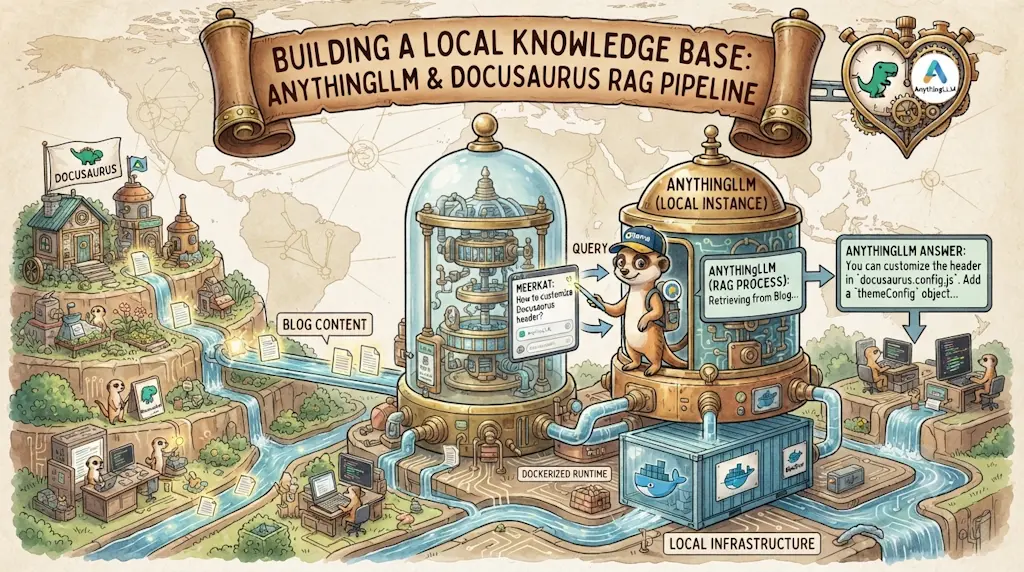
AnythingLLM is a self-hosted, Docker-friendly app that turns your own documents — Markdown, Quarto, PDF, DOCX, Excel, PowerPoint, whatever — into a searchable, chattable knowledge base, with answers that cite the exact file they came from. It doesn't run its own AI; it talks to an LLM provider of your choice, which means it can reuse an Ollama server you already have running elsewhere. This article sets it up twice: once fully on one machine (my home PC), and once split across two — documents on my work PC, GPU inference on the home PC — because some documents are simply not allowed to leave the machine they live on.
Under ~/repositories on my work laptop, I have dozens of project folders, and every one of them has quietly grown its own pile of documentation: a README.md here, a Quarto report there, a PDF spec somebody sent me, an Excel sheet nobody remembers the purpose of anymore, a PowerPoint from a meeting six months ago. Individually, each file is fine. Together, they're a graveyard — I know I wrote down the answer to "how did I configure that VPN last time" somewhere, in one of these folders, in one of these formats, but finding it means either remembering the exact filename or grepping and hoping the words match.
If you've ever opened a terminal, typed grep -r "some term" ~/repositories, gotten forty irrelevant hits, and given up — you already have the problem this article is about.
Seeing It Work
Here is a real question against a real workspace — the 248 articles of this blog, indexed with the script further down. Asking is one API call, the same request the chat panel sends when you type into it:
Read the question again and notice what it doesn't contain. Not chpwd. Not for-each-ref. Not committerdate. Not even the words in the title of the article it found — Showing the last 3 updated branches when you jump in a git repo. I described a vague memory in the words I'd actually use two years later, and got back the mechanism, the hook it's wired to, the flag that sorts the branches, and a link.
That is precisely the query grep cannot serve. grep -r "chpwd" would have found it instantly — if I had remembered the word chpwd. The whole point is that I hadn't.
Why It Works
- AnythingLLM is an open-source, self-hosted app built around Retrieval-Augmented Generation (RAG) over your own files, organized into workspaces — one per project, per client, or per topic, with nothing leaking between them.
- It's a client, not an LLM. AnythingLLM doesn't ship a model of its own — it calls out to an LLM Provider you configure: OpenAI, Anthropic, or, the interesting part for us, Ollama. If you already run Ollama somewhere, AnythingLLM is just another thing that talks to it.
- Every answer comes back with a reference to the source file and the chunk it was pulled from — a citation, not a guess you have to trust on faith.
- It reads what
grepcannot open at all: the PDF spec, the Excel sheet, the PowerPoint deck. That is the other half of why it complementsrgrather than replacing it. It also coexists with Open WebUI — Open WebUI is a general-purpose chat client for Ollama, AnythingLLM is specifically the document-RAG layer, and both are happy to talk to the same Ollama instance.
What you get for the setup effort
A natural-language question over everything in a workspace, with the source file named in the answer. That single feature is worth the twenty minutes of Docker setup below — it turns "I know I wrote this down somewhere" into an actual answer.
Four things follow, and they are worth reading in any order you like:
- Installing it — one
compose.yaml, plus the thirty-second check that saves you from an embedder that silently returns noise. - Getting documents in — why there is no "index this folder" button, and the script that indexed 248 articles in 94 seconds.
- Searching from the terminal — one
curl, then the same thing as a shell command with clickable results. - Documents here, GPU there — the two-machine split, for documents that are not allowed to travel.
Part 1 — Installing AnythingLLM on One Machine
This is the simple case: AnythingLLM and Ollama live on the same machine, my home PC with 24GB of VRAM to spare.
Prerequisites
This assumes Ollama is already running as a Docker container, the way I set it up in Installing Ollama and get local AI. Nothing below re-explains that part.
The compose.yaml file
Following my usual habit of one folder per tool under ~/tools, let's create ~/tools/anythingllm/compose.yaml:
name: tools
services: anythingllm: image: mintplexlabs/anythingllm container_name: anythingllm cap_add: - SYS_ADMIN ports: - "3001:3001" env_file: - .env environment: - STORAGE_DIR=/app/server/storage - LLM_PROVIDER=ollama - OLLAMA_BASE_PATH=http://192.168.0.218:11434 - OLLAMA_MODEL_PREF=qwen2.5:14b-instruct - OLLAMA_MODEL_TOKEN_LIMIT=8192 - EMBEDDING_ENGINE=ollama - EMBEDDING_BASE_PATH=http://192.168.0.218:11434 - EMBEDDING_MODEL_PREF=mxbai-embed-large # mxbai-embed-large has a 512-token context — a larger chunk size makes # every single embedding call fail. Keep this comfortably under it. - EMBEDDING_MODEL_MAX_CHUNK_LENGTH=400 - OLLAMA_EMBEDDING_BATCH_SIZE=16 - VECTOR_DB=lancedb volumes: - anythingllm_storage:/app/server/storage restart: always
volumes: anythingllm_storage:This is a Docker Compose configuration file that sets up a single service called 'anythingllm', which is an AI application that uses language models. It configures the container to run on port 3001, connects it to an Ollama language model server at a specific IP address, sets up persistent storage, and defines various AI model parameters like embedding settings.
Before starting it, create the .env file it references, holding a random secret AnythingLLM uses to sign session tokens:
$ echo "JWT_SECRET=$(openssl rand -hex 32)" > .env
About cap_add: SYS_ADMIN
AnythingLLM uses a headless Chromium under the hood for some document and web-scraping features, and Chromium wants this capability to run its sandbox inside a container. It's a broader grant of privilege than I'd like to hand out by default — the project has an open discussion about replacing it with a narrower seccomp profile instead, but as of now, SYS_ADMIN is what the official image expects. Worth knowing, not worth losing sleep over on a home LAN.
OLLAMA_BASE_PATH and EMBEDDING_BASE_PATH both point at 192.168.0.218 — the same home-server IP address I used in Accessing Ollama across your local network. Replace it with your own server's IP. Notice that even though Ollama and AnythingLLM run on the very same machine here, I'm still using the LAN IP rather than localhost — that detail matters later, where it stops being a detail and becomes the whole point.
Pull the embedding model on the Ollama side before starting AnythingLLM — it's small (a few hundred MB) and required for anything to get embedded at all:
$ docker exec -it ollama ollama pull mxbai-embed-large
Match the chunk size to the embedding model, or nothing will embed at all
EMBEDDING_MODEL_MAX_CHUNK_LENGTH above is set to 400 for a reason. Run docker exec ollama ollama show mxbai-embed-large and you'll see context length 512 — set the chunk size higher than that and every document fails to embed, with Ollama Failed to embed: the input length exceeds the context length buried in docker logs anythingllm. The UI gives you no hint: the upload succeeds, the document shows up in the library, and the workspace simply stays empty. OLLAMA_EMBEDDING_BATCH_SIZE is pure speed — the default of 1 sends one chunk per HTTP call, which turns a few hundred documents into a very long afternoon.
Check that your embedder actually discriminates
I originally used nomic-embed-text here — it's the model everyone recommends for this job. It embedded all 248 articles without a single error, and then answered "there are no articles specifically covering WordPress" about a blog containing an article titled Quickly install WordPress in just three commands.
Nothing had failed. The embeddings were simply meaningless, and a RAG stack has no way to tell you that: it retrieves the closest vectors it can find and hands them to the model, whatever they are. So before trusting an embedder, spend thirty seconds proving it separates related text from unrelated text:
#!/usr/bin/env python3"""Prove an Ollama embedding model separates related text from unrelated text.
python3 embedder-sanity-check.py mxbai-embed-large nomic-embed-text"""
import jsonimport mathimport sysimport urllib.request
OLLAMA = "http://localhost:11434/api/embed"
# The first two sentences say the same thing; the third is unrelated.SENTENCES = [ "Installing WordPress using Docker containers", "WordPress installation with Docker", "Powerlevel10k is a theme for the zsh shell",]
def embed(texts, model): payload = json.dumps({"model": model, "input": texts}).encode() request = urllib.request.Request( OLLAMA, data=payload, headers={"Content-Type": "application/json"} ) with urllib.request.urlopen(request, timeout=300) as response: return json.loads(response.read())["embeddings"]
def cosine(a, b): dot = sum(x * y for x, y in zip(a, b)) return dot / (math.sqrt(sum(x * x for x in a)) * math.sqrt(sum(y * y for y in b)))
for model in sys.argv[1:] or ["mxbai-embed-large"]: vectors = embed(SENTENCES, model) related = cosine(vectors[0], vectors[1]) unrelated = cosine(vectors[0], vectors[2]) print( f"{model:<20} dims={len(vectors[0]):<5}" f" related={related:.4f} unrelated={unrelated:.4f}" f" separation={related - unrelated:+.4f}" )This script tests whether an embedding model can distinguish between similar and dissimilar text by converting sentences into numerical vectors and measuring how close the vectors are to each other. It sends text to a local Ollama service, converts the resulting embeddings into cosine similarity scores (a measure of how similar two vectors are), and prints out whether related sentences have higher similarity scores than unrelated ones.
$ python3 embedder-sanity-check.py mxbai-embed-large nomic-embed-text

mxbai-embed-large    dims=1024  related=0.9536  unrelated=0.4591  separation=+0.4945
nomic-embed-text     dims=768   related=0.5910  unrelated=0.5377  separation=+0.0532
Two sentences that mean the same thing should score far above an unrelated one. mxbai-embed-large separates them by +0.49; on my machine nomic-embed-text managed +0.05, which is noise. I never traced the root cause — both the :latest and :v1.5 tags behaved identically, and Ollama's OLLAMA_FLASH_ATTENTION / OLLAMA_KV_CACHE_TYPE tuning made no difference — but the fix doesn't depend on the cause. Run the check, and if the separation is small, change the model rather than your questions.
Then bring AnythingLLM up:
$ docker compose up --detach
[+] Running 1/1 ✔ Container anythingllm Started
First-run setup
Browse to http://localhost:3001 (or http://192.168.0.218:3001 from another machine on the network). The onboarding wizard asks for:
AnythingLLM onboarding
- LLM Provider — select Ollama, paste your server's URL (
http://192.168.0.218:11434), pick the model you already pulled (qwen2.5:14b-instructfits comfortably in 24GB of VRAM alongside the embedding model) - Embedding Provider — select Ollama again, same URL, pick
mxbai-embed-large - Vector Database — leave the default, LanceDB; it's embedded, no extra container to run
- Create your first workspace — name it after a real project, not "test"
Getting Your Documents In
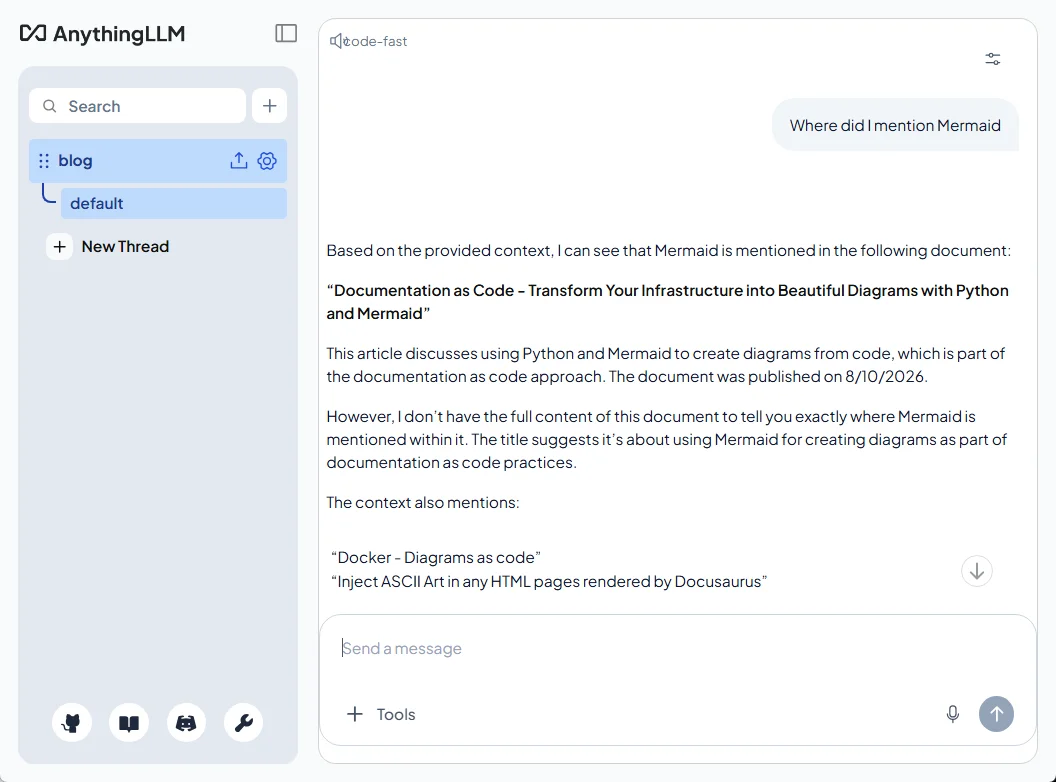
Inside the workspace, the upload dialog accepts exactly the mix I described earlier: drop in a README.md, a Quarto .qmd report, a PDF, a DOCX, an Excel sheet, a PowerPoint deck — multi-select as many as the OS file picker lets you grab at once. AnythingLLM parses each format on its own; you don't need to convert anything first.
Once the documents show a green "embedded" status, ask a real question in the chat panel — something you'd normally have gone digging for, the same way the terminal proof above got its answer. The answer comes back with the source document named next to it, so you can go double-check it instead of taking the model's word for it.
You don't give it a path — and that surprises everyone
This is the part I got wrong the first time, so let's make it explicit: there is no field anywhere in AnythingLLM where you type /home/me/repositories and let it index that folder. Two things stack up to make that impossible:
- The server runs in a container, and the
compose.yamlabove mounts exactly one volume —anythingllm_storage. Your documents folder simply doesn't exist inside that container. - Adding a bind mount wouldn't help either, because that Upload dialog is your browser's file picker, running on your machine. It can't see inside the container, and the container never learns where the file came from — the bytes arrive over HTTP like any other form upload.
So AnythingLLM never reads your files in place. It copies each one into its storage volume, parses it to JSON, splits it into chunks and embeds them. That's the same fact Part 2 below hangs its entire argument on, and it's worth internalizing early: documents live where the container runs.
Which leaves a real question — how do you get a few hundred files in there without clicking through a file picker a few hundred times?
Indexing a whole folder tree with one command
The GUI is one of three doors, and the other two are better suited to bulk:
- The Developer API — a REST endpoint that takes one file per call. Wrap it in a loop and you can feed it anything you can
find. This is the one we'll use. - Data connectors (Settings → Data Connectors) — ready-made importers for GitHub, GitLab, Confluence, Obsidian and a website depth-crawler. If your documents already live in a repository, pointing the GitHub connector at it is zero scripting. Do give it an access token though: unauthenticated, it's throttled by GitHub's public rate limit and often only picks up top-level files.
- The website crawler, if the content is published somewhere. Simplest of all, but you index rendered HTML — navigation, footer and sidebar included — instead of the source.
I went with the API, because what I actually want indexed is this blog: 248 articles, each one an index.md in its own dated folder. Generate a key under Settings → Tools → Developer API, and a single call looks like this:
$ curl -X POST http://localhost:3001/api/v1/document/upload \
    -H "Authorization: Bearer $ANYTHINGLLM_API_KEY" \
    -F "file=@blog/2026/08/17/anythingllm-chat-with-your-docs/index.md" \
    -F "addToWorkspaces=blog"
The addToWorkspaces field is what makes this a one-step operation: without it the document lands in AnythingLLM's document library but isn't embedded into anything, and you'd still have to go tick boxes in the UI.
The trap: 241 files named index.md
Docusaurus puts every article in its own folder as index.md, and AnythingLLM cites its sources by filename. Upload them as-is and every single answer ends with Source: index.md — 241 of them, indistinguishable. Citation is the whole reason to use this tool, so it has to be fixed at upload time: curl lets you override the transmitted name with -F "file=@path/index.md;filename=the-slug.md", and the slug is sitting right there in the frontmatter.
That, plus skipping files that haven't changed since last time, is all the script does:
#!/usr/bin/env bash## Index every blog post into an AnythingLLM workspace.## ANYTHINGLLM_API_KEY=xxxxxx ./anythingllm-index.sh## Re-run it after publishing a new article: only new and modified posts are# sent, everything else is skipped.
set -o errexitset -o nounsetset -o pipefail
WORKSPACE="${ANYTHINGLLM_WORKSPACE:-blog}"BLOG_DIR="${BLOG_DIR:-blog}"STATE_FILE="${STATE_FILE:-.anythingllm-indexed}"SITE_URL="${SITE_URL:-https://www.avonture.be}"
# The key can come from the environment (a line in ~/.zshrc) or from the# gitignored .env at the root of the blog — handy inside a devcontainer, which# doesn't inherit the host's shell configuration.if [[ -z "${ANYTHINGLLM_API_KEY:-}" && -f ".env" ]]; then ANYTHINGLLM_API_KEY="$(grep -E '^ANYTHINGLLM_API_KEY=' .env | head -1 | cut -d= -f2- | tr -d "\"'")" || truefi: "${ANYTHINGLLM_API_KEY:?Generate one in Settings > Tools > Developer API}"
# "localhost" is right when the script runs on the Docker host; from inside# another container it isn't, and the bridge gateway is what reaches it.if [[ -z "${ANYTHINGLLM_URL:-}" ]]; then for candidate in "http://localhost:3001" "http://172.17.0.1:3001"; do if curl --silent --fail --max-time 2 "${candidate}/api/ping" >/dev/null 2>&1; then ANYTHINGLLM_URL="${candidate}" break fi donefi: "${ANYTHINGLLM_URL:?No AnythingLLM instance answered on port 3001}"
api() { curl --silent --show-error \ --header "Authorization: Bearer ${ANYTHINGLLM_API_KEY}" "$@"}
# Read one key out of a Markdown file's YAML frontmatter, unquoted.frontmatter() { local key="${1}" file="${2}"
awk -v key="${key}" ' NR == 1 && $0 == "---" { in_fm = 1; next } in_fm && $0 == "---" { exit } in_fm && index($0, key ":") == 1 { sub("^" key ": *", "") gsub(/^"|"$/, "") print exit } ' "${file}"}
# Fail early and loudly rather than uploading 248 files into the void.if ! api "${ANYTHINGLLM_URL}/api/v1/workspaces" | jq -e --arg slug "${WORKSPACE}" '.workspaces[]? | select(.slug == $slug)' >/dev/null; then printf 'Workspace "%s" not found at %s (check the slug and the API key)\n' \ "${WORKSPACE}" "${ANYTHINGLLM_URL}" >&2 exit 1fi
# Replay the state file: post path -> "<sha256>\t<document location>".declare -A previous=()if [[ -f "${STATE_FILE}" ]]; then while IFS=$'\t' read -r hash path location; do [[ -n "${path}" ]] && previous["${path}"]="${hash}"$'\t'"${location}" done <"${STATE_FILE}"fi
declare -A current=()added=0updated=0skipped=0failed=0
while IFS= read -r -d '' file; do hash="$(sha256sum "${file}" | cut -d' ' -f1)" entry="${previous["${file}"]:-}" known_hash="${entry%%$'\t'*}"
if [[ "${known_hash}" == "${hash}" ]]; then current["${file}"]="${entry}" skipped=$((skipped + 1)) continue fi
if [[ "$(frontmatter draft "${file}")" == "true" ]]; then continue fi
# Every post is an index.md, so the folder name is what makes it # identifiable — send it as the filename AnythingLLM will cite. slug="$(frontmatter slug "${file}")" [[ -n "${slug}" ]] || slug="$(basename "$(dirname "${file}")")" title="$(frontmatter title "${file}")" [[ -n "${title}" ]] || title="${slug}"
# AnythingLLM stamps each document with a "published" date taken from the # temp file the collector received — i.e. the upload date, always today, and # not overridable through the API. Ask the workspace when something was # written and it answers confidently and wrongly. # Of the three fields copied into every chunk's header, "title" is the only # one we control, so the real date rides along inside it. published="$(frontmatter date "${file}")" [[ -z "${published}" ]] || title="${title} (published ${published})"
# A modified post: drop the previously embedded copy first, otherwise the # workspace ends up answering from two versions of the same article. if [[ -n "${entry}" ]]; then old_location="${entry#*$'\t'}" api --request DELETE "${ANYTHINGLLM_URL}/api/v1/system/remove-documents" \ --header "Content-Type: application/json" \ --data "$(jq -nc --arg name "${old_location}" '{names: [$name]}')" >/dev/null || true fi
# A "link://" chunkSource is the one metadata field AnythingLLM copies into # every chunk's header, so this is what lets the model answer with the live # URL of the article instead of just a filename. response="$(api --request POST "${ANYTHINGLLM_URL}/api/v1/document/upload" \ --form "file=@${file};filename=${slug}.md;type=text/markdown" \ --form "addToWorkspaces=${WORKSPACE}" \ --form "metadata=$(jq -nc \ --arg title "${title}" \ --arg source "${file}" \ --arg link "link://${SITE_URL}/blog/${slug}" \ '{title: $title, docSource: $source, chunkSource: $link}')")"
location="$(jq -r '.documents[0].location // empty' <<<"${response}")" if [[ -z "${location}" ]]; then printf 'FAILED %s: %s\n' "${slug}" "$(jq -r '.error // "unknown error"' <<<"${response}")" >&2 failed=$((failed + 1)) continue fi
current["${file}"]="${hash}"$'\t'"${location}" if [[ -n "${entry}" ]]; then printf 'updated %s\n' "${slug}" updated=$((updated + 1)) else printf 'added %s\n' "${slug}" added=$((added + 1)) fidone < <(find "${BLOG_DIR}" -type f \( -name 'index.md' -o -name 'index.mdx' \) -print0 | sort -z)
# Rewrite the state file from scratch so deleted posts drop out of it.for path in "${!current[@]}"; do printf '%s\t%s\t%s\n' \ "${current["${path}"]%%$'\t'*}" "${path}" "${current["${path}"]#*$'\t'}"done | sort -k2 >"${STATE_FILE}"
printf '\n%d added, %d updated, %d unchanged, %d failed\n' \ "${added}" "${updated}" "${skipped}" "${failed}"[[ "${failed}" -eq 0 ]]This script syncs blog posts to an AnythingLLM workspace by checking file hashes to detect new and modified posts, then uploading only those that have changed. It maintains a state file to remember which posts have been indexed and their locations in the workspace, so subsequent runs skip unchanged files. The script also handles removing old versions of modified posts before uploading the new ones, and embeds publication dates and URLs into the document metadata.
Create a workspace named blog in the UI first, then run it from the root of the blog repository:
$ export ANYTHINGLLM_API_KEY=your-key-here
$ ./anythingllm-index.sh

added   docker-php-run-script-or-website
added   keepass-overriding-url
added   welcome
added   wslg-rpd-connection
added   docker-volume
added   apache-htaccess
...
added   ollama-test-generator
added   ollama-git-precommit
added   anythingllm-chat-with-your-docs

248 added, 0 updated, 0 unchanged, 0 failed
One manual step: the workspace system prompt
The script handles everything the upload API allows, but one thing it cannot reach is how the model reads what it receives. Paste this into Workspace Settings → Chat Settings → Prompt — it is what makes dates come out right, and what stops the model reconstructing URLs it half-remembers:
You answer questions about a personal technical blog, using only the retrieved excerpts.
Each excerpt starts with a <document_metadata> block. Read it as follows:
- "sourceDocument" is the article title. When it ends with "(published YYYY-MM-DD)", that is the article's real publication date.- "published:" is the date the article was fed to the search index. It is ALWAYS today's date and ALWAYS wrong. Never quote it, never mention it, never use it to compare or sort articles.- "source:" is the article's public URL. Use it verbatim; never invent or reconstruct a URL.
When you state a date, write it as DD/MM/YYYY.
Always answer in the language the question was asked in. When listing articles, give the title andthe URL of each. If the excerpts do not answer the question, say so plainly rather than guessing.This document outlines instructions for an AI assistant that answers questions about a personal technical blog using search results. The assistant must carefully parse metadata from retrieved excerpts, ignore the search index date, and present information accurately in the questioner's language.
Ask in French, get 02/03/2024
With that prompt in place, "Quand ai-je publié l'article sur Tabnine ?" answers 02/03/2024 — right value, right format, right language. Without it, the same question returns 8/10/2026, 9:56:01 AM: the day I ran the indexer, in a US format nobody asked for. Skipping this step is the one way to end up with a workspace that looks fine and lies about every date; the last section explains where that second date comes from.
Keeping the index up to date
One habit to unlearn before you build anything on top of this: AnythingLLM never re-scans anything on its own. An embedded document is a frozen copy; editing the original Markdown on disk changes nothing in the workspace, and a brand-new file is simply invisible to it.
There is an automatic sync feature, but it doesn't cover this case: in the Docker deployment it only watches website links and documents pulled in by a data connector. Manually uploaded files — everything the API route produces — are explicitly out of scope. (The desktop app does watch local files, every 10 minutes, but only while the app is open.)
Hence the state file the script keeps. Re-running it is the sync:
Keeping the workspace current
- A new article — its path isn't in
.anythingllm-indexed, so it gets uploaded and embedded - A modified article — its checksum no longer matches, so the old copy is removed first, then the new one uploaded; without that removal the workspace would answer from two versions of the same text
- Everything else — checksum unchanged, skipped without an HTTP call of its own
The numbers make the case better than I can: indexing all 248 articles from scratch took 1 minute 34, and the second run — where nothing had changed — took 0.26 seconds and made exactly one HTTP call, the workspace lookup. That's cheap enough to hang off every publish: a line in your deploy script, a post-commit hook, or a nightly cron entry.
One workspace per project
For my ~/repositories documentation, I still keep one workspace per project rather than dumping everything into one — it keeps the vector space focused, so a question about project A doesn't get diluted by irrelevant chunks from project B. The script takes the target workspace as ANYTHINGLLM_WORKSPACE, so the same loop covers both layouts.
Searching From the Terminal
With 248 articles embedded, the payoff is a single curl away. Export the key once — I keep mine in ~/.zshrc, but a plain export in the shell works just as well — and query the workspace:
$ export ANYTHINGLLM_API_KEY=your-key-here

$ curl -s -X POST http://localhost:3001/api/v1/workspace/blog/chat \
    -H "Authorization: Bearer $ANYTHINGLLM_API_KEY" \
    -H "Content-Type: application/json" \
    -d '{"message":"Which articles cover devcontainers?","mode":"query"}' \
  | jq -r '.textResponse'

Here are the articles that cover devcontainers:

1. **[PHP development in a devcontainer with preinstalled code quality tools](https://www.avonture.be/blog/vscode-devcontainer)** (published 09/02/2024)
   - This article explains how to set up a PHP development environment using a devcontainer with preinstalled code quality tools.

2. **[Docker - Python devcontainer](https://www.avonture.be/blog/docker-python-devcontainer)** (published 30/10/2024)
   - This article guides you through setting up a VSCode devcontainer for Python development using Docker.

3. **[One Docker Image for Production and Devcontainers - The Clean Way](https://www.avonture.be/blog/docker-prod-devcontainer)** (published 13/10/2025)
   - This article discusses how to use a single Docker image for both production deployments and VS Code Devcontainers, emphasizing clean overrides and environment isolation.

4. **[Make your Quarto project Devcontainer-Ready — No More Setup Headaches](https://www.avonture.be/blog/quarto-devcontainer)** (published 03/11/2025)
   - This article explains how to make Quarto projects devcontainer-ready, using the `.devcontainer/devcontainer.json` file for configuration.

5. **[Level Up Your Presentations with Quarto, reveal.js, Decktape, Docker and DevContainers](https://www.avonture.be/blog/running-revealjs-with-docker)** (published 15/12/2025)
   - This article mentions using devcontainers for presentations with Quarto and reveal.js.

6. **[Running Docusaurus using Docker](https://www.avonture.be/blog/running-docusaurus-with-docker)** (published 11/11/2025)
   - This article discusses how devcontainers can be used to fine-tune environments, including VSCode extensions and editor settings.

7. **[Install a PHP Docker environment in a matter of seconds](https://www.avonture.be/blog/php-devcontainer)** (published 23/02/2024)
   - This article aims to create a development environment (devcontainer) for PHP.
Three things make that answer useful rather than merely impressive:
"mode": "query"restricts the model to what it actually retrieved. The other value,"chat", lets it fall back on its own general knowledge when the workspace has nothing relevant — which is precisely how you get a confident answer about an article you never wrote. For searching your own corpus,queryis the honest setting.- The URLs are real, not reconstructed. That's the
chunkSourcefield in the script: AnythingLLM copies metadata prefixed withlink://into every chunk's header, so the live URL travels with the text into the model's context. Without it you get filenames, and a model left to guess at URLs will happily invent them. jq -r '.textResponse'is all you need for reading; drop it to see the full payload, wheresources[]gives you each retrieved chunk with itstitle,docSource(the path in the repo) and a similarityscore.
ai-blog-search: the portable script
Typing that curl every time gets old fast, so it lives in a script — same key/URL resolution as the indexer, plus source formatting:
#!/usr/bin/env bash## Ask the AnythingLLM 'blog' workspace a question and print the answer plus the# articles it came from, as clickable links.## ai-blog-search which articles cover docker?## Index first with .scripts/anythingllm-index.sh — this script only reads.
set -o errexitset -o nounsetset -o pipefail
WORKSPACE="${ANYTHINGLLM_WORKSPACE:-blog}"
if [[ "$#" -eq 0 ]]; then printf 'Usage: %s <your question>\n' "$(basename "${0}")" >&2 exit 1fiquestion="$*"
# Same resolution as the indexer: environment first, then the gitignored .env.if [[ -z "${ANYTHINGLLM_API_KEY:-}" && -f ".env" ]]; then ANYTHINGLLM_API_KEY="$(grep -E '^ANYTHINGLLM_API_KEY=' .env | head -1 | cut -d= -f2- | tr -d "\"'")" || truefi: "${ANYTHINGLLM_API_KEY:?Generate one in Settings > Tools > Developer API}"
if [[ -z "${ANYTHINGLLM_URL:-}" ]]; then for candidate in "http://localhost:3001" "http://172.17.0.1:3001"; do if curl --silent --fail --max-time 2 "${candidate}/api/ping" >/dev/null 2>&1; then ANYTHINGLLM_URL="${candidate}" break fi donefi: "${ANYTHINGLLM_URL:?No AnythingLLM instance answered on port 3001}"
# "query" keeps the model inside the retrieved documents; "chat" would let it# answer from its own general knowledge, which is how you get invented articles.## The random sessionId matters more than it looks: without it every call lands# in the workspace's default thread, and the model reads its own previous# answers as context. One bad answer then repeats itself for every later# question, even after the underlying retrieval has been fixed.response="$(curl --silent --show-error \ --header "Authorization: Bearer ${ANYTHINGLLM_API_KEY}" \ --header "Content-Type: application/json" \ --request POST "${ANYTHINGLLM_URL}/api/v1/workspace/${WORKSPACE}/chat" \ --data "$(jq -nc --arg m "${question}" --arg s "cli-${RANDOM}${RANDOM}-$$" \ '{message: $m, mode: "query", sessionId: $s}')")"
error="$(jq -r '.error // empty' <<<"${response}")"if [[ -n "${error}" && "${error}" != "null" ]]; then printf 'AnythingLLM returned an error: %s\n' "${error}" >&2 exit 1fi
printf '\n\033[1;36m❓ %s\033[0m\n\n' "${question}"jq -r '.textResponse' <<<"${response}"
# OSC 8 hyperlinks make the title itself clickable in VS Code's terminal and# Windows Terminal; anywhere else (or when piped) fall back to the bare URL.if [[ -t 1 ]]; then print_source() { printf ' \033[1;32m•\033[0m \033]8;;%s\033\\\033[4m%s\033[0m\033]8;;\033\\\n' "${1}" "${2}" printf ' \033[2m%s\033[0m\n' "${3}" }else print_source() { printf ' • %s\n %s\n' "${2}" "${1}" }fi
sources="$(jq -r ' [ .sources[]? | select(.chunkSource // "" | startswith("link://")) | { title, url: (.chunkSource | sub("^link://"; "")) } ] | unique_by(.url) | .[] | "\(.url)\t\(.title)"' <<<"${response}")"
if [[ -n "${sources}" ]]; then printf '\n\033[1;33m📚 Sources the answer was built from\033[0m\n' while IFS=$'\t' read -r url title; do print_source "${url}" "${title}" "${url##*/}" done <<<"${sources}"else printf '\n\033[2mNo source document was cited.\033[0m\n'fi
# Vector search ranks by similarity and stops at topN, so it will never# enumerate exhaustively: a couple of long articles can fill every slot. This# second pass is the opposite trade-off — a dumb, exact, complete scan of the# frontmatter. Together they answer "where did I write about X" properly.blog_dir="${BLOG_DIR:-blog}"
# Function words, English and French — the vocabulary of asking a question# rather than of any topic. Rarity alone can't catch these: "content" and# "already" each legitimately appear in a handful of titles.stopwords="about after algo already also always another anything article articles beenbefore blog both content cover covers does each every find first from givehave here how into just know like list made make mention mentions more mostmust need only other post posts really related same search some somethingsuch talk talked than that their them then there these they this thosetopic use used using very want what when where which while will with writewritten wrote youralors aussi autre avec avoir beaucoup cela cette comme contenu dans dejadéjà donc dont elle encore est etre être fait faire ils leur mais mes monnous ont parle parler parlé pour quel quelle quelles quels qui quoi sanssont sujet sur tous tout toute une vous"
mapfile -t candidates < <(printf '%s' "${question}" | tr -c '[:alnum:]' '\n' | tr '[:upper:]' '[:lower:]' | awk 'length($0) >= 4' | sort -u | grep -vxF -f <(printf '%s' "${stopwords}" | tr -s '[:space:]' '\n' | grep .) || true)
# Second filter, dictionary-free: drop any surviving word that is simply too# common to be a topic. "docker" matches half the blog and would drown the# result; "joomla" matches nine posts and is exactly what you asked about.total="$(find "${blog_dir}" -type f \( -name 'index.md' -o -name 'index.mdx' \) | wc -l)"ceiling=$(( total / 10 ))[[ "${ceiling}" -ge 3 ]] || ceiling=3
keywords=()matched=""for word in "${candidates[@]}"; do files="$(grep -rliE "^(title|slug|description|mainTag):.*${word}|^ - ${word}$" \ "${blog_dir}" --include='index.md' --include='index.mdx' || true)" count="$(grep -c . <<<"${files}" || true)" [[ -n "${files}" && "${count}" -le "${ceiling}" ]] || continue keywords+=("${word}") matched+="${files}"$'\n'done
if [[ "${#keywords[@]}" -gt 0 ]]; then matches="$(sort -u <<<"${matched}" | grep . || true)" if [[ -n "${matches}" ]]; then printf '\n\033[1;33m🔎 Exact frontmatter matches (%s)\033[0m\n' "${keywords[*]}" while read -r file; do [[ -n "${file}" ]] || continue # sed, not awk -F': ' — plenty of titles contain a colon of their own. slug="$(sed -n 's/^slug: *//p' "${file}" | head -1 | sed 's/^"//; s/"$//')" title="$(sed -n 's/^title: *//p' "${file}" | head -1 | sed 's/^"//; s/"$//')" print_source "${SITE_URL:-https://www.avonture.be}/blog/${slug}" "${title}" "${slug}" done <<<"${matches}" fifiprintf '\n'This script queries an AnythingLLM AI workspace about blog articles, displays the AI's answer along with cited sources as clickable links, then performs a secondary exact-match search through blog frontmatter to find additional relevant articles the AI might have missed. It filters out common words and overly-frequent terms to surface genuinely topical matches.
Point your shell at it, exporting the key once:
export ANYTHINGLLM_API_KEY="your-key-here"
ai-blog-search() { (cd ~/repositories/blog && .scripts/anythingllm-search.sh "$@"); }
$ ai-blog-search Do I already have content about Joomla?

❓ Do I already have content about Joomla?

Yes, you have content about Joomla. Here are the articles related to Joomla:

1. **Create your Joomla website using Docker - Part 1** (published 2023-12-22)
   - URL: [https://www.avonture.be/blog/docker-joomla](https://www.avonture.be/blog/docker-joomla)

2. **Create your Joomla website using Docker - Part 2** (published 2024-10-18)
   - URL: [https://www.avonture.be/blog/docker-joomla-part-2](https://www.avonture.be/blog/docker-joomla-part-2)

3. **Joomla - Run a SQL statement outside Joomla and display a nice HTML table** (published 2024-06-02)
   - URL: [https://www.avonture.be/blog/joomla-show-table](https://www.avonture.be/blog/joomla-show-table)

These articles cover topics such as setting up a Joomla website using Docker and running SQL statements in Joomla.

📚 Sources the answer was built from
  • Create your Joomla website using Docker - Part 1 (published 2023-12-22)
    https://www.avonture.be/blog/docker-joomla
  • Create your Joomla website using Docker - Part 2 (published 2024-10-18)
    https://www.avonture.be/blog/docker-joomla-part-2
  • Organize Your Docusaurus Content with a Custom Series Component (published 2025-09-09)
    https://www.avonture.be/blog/docusaurus-series
  • Joomla - Run a SQL statement outside Joomla and display a nice HTML table (published 2024-06-02)
    https://www.avonture.be/blog/joomla-show-table

🔎 Exact frontmatter matches (joomla)
  • FrankenPHP, a modern application server for PHP
    https://www.avonture.be/blog/frankenphp-docker-joomla
  • Create your Joomla website using Docker - Part 1
    https://www.avonture.be/blog/docker-joomla
  • Update php.ini when using a Docker image
    https://www.avonture.be/blog/docker-php-ini
  • Joomla - delete tables from your database according to a certain prefix
    https://www.avonture.be/blog/joomla-db-kill-tables-prefix
  • Joomla - Run a SQL statement outside Joomla and display a nice HTML table
    https://www.avonture.be/blog/joomla-show-table
  • aeSecure - QuickScan - Free viruses scanner
    https://www.avonture.be/blog/aesecure-quickscan
  • Start Joomla with Docker in just a few clicks
    https://www.avonture.be/blog/docker-joomla-right-to-the-point
  • Create your Joomla website using Docker - Part 2
    https://www.avonture.be/blog/docker-joomla-part-2
  • Restore a Joomla backup using Docker
    https://www.avonture.be/blog/docker-joomla-restore-jpa
Two design decisions in there earned their place the hard way.
A random sessionId on every call. Without one, each query lands in the workspace's default thread and the model reads its own previous answers as context. I spent a genuinely embarrassing amount of time on a workspace that kept insisting it had no WordPress article — long after retrieval had been fixed and was returning the right chunks. It was quoting itself, from the failed attempt before. A search command has no business carrying conversation history.
Two result lists instead of one. Look at the run above: the semantic half names three Joomla articles, the grep half finds nine. That gap isn't a bug to tune away — vector search stops at the workspace's topN and ranks by similarity, so a couple of long articles fill the slots with their own chunks. Raising topN from 20 to 60 added exactly one result. So the script also runs a plain grep over title/slug/description/tags. Semantic search finds what you couldn't phrase; grep guarantees you didn't miss anything. Printing both is the honest answer.
Turning a sentence into grep terms needs one trick worth stealing: after dropping the obvious function words, the script also drops any surviving word that matches more than 10% of the blog. "Docker" would bury everything under half the corpus; "joomla" matches nine posts and is precisely what you asked about. Rarity does the work no stopword list can, and it doesn't care which language you asked in.
RAG is not a search index
This is the mental adjustment that matters most. "Which articles mention X" is a question for grep or the site search — exact, complete, instant. RAG earns its keep on the other kind of question: the chpwd one at the top of this article, where you remember the idea but not a single word you actually used, or where the answer is buried in a PDF that grep can't read at all. Expecting exhaustive enumeration from a similarity ranking is expecting the wrong thing from the right tool.
The same thing as a zsh function
The script above is the portable version — it runs in a devcontainer, in CI, in a post-commit hook, anywhere with bash and jq. For daily use I'd rather type a word, so it also exists as a member of the ai-* family: drop it in ~/.zsh/fns/, and it registers itself with the ai dispatcher exactly like ai-review and ai-commit do.
# ai-blog-search — ask your own blog a question and get the matching articles# back, as clickable links.## The odd one out in this series: it doesn't call Ollama directly. It queries an# AnythingLLM workspace, which owns the vector index and calls Ollama itself for# both the embeddings and the answer. So the guard clause below is the# AnythingLLM counterpart of _ollama_check rather than a reuse of it.
AI_COMMANDS[blog-search]="ai-blog-search — ask your blog a question (RAG over every published article)"AI_PARAMS[blog-search]="text"
# Where the blog repository lives, used only by the exact-match pass. Without# it you still get the semantic answer — just not the grep safety net.: "${AI_BLOG_DIR:=$HOME/repositories/blog}": "${AI_BLOG_SITE_URL:=https://www.avonture.be}": "${AI_BLOG_WORKSPACE:=blog}"
# _anythingllm_check — credentials and reachability guard._anythingllm_check() { if [[ -z "${ANYTHINGLLM_API_KEY:-}" ]]; then echo "ai-blog-search: ANYTHINGLLM_API_KEY is not set — generate one under Settings > Tools > Developer API" >&2 return 1 fi
local host="${ANYTHINGLLM_URL:-http://localhost:3001}" if ! curl --silent --max-time 2 "${host}/api/ping" >/dev/null 2>&1; then echo "ai-blog-search: cannot reach ${host} — is the AnythingLLM container running?" >&2 return 1 fi}
# _ai_blog_link <url> <title> — one source line, hyperlinked when the terminal# is one (OSC 8) and a plain URL when the output is being piped._ai_blog_link() { if [[ -t 1 ]]; then printf ' \e[1;32m•\e[0m \e]8;;%s\e\\\e[4m%s\e[0m\e]8;;\e\\\n' "$1" "$2" printf ' \e[2m%s\e[0m\n' "${1:t}" else printf ' • %s\n %s\n' "$2" "$1" fi}
# The alias at the bottom of this file survives in the running shell, so on a# re-source ("source ~/.zshrc") it would shadow the name below and the function# definition would die with "parse error near '()'". Drop it first.(( $+aliases[ai-blog-search] )) && unalias ai-blog-search
ai-blog-search() { local question="$*" if [[ -z "$question" ]]; then echo "usage: ai-blog-search <your question>" >&2 return 1 fi
_anythingllm_check || return 1
local host="${ANYTHINGLLM_URL:-http://localhost:3001}"
# "query" confines the model to the retrieved excerpts; "chat" would let it # answer from general knowledge and describe articles that don't exist. # # The random sessionId is not cosmetic: without one every call lands in the # workspace's default thread, the model reads its own previous answers as # context, and a single wrong answer repeats itself for every later question. local response response=$( jq -nc --arg m "$question" --arg s "zsh-${RANDOM}${RANDOM}-$$" \ '{message: $m, mode: "query", sessionId: $s}' \ | curl --silent --show-error --data-binary @- \ --header "Authorization: Bearer ${ANYTHINGLLM_API_KEY}" \ --header "Content-Type: application/json" \ "${host}/api/v1/workspace/${AI_BLOG_WORKSPACE}/chat" )
local error error=$(print -r -- "$response" | jq -r '.error // empty') if [[ -n "$error" ]]; then echo "ai-blog-search: ${error}" >&2 return 1 fi
printf '\n\e[1;36m❓ %s\e[0m\n\n' "$question" print -r -- "$response" | jq -r '.textResponse'
local sources sources=$(print -r -- "$response" | jq -r ' [ .sources[]? | select(.chunkSource // "" | startswith("link://")) | {title, url: (.chunkSource | sub("^link://"; ""))} ] | unique_by(.url) | .[] | "\(.url)\t\(.title)"')
if [[ -n "$sources" ]]; then printf '\n\e[1;33m📚 Sources the answer was built from\e[0m\n' local line for line in ${(f)sources}; do _ai_blog_link "${line%%$'\t'*}" "${line#*$'\t'}" done fi
_ai_blog_grep "$question"}
# "?" and "*" are glob characters in zsh, and a natural question ends in one.# Without this, "ai-blog-search which posts cover Joomla?" dies with "no matches# found" before the function is even called. Declared after the function, since# zsh refuses to define a function whose name is an existing alias.alias ai-blog-search='noglob ai-blog-search'
# _ai_blog_grep <question> — the exact half of the answer.## Vector search ranks by similarity and stops at the workspace's topN, so it# never enumerates: two long articles can fill every slot. This pass is the# opposite trade-off — dumb, exact and complete._ai_blog_grep() { [[ -d "${AI_BLOG_DIR}" ]] || return 0
local question="$1"
# Function words, English and French: the vocabulary of asking a question # rather than of any topic. Rarity alone can't catch these — "content" and # "already" each legitimately appear in a handful of titles. local stopwords="about after already also always another anything article articles been before blog both content cover covers does each every find first from give have here into just know like list made make mention mentions more most must need only other post posts really related same search some something such talk talked than that their them then there these they this those topic used using very want what when where which while will with write written wrote your alors aussi autre avec avoir beaucoup cela cette comme contenu dans deja donc dont elle encore est etre fait faire ils leur mais mes mon nous ont parle parler pour quel quelle quelles quels qui quoi sans sont sujet sur tous tout toute une vous"
local -a candidates candidates=(${(u)${(s: :)${(L)question//[^[:alnum:]]/ }}})
# Second filter, dictionary-free: drop any surviving word too common to be a # topic. "docker" matches half the blog; "joomla" matches nine posts. local total ceiling total=$(find "${AI_BLOG_DIR}/blog" -type f \( -name 'index.md' -o -name 'index.mdx' \) | wc -l) ceiling=$(( total / 10 )) (( ceiling >= 3 )) || ceiling=3
local -a keywords matched local word files count for word in $candidates; do (( ${#word} >= 4 )) || continue [[ " ${stopwords} " == *" ${word} "* ]] && continue
files=$(grep -rliE "^(title|slug|description|mainTag):.*${word}|^ - ${word}\$" \ "${AI_BLOG_DIR}/blog" --include='index.md' --include='index.mdx' 2>/dev/null) [[ -n "$files" ]] || continue
count=$(print -r -- "$files" | grep -c .) (( count <= ceiling )) || continue
keywords+=("$word") matched+=(${(f)files}) done
(( ${#keywords} > 0 )) || return 0
printf '\n\e[1;33m🔎 Exact frontmatter matches (%s)\e[0m\n' "${keywords[*]}"
local file slug title for file in ${(u)matched}; do # sed, not awk -F': ' — plenty of titles contain a colon of their own. slug=$(sed -n 's/^slug: *//p' "$file" | head -1 | sed 's/^"//; s/"$//') title=$(sed -n 's/^title: *//p' "$file" | head -1 | sed 's/^"//; s/"$//') _ai_blog_link "${AI_BLOG_SITE_URL}/blog/${slug}" "$title" done printf '\n'}This bash script implements a blog search function that answers questions about a blog by querying an AnythingLLM workspace (which handles vector embeddings and semantic search). It displays the AI's answer along with clickable source links, then runs a secondary exact-match search on blog frontmatter as a safety net to catch articles the semantic search might have missed.
Save it as ~/.zsh/fns/ai-blog-search.zsh, next to the series' shared _ollama.zsh, which declares the AI_COMMANDS registry this file adds itself to. Both, and the three ~/.zshrc lines that load the folder, are in ai-test's installation steps. Open a new terminal afterwards, and ai-blog-search is ready.
Here is an example of use:
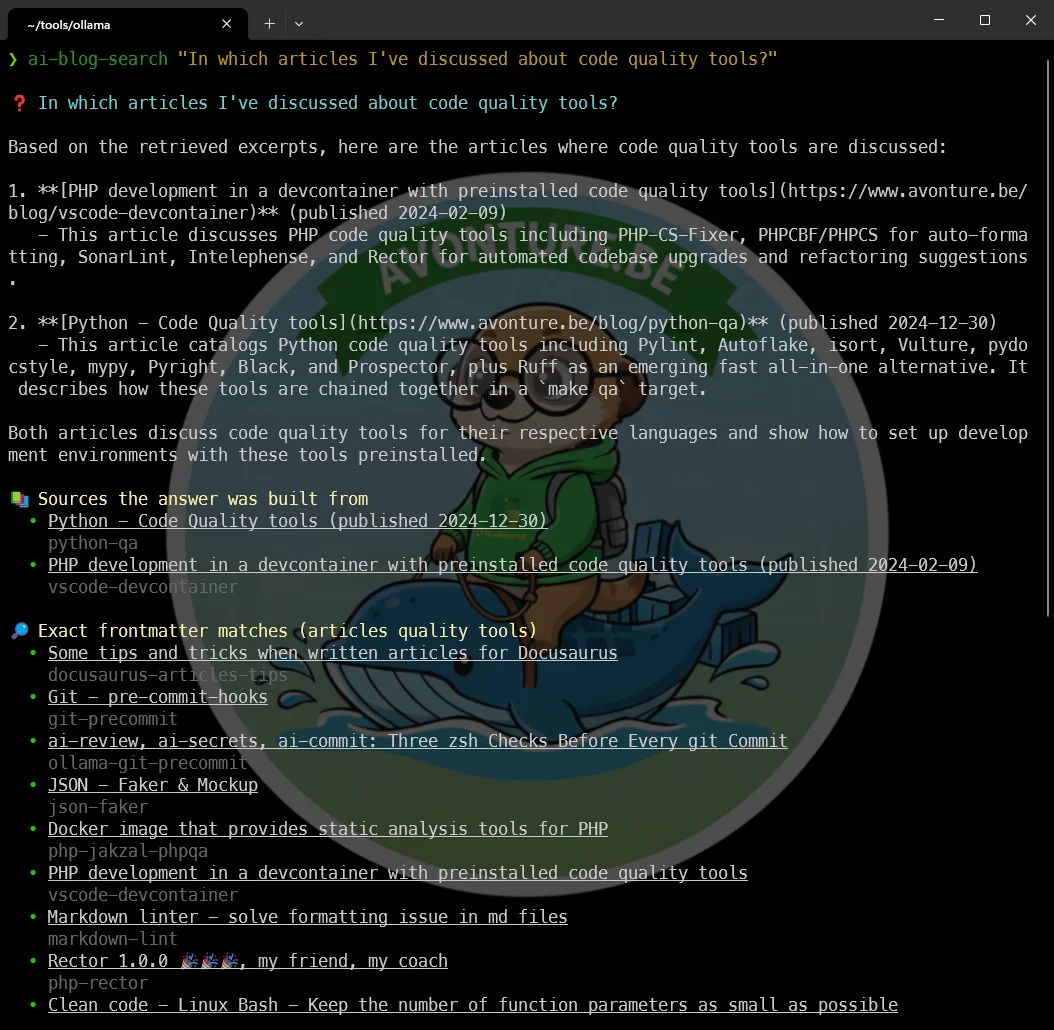
It's the odd one out in that series, and worth saying why: every other ai-* function calls _ollama_query, while this one talks to AnythingLLM — which owns the vector index and calls Ollama itself, for the embeddings and for the answer. So it brings its own _anythingllm_check guard rather than reusing _ollama_check, and declares AI_PARAMS[blog-search]="text" so the ai menu prompts for the question before running it.
The zsh detail that costs you an afternoon
? and * are glob characters, and a natural question ends in one. Without the alias ai-blog-search='noglob ai-blog-search' at the bottom of that file, ai-blog-search which posts cover Joomla? dies with zsh: no matches found before the function is ever entered. The alias has to come after the function definition, too — zsh expands aliases at parse time, so it refuses to define a function whose name is already an alias. And since that alias then lives on in your shell, the file drops it again on the way in ((( $+aliases[ai-blog-search] )) && unalias ai-blog-search); without that guard the file works once and then breaks every later source ~/.zshrc with parse error near '()'.
Two implementations of one idea is a real cost, so be deliberate about it: the bash script is the repo's tool and the single source of truth for the logic; the zsh function is the daily driver, and stays self-contained because the whole promise of that series is "drop the file in and it works". If you only ever query from inside the blog repository, take the bash one and skip this section entirely.
At this point, everything — the documents themselves, their embeddings, the LanceDB files — lives inside the anythingllm_storage volume, on the home PC. Fine for this machine. Not fine for what comes next.
Part 2 — Documents on One Machine, GPU on Another
Here's the constraint that changes everything: my actual documentation — the stuff under ~/repositories — lives on my work PC, and it's staying there. Not synced, not copied, not uploaded anywhere for convenience.
That rules out the simplest option, which would be "just open http://192.168.0.218:3001 from my work PC's browser and upload files there." It would technically work — but uploading a file to that page sends its content over the network to the home PC's container, where AnythingLLM stores the parsed text, the vector embeddings, and a cached copy, inside anythingllm_storage, on a disk that isn't mine at the office. That's exactly the kind of copy I ruled out. The browser is just the window; the documents themselves land wherever the server behind that page is actually running.
So the fix follows directly from that: run the AnythingLLM server itself on the work PC — same Docker container, same compose.yaml — and only reach out to the home PC for the one thing that doesn't touch document content: the model doing the actual thinking.
Work PC (Docker)                          Home PC
┌─────────────────────────┐               ┌──────────────────────┐
│ anythingllm container   │  inference    │ ollama container     │
│  - documents            │ ────────────► │  - qwen2.5:14b       │
│  - vectors (LanceDB)    │ ◄──────────── │  - mxbai-embed-large │
│  - STORAGE_DIR          │   tokens back │  - 24GB VRAM         │
└─────────────────────────┘               └──────────────────────┘
Only prompts and the retrieved text chunks needed to answer them cross the network for that single request — nothing gets stored on the other end.
What actually changes in the compose file
Nothing structural — it's the exact same compose.yaml from Part 1, running through Docker Desktop on the work PC instead. The only thing that changes is which address OLLAMA_BASE_PATH and EMBEDDING_BASE_PATH point to, and that address depends on where the work PC physically is:
      - OLLAMA_BASE_PATH=http://192.168.0.218:11434      # same LAN, e.g. working from home
      - EMBEDDING_BASE_PATH=http://192.168.0.218:11434
When the work PC is sitting on the same home network, that's it — 192.168.0.218 is reachable exactly as it was in the earlier article, and the rest of this setup is a copy-paste of Part 1.
And when it isn't home
Five days a week, that work PC isn't on the home LAN at all. A plain IP address on a private 192.168.x.x range simply isn't reachable from the office — that's the whole point of a private network.
The practical fix: a mesh VPN
Tools like Tailscale or WireGuard give every device — home PC included — a stable address that stays reachable no matter which network it's actually sitting on, without opening ports on your home router to the internet. Install it on the home PC, install it on the work PC, and the same OLLAMA_BASE_PATH pattern above keeps working — just with the VPN-assigned address instead of 192.168.0.218. That setup deserves its own article rather than a rushed paragraph here, so consider this a preview of one.
Ollama has no authentication of its own
Exposing 192.168.0.218:11434 inside a private LAN is one thing; making it reachable from anywhere via a VPN is another step up in exposure. Ollama's API doesn't ask for a password — anyone who can reach that port can query your models. A mesh VPN like Tailscale keeps that surface limited to devices you've explicitly authorized, which is precisely why it's the recommended answer here rather than a router port-forward.
Recreate the workspaces, this time for real
With the container now running on the work PC, redo the onboarding from Part 1 — same LLM provider, same embedding model, pointing at whichever address currently reaches the home PC. Then start creating one workspace per repository under ~/repositories, feeding each one its own documentation.
This time, the documents never leave the machine you're sitting at. The only thing making the round trip to the home PC is a question and the handful of text chunks needed to answer it — exactly the split I wanted going in.
Under the Hood (skip this if you just want to use it)
Everything above is enough to run this. What follows is the one piece of AnythingLLM's internals worth knowing, because it explains why the indexing script does something that otherwise looks arbitrary.
Where that wrong date comes from
Three fields, and only three, ever reach the model. Whatever the API accepted at upload time, AnythingLLM builds this header and prepends it to every chunk:
<document_metadata>
sourceDocument: Tabnine - AI Autocomplete & Chat for Javascript, Python, ... (published 2024-03-02)
published: 8/10/2026, 9:56:01 AM
source: https://www.avonture.be/blog/vscode-tabnine
</document_metadata>
published comes from the collector: published: createdDate(fullFilePath), stat'ed off the temporary file it has just received. Not your frontmatter date — the day you ran the indexer. And metadata.published is silently ignored on upload, so there is no way to correct it.
That leaves exactly two levers, which is why the script pulls both: the title carries the real date appended as (published YYYY-MM-DD), and chunkSource carries the live URL because a link:// prefix is the one thing that turns into the source: line. Everything else you pass at upload — docSource, description, docAuthor — is stored, retrievable through the API, and never shown to the model.
Which is also why the system prompt isn't optional decoration. Two contradictory dates sit in that header on every single chunk, and nothing in the data says which one to believe.
Key Takeaways
The one thing to carry away in prose: documents live where the container runs, not where the browser is. Everything else on this page follows from that — where to deploy it, why there is no "index this folder" box, and why the bulk route is the API rather than the GUI.
The rest is lookup material, and these are the values that cost me an afternoon each:
Settings that silently break things when wrong
EMBEDDING_MODEL_MAX_CHUNK_LENGTH=400— must stay under the embedder's context (ollama show <model>; 512 formxbai-embed-large). Above it, every embedding fails and the workspace stays empty with no error in the UIOLLAMA_EMBEDDING_BATCH_SIZE=16— pure speed; the default of 1 sends one chunk per HTTP calltopN= 20, in Workspace Settings → Vector Database — the default of 4 answers corpus-wide questions from a single article. Past ~20 it buys almost nothing- Workspace system prompt — not optional: it is what settles the two contradictory dates sitting in every chunk header, and what fixes date formatting once
"mode": "query"in every API call —"chat"lets the model answer from general knowledge and invent articles you never wrote- A fresh
sessionIdper call — without one the model reads its own previous answers, and one wrong answer repeats forever ANYTHINGLLM_API_KEY(Settings → Tools → Developer API), plusAI_BLOG_DIRandAI_BLOG_SITE_URLfor the zsh function
Conclusion
What started as "I can never find that one config I wrote down somewhere" turned into a genuinely small amount of Docker work: one compose.yaml, pointed at a model I was already running for something else. The part worth remembering isn't the YAML — it's the realization that a web UI's "upload" button is a request to wherever its server happens to live, which is exactly the detail that decides whether your documents stay put or quietly migrate to a machine you didn't intend. Once that clicked, the two-machine setup wasn't a compromise; it was just the obvious shape once GPU and documents don't live in the same place. Now, every time I catch myself about to grep -r and hope, I ask the workspace instead.
The uncomfortable lesson is the other one, though: a RAG stack cannot tell you it is broken. Mine indexed 248 articles without a single error and then denied having anything on WordPress. If you take one habit from this article, take the thirty-second cosine check before you trust an embedder — and if you want more of your terminal answering questions locally, the ai-review, ai-secrets and ai-commit family is where this one came from. The mesh VPN that makes the two-machine setup work from the office is the article I owe you next.
This article is part of the Ollama daily use series:
- Installing Ollama and get local AI
- Accessing Ollama across your local network
- ai-test: Generate Missing Unit Tests From Your Terminal With a Local LLM
- ai-review, ai-secrets, ai-commit: Three zsh Checks Before Every git Commit
- AnythingLLM: Chat With All Your Scattered Documentation
- ai-translate & ai-summarize: Confidential Documents, Handled 100% Locally
- ai-diagram: From a Sentence (or a compose.yaml) to a Mermaid Diagram
- ai-data: Let a Local LLM Write Your jq and awk One-Liners
- ai-explain: ELI5 for Scripts and Errors, Right in Your Terminal
Loading comments…
Related posts
ai-explain: ELI5 for Scripts and Errors, Right in Your Terminal
November 12, 2026
Open WebUI — Beyond the Chat: Models, RAG, Tools and API Keys
October 26, 2026

ai-data: Let a Local LLM Write Your jq and awk One-Liners
October 22, 2026
Ask My Blog: Turning 259 Articles Into 2,160 Searchable Questions
September 28, 2026