Streamline Your Frontend - Minifying Assets with Docker, Bash, and YAML
Drop the heavy Node toolchains. Build a fast, dependency-free asset minification pipeline using a declarative YAML manifest, Bash, and Docker.


tdewolff/minify), you get reproducible, isolated builds. It is the perfect setup for projects that require a lean, Docker-first approach to frontend optimization.In modern web development, keeping your CSS and JavaScript files lean is crucial for performance. While heavy-duty bundlers like Webpack or Vite are great for complex apps, sometimes you just need a simple, portable way to concatenate and minify files without installing a massive Node.js ecosystem on your local machine or CI/CD runner.
Today, we will build a custom build pipeline using:
- YAML to define our asset bundles.
- Bash to orchestrate the file concatenation.
- Docker to perform the actual minification using high-performance tools.
Running It
Once the manifest and script are in place (covered below), the whole pipeline is one command:
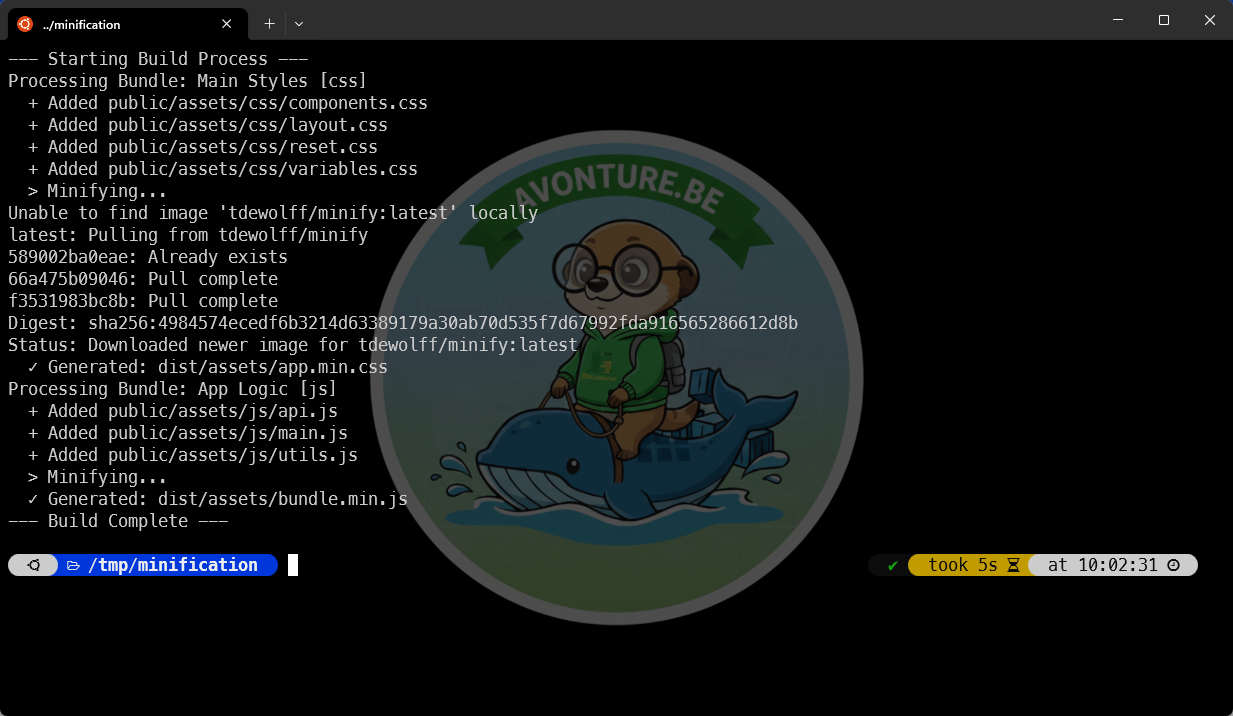
Yeah, it just took five seconds (downloading the Docker image included).
Why This Approach?
- No Node Dependencies: You don't need a
package.jsonor anode_modulesfolder. The minification engine lives inside a Docker container. - Blazing Fast:
tdewolff/minifyis written in Go. It is significantly faster than many JavaScript-based minifiers. - Declarative: Adding a new file to your CSS bundle is as simple as adding one line to your
manifest.yaml. - Consistency: Because we use Docker, the minification result will be exactly the same on your local machine, your colleague's laptop, and your production CI server.
The Architecture
Our workflow is really (really!) simple:
- A Bash script reads a
manifest.yamlfile. - It gathers the source files and merges them into a single temporary file.
- It triggers a Docker container that runs the minify engine to compress the code.
1. The Configuration (manifest.yaml)
First, we need a way to tell our script which files belong together. This YAML structure allows you to define multiple bundles for both CSS and JS.
Here is what we need:
bundles: - name: "Main Styles" type: "css" output: "dist/assets/app.min.css" inputs: - "public/assets/css/components.css" - "public/assets/css/layout.css" - "public/assets/css/reset.css" - "public/assets/css/variables.css" - name: "App Logic" type: "js" output: "dist/assets/bundle.min.js" inputs: - "public/assets/js/api.js" - "public/assets/js/main.js" - "public/assets/js/utils.js"This YAML configuration defines two asset bundles for a web project: one that combines multiple CSS files into a minified stylesheet, and another that bundles JavaScript files into a single minified script. Each bundle specifies its input files and where the final compiled output should be written.
We've two parts, one for CSS and one for JS, and we'll define two things
- The name of our target file (f.i. we are saying the minified CSS file will be
dist/assets/app.min.css) - A list of input files
2. The Orchestrator Script (build.sh)
This Bash script uses yq (a lightweight YAML processor; think of it as the YAML cousin of jq) to parse our manifest. It concatenates the files and then calls the Docker image [tdewolff/minify](https://hub.docker.com/r/tdewolff/minify) to handle the heavy lifting. So, we won't pollute our system with additional dependencies — just one small Docker image.
3. How to Run It
Prerequisites
- Docker: Installed and running.
- yq: A portable command-line YAML processor. You can install by running
sudo apt-get update && sudo apt-get install yqif you don't have it yet.
Set-up
For this tutorial, let's create a few example files. To do this, please start a new terminal and run this long command:
This instruction will create a new /tmp/minification folder and automate the creation of a few files:
Now, please create the manifest and the script
This done, please finish the set-up by creating the /tmp/minification/manifest.yaml manifest file:
And, too, please create the /tmp/minification/build.sh Bash script:
Last thing is to make it executable (chmod +x /tmp/minification/build.sh).
Execution
You're now ready. Simply run ./build.sh to start the concatenation and the minification — the exact command behind the screenshot at the top of this article.
Look at the Docker image flags
Surf to tdewolff/minify and look for the demo site, the CLI options and docs.
Conclusion
By combining the scripting power of Bash with the isolation of Docker, we've created a robust asset pipeline. This setup is perfect for static sites, legacy PHP projects, or any environment where you want to keep your development tooling as lightweight as possible.
Minified assets are only half of the performance story, though: images are usually the heaviest part of a page. See Running some checks on your Docusaurus images for the automated audit I run on mine.
Loading comments…
Related posts

ai-explain: ELI5 for Scripts and Errors, Right in Your Terminal
November 12, 2026
yq — The YAML Processor You Already Know How to Use
October 19, 2026
hyperfine — Stop Guessing Which Command Is Faster, Measure It
October 12, 2026