Best Practice - Customizing the Docusaurus RSS Feed for Full Content & Images
Upgrade your Docusaurus blog's RSS file. Write a plugin to disable the basic feed and include full article content, images and enhanced metadata for better readers.

This article is part of the Creating Docusaurus components series:
- Change how Docusaurus will create img tags
- Overrides the generation of img tags with Docusaurus
- Organize Your Docusaurus Content with a Custom Series Component
- Providing a go to the top button in Docusaurus posts
- Creating a search&replace plugin for Docusaurus
- A component for showing code snippets in a Docusaurus blog
- A Docusaurus component that alerts readers the article is over a year old
- Showing the changelog of your post
- Inject ASCII Art in any HTML pages rendered by Docusaurus
- Best Practice - Customizing the Docusaurus RSS Feed for Full Content & Images
- Running some checks on your Docusaurus images
- Tags management in Docusaurus
- Automating TL;DR Summaries with Gemini AI
- Introducing the ProjectSetup Component - A Standardized Way to Share Project Structures
- How to indicate AI-assisted content in a Docusaurus blog
- Bring Your CLI Tutorials to Life with a Typewriter Terminal
- Meerkat Mischief: Sprinkling Easter Eggs Across my Blog
- AI-Powered Code Tooltips in Docusaurus — Explain Like I'm Five
- Adding Reader Reactions to Your Docusaurus Blog
- Your Blog Is Unreadable to an AI. Here Is the Fix.
- Shake Your Phone, Startle the Meerkat
- Add a "Copy as Markdown" Button to Your Docusaurus Blog
- Ask My Blog: Turning 259 Articles Into 2,160 Searchable Questions
- The Third Door: A Floating Chat Bubble, and the Feature Nobody Could Find
- Drawing a Map of My Own Blog
- Let Readers Flag Issues — A Multi-Type Feedback Widget for Docusaurus

Docusaurus's default RSS feed is basic, lacking full article content and images, which limits its utility for RSS readers. This article provides a solution by guiding users to create a custom plugin that disables the default feed generation. The new plugin produces an enhanced rss.xml file, incorporating full article HTML content, images, and improved metadata for a richer reader experience.
If you're running Docusaurus, you can ask it to generate a rss.xml file by adding the code below in the blog section of docusaurus.config.js.
feedOptions: {
    type: ["rss"],
},
Docusaurus uses RSS 2.0 and exports, by default, up to 20 articles. The file generated is relatively basic; for example, it does not include the image from the post or the HTML content of the article. Docusaurus creates a fairly simple file.
Let's see how to enhance it.
This is another local Docusaurus plugin, like the ones built in Creating a search&replace plugin for Docusaurus and Inject ASCII Art in any HTML pages rendered by Docusaurus — this one hooks the postBuild event too.
What is the rss.xml file?
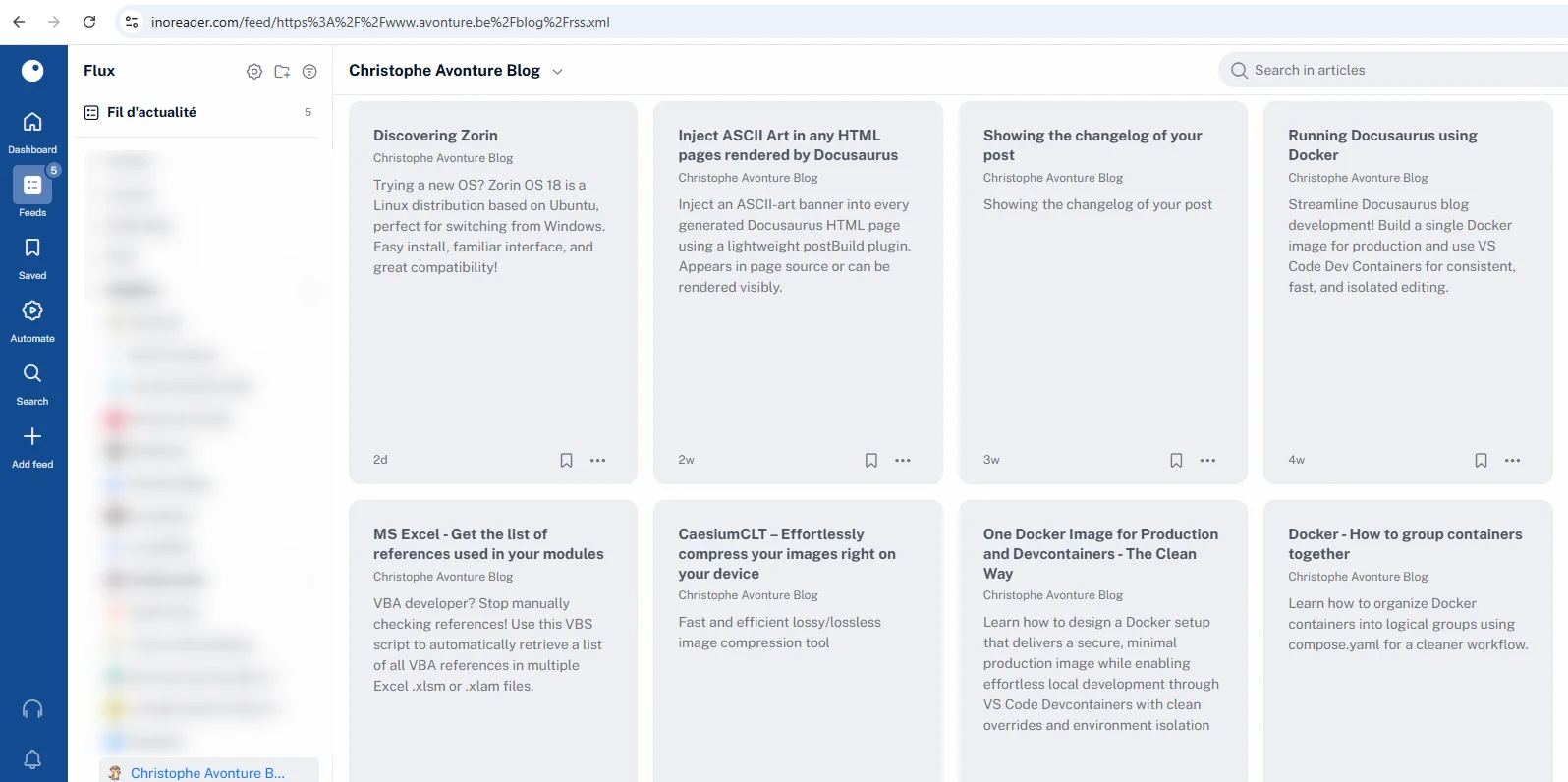
This file is used by RSS readers to be informed of new articles on your blog. Some people, myself included, use these tools for technical monitoring (or tech watch): they use services like Feedly or inoreader to subscribe to new content published on the sites they want to track. As a result, when they open their RSS reader, they instantly see a list of updates, all powered by the RSS feed.
The standard rss.xml file generated by Docusaurus is too basic for me. Indeed, when I open my RSS reader, I'm missing the full content of my article and the introduction image.
If you're maintaining a blog with Docusaurus, your RSS is located at the blog/rss.xml location. For my site, it's https://www.avonture.be/blog/rss.xml.
It's an XML file but you'll see a nice HTML page because there is an XSLT (a transformation of XML to HTML).
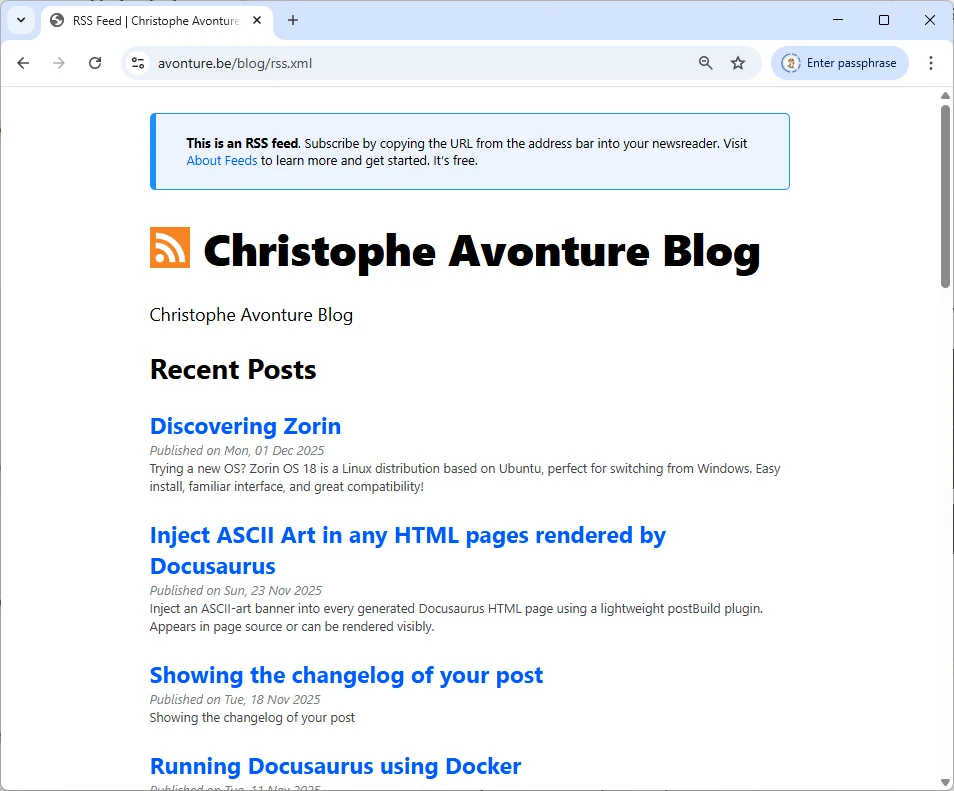
View source
Just press CTRL+U to see the XML source code if you're interested.
Viewing the RSS using Inoreader
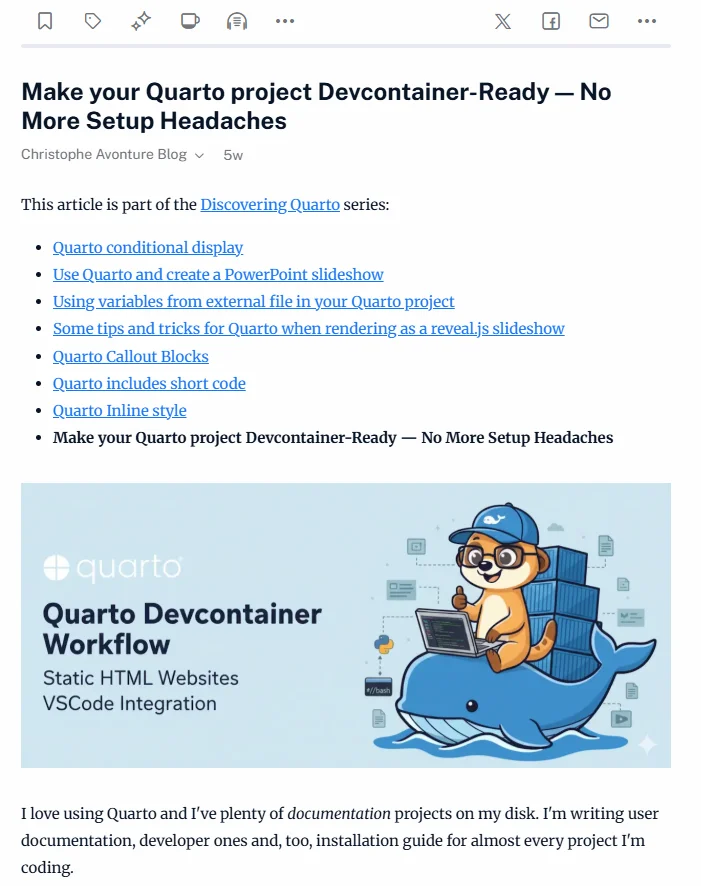
Below, what I was seeing in Inoreader:
In the next chapters, we'll see how to improve our rss.xml. Once done, you'll get this:
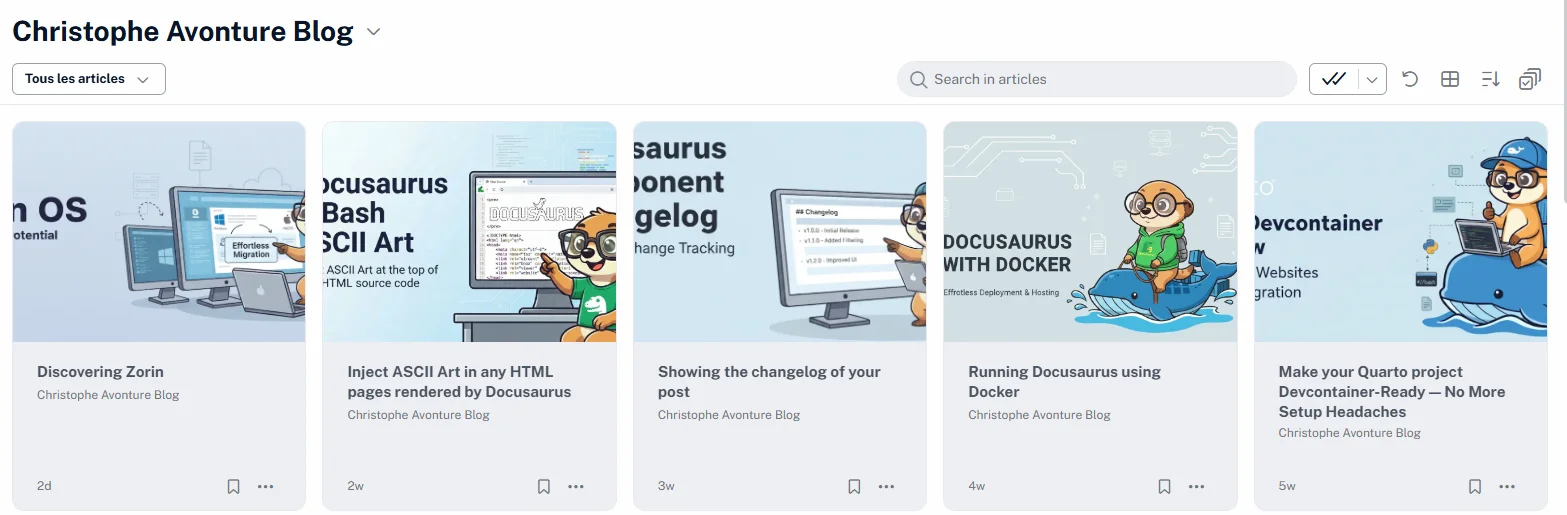
And by opening an article, we'll get this:
How Docusaurus is managing feeds
The generation of feeds is defined by the feedOptions item in the docusaurus.config.js file.
I've tried the official documentation (https://docusaurus.io/docs/api/plugins/@docusaurus/plugin-content-blog) but didn't succeed in managing the createFeedItems element: we're supposed to be able to define which information (author, categories, description, content, images, ...) we want in the feed but, I have to admit, all my attempts have failed.
That's why, after hours, I've created my own plugin using AI.
Let's optimize it
Prepare your system
Please start a console and add some dependencies needed by the plugin we'll create.
Create the plugin
Please create the plugins/blog-feed-plugin/index.js with the code below
/** * @fileoverview Docusaurus Blog Feed Plugin (RSS 2.0) * * Generates an optimized RSS feed (blog/rss.xml) from the final HTML in the Docusaurus build output. * Extracts and cleans article content to avoid leaking UI elements, respects front matter metadata, * and includes optional <enclosure> image support with MIME type detection. * * Key features: * - Robust article extraction with selector fallbacks. * - Critical selectors always stripped (header, svg). * - Configurable cleaning via options.stripSelectors (user-defined). * - Properly normalized slugs and POSIX-safe permalinks. * - Absolute URLs for links and images (siteConfig.url + baseUrl + paths). * - Optional image injection to descriptions and enclosure tags. * - Safe character cleanup to prevent invalid XML characters. * * Options: * - maxItems?: number (default: 20) — items in the site-wide feed * - includeContent?: boolean (default: true) * - includeImages?: boolean (default: true) * - stripSelectors?: string[] (default: curated list, merged with critical) * - ignorePatterns?: string[] * - emitTopicFeeds?: boolean (default: true) — per-tag and per-series feeds * - topicMaxItems?: number (default: 10) — items in each per-topic feed * - minPostsPerTagFeed?: number (default: 1) — a tag below this gets no feed * * Usage: * const blogFeedPlugin = require("./plugins/blog-feed-plugin/index.js"); * * module.exports = { * // ... * plugins: [ * [blogFeedPlugin, { * maxItems: 20, * includeContent: true, * includeImages: true, * stripSelectors: [ * ".custom-ads", * ".share-buttons" * ], * }], * ], * }; * * Output: * - The RSS file is written to: <outDir>/blog/rss.xml (served at /blog/rss.xml). * - Per-tag feeds: <outDir>/blog/tags/<slug>/rss.xml (served at /blog/tags/<slug>/rss.xml). * - Per-series feeds: <outDir>/series/<slug>/rss.xml (served at /series/<slug>/rss.xml). * * @license MIT — free to use, modify, and contribute. */
const yaml = require("js-yaml");const fs = require("fs-extra");const path = require("path");const frontMatter = require("front-matter");const glob = require("glob");const cheerio = require("cheerio");// Which posts land in which per-topic feed. Split out because it is pure and// self-contained; this file keeps the serializing and the writing.const { groupItemsByTag, groupItemsBySeries } = require("./topic-feeds.cjs");
// --- Utilities ---------------------------------------------------------------
/** * Join URL segments with POSIX semantics and ensure leading slash consistency. * @param {string[]} parts * @returns {string} */function posixJoin(...parts) { const joined = path.posix.join(...parts); return joined.startsWith("/") ? joined : `/${joined}`;}
/** * Resolve an absolute URL from site config components. * @param {string} siteUrl * @param {string} baseUrl * @param {string} relPath * @returns {string} */function absoluteUrl(siteUrl, baseUrl, relPath) { const base = baseUrl || "/"; const rel = relPath || "/"; const fullPath = posixJoin(base, rel); return `${siteUrl.replace(/\/+$/g, "")}${fullPath}`;}
/** * Determine the MIME type from an image URL. * @param {string} url * @returns {string} */function getMimeTypeFromUrl(url) { const ext = path.extname(url).toLowerCase(); switch (ext) { case ".jpg": case ".jpeg": return "image/jpeg"; case ".png": case ".avif": return "image/png"; case ".gif": return "image/gif"; case ".webp": return "image/webp"; case ".svg": return "image/svg+xml"; default: return "application/octet-stream"; }}
/** * Remove control/non-printable characters that can break XML parsers. * @param {string} s * @returns {string} */function cleanProblemChars(s) { return ( String(s) .replace(/\u00a0/g, " ") .replace(/\u200b/g, "") // eslint-disable-next-line no-control-regex .replace(/[\x00-\x09\x0B\x0C\x0E-\x1F\x7F]/g, "") .trim() );}
// --- Strip selectors ---------------------------------------------------------
const CRITICAL_STRIP_SELECTORS = ["header", "svg"];
const DEFAULT_STRIP_SELECTORS = [ 'h3:contains("Related posts")', "div.row:has(div.col.col--4)", "footer.docusaurus-mt-lg", ".blueSkyContainer", 'p:contains("Loading comments")', ".scrollBtn_Pv66",];
function getStripSelectors(userSelectors = []) { return [...CRITICAL_STRIP_SELECTORS, ...DEFAULT_STRIP_SELECTORS, ...userSelectors];}
// --- Article extraction ------------------------------------------------------
/** * Locates a built page from its permalink. * * `outDir` is ALREADY the locale's output directory (`build/` for the default locale, * `build/fr/` for `fr`), while `permalink` already carries the locale's baseUrl * (`/fr/blog/<slug>`). Joining them naively produces `build/fr/fr/blog/<slug>` — a path that * never exists, so every article silently lost its body and the French feed came out empty * with a green build. Strip the baseUrl prefix before joining. See TODO 0119. */async function getArticleHtml(permalink, outDir, stripSelectors = [], baseUrl = "/") { const normalizedBase = baseUrl.endsWith("/") ? baseUrl : `${baseUrl}/`; const relativePermalink = normalizedBase !== "/" && permalink.startsWith(normalizedBase) ? permalink.slice(normalizedBase.length - 1) : permalink;
const htmlFilePath = path.join(outDir, relativePermalink, "index.html"); if (!fs.existsSync(htmlFilePath)) { console.warn( `[BlogFeedPlugin] HTML file not found for ${permalink} at: ${htmlFilePath}`, ); return null; }
const htmlContent = await fs.readFile(htmlFilePath, "utf8"); const $ = cheerio.load(htmlContent);
// Attempt to find the main article container using multiple fallbacks let articleContainer = $("article").first(); if (!articleContainer.length) { articleContainer = $(".theme-doc-content, .theme-doc-markdown").first(); } if (!articleContainer.length) { console.warn(`[BlogFeedPlugin] Could not find article container for ${permalink}.`); return null; }
// Remove elements based on strip selectors const selectorsToRemove = getStripSelectors(stripSelectors); selectorsToRemove.forEach((sel) => { articleContainer.find(sel).remove(); });
// Handle Docusaurus code snippet wrapper cleanup for cleaner RSS content articleContainer.find(".snippet_block_pySp").each((_, element) => { const $snippet = $(element); const $codeBlock = $snippet.find(".codeBlockContainer_Ckt0").first(); if ($codeBlock.length) { $snippet.replaceWith($codeBlock); } else { $snippet.remove(); } });
const contentHtml = articleContainer.html(); if (!contentHtml) return null; return cleanProblemChars(contentHtml);}
// --- Slug computation --------------------------------------------------------
function computeSlug(attributes, relativeFilePath) { if (attributes.slug) { const normalized = String(attributes.slug).replace(/^\/|\/$/g, ""); return normalized || null; }
const slugWithDate = relativeFilePath.replace(/\.(md|mdx)$/i, ""); const parts = slugWithDate.split(path.sep); let finalSlug; // Handle index file inside a folder (e.g., folder/index.md) if (parts[parts.length - 1].toLowerCase() === "index" && parts.length > 1) { finalSlug = parts[parts.length - 2]; } else { finalSlug = parts[parts.length - 1]; } if (!finalSlug) return null;
// Normalize slug to lowercase and use hyphens return finalSlug.toLowerCase().replace(/_/g, "-");}
// --- Feed assembly -----------------------------------------------------------
/** * Serialize one RSS 2.0 document — channel header, items, dc:creator injection * and the XSLT processing instruction. * * Extracted from `postBuild` so the same recipe produces the site-wide feed and * every per-topic one. The cheerio pass has to live in here rather than at the * call site: it runs on the serialized XML, so a feed built outside it would * silently ship without its `<dc:creator>` elements. * * @param {object} params * @param {Function} params.Feed - the `feed` package's Feed constructor. * @param {object} params.channel - `{title, description, id, link, language}`. * @param {Array<object>} params.items - items to serialize, newest first. * @param {string} params.siteUrl - site origin, no trailing slash. * @param {string} params.baseUrl - Docusaurus baseUrl. * @param {object} params.authorsData - parsed `blog/authors.yml`. * @param {boolean} params.includeContent - emit `<content:encoded>` bodies. * @param {boolean} params.includeImages - emit `<enclosure>` and inline `<img>`. * @param {boolean} [params.verbose] - per-item logging (site-wide feed only). * @returns {string} the complete RSS 2.0 document. */function buildRssXml({ Feed, channel, items, siteUrl, baseUrl, authorsData, includeContent, includeImages, verbose = false,}) { const feed = new Feed({ title: channel.title, description: channel.description, id: channel.id, link: channel.link, language: channel.language, // Drives <lastBuildDate>. Deliberately the newest post's date rather // than `new Date()`: a wall-clock value rewrote this 1.3 MB file on // every build, so the deploy re-uploaded it even when no article had // changed. The date of the most recent entry is also the more honest // answer to "when did this feed last actually change?". Per-topic feeds // take *their own* newest entry for the same reason — a shared clock // would dirty all of them on every build. updated: items.length ? new Date(items[0].date) : new Date(0), });
// Parallel to `items`: the dc:creator markup each entry needs, consumed by the // cheerio pass below. It used to be smuggled through `feed.addItem()` as a // `customRssData` key and read back off the *source* item — which never // carried it, so the injection silently no-opped and no feed this plugin ever // wrote had a single <dc:creator> in it. Keeping it here, where it is // produced, is what makes the feature actually work. const creatorMarkup = [];
items.forEach((item) => { // Resolve authors const authorKeys = Array.isArray(item.frontMatter.authors) ? item.frontMatter.authors : item.frontMatter.authors ? [item.frontMatter.authors] : [];
const rssAuthors = authorKeys .map((key) => authorsData[key]) .filter(Boolean) .map((a) => ({ name: a.name }));
creatorMarkup.push( rssAuthors .map((a) => `<dc:creator><![CDATA[${cleanProblemChars(a.name)}]]></dc:creator>`) .join(""), );
// Log to confirm data is ready if (verbose && rssAuthors.length > 0) { console.log( `[BlogFeedPlugin] ✍️ Post "${ item.title }" - Found authors: ${rssAuthors.map((a) => a.name).join(", ")}`, ); }
// Handle enclosure image and description injection const postImageUrl = item.frontMatter?.image; const absoluteImageUrl = postImageUrl ? absoluteUrl(siteUrl, baseUrl, postImageUrl) : null; const mimeType = absoluteImageUrl ? getMimeTypeFromUrl(absoluteImageUrl) : null;
let descriptionWithImage = cleanProblemChars(item.description || ""); if (includeImages && absoluteImageUrl) { descriptionWithImage = `<img src="${absoluteImageUrl}" alt="${cleanProblemChars( item.title, )}" style="display:block;max-width:100%;height:auto;">` + descriptionWithImage; }
const itemLink = absoluteUrl(siteUrl, baseUrl, item.permalink);
feed.addItem({ title: cleanProblemChars(item.title), id: item.permalink, link: itemLink, category: Array.isArray(item.frontMatter.tags) ? item.frontMatter.tags.map((t) => ({ name: t })) : item.frontMatter.tags ? [{ name: item.frontMatter.tags }] : undefined, description: descriptionWithImage, content: includeContent ? cleanProblemChars(item.fullContentBody || "") : undefined, date: new Date(item.date), author: rssAuthors, // Add enclosure tag if image is present ...(includeImages && absoluteImageUrl && mimeType && { enclosure: { url: absoluteImageUrl, type: mimeType, length: 0, // Length is often 0 for dynamically generated feeds }, }), }); });
let rssContent = feed.rss2();
// --- CUSTOM XML MANIPULATION (Cheerio) --- // The 'feed' library does not natively support dc:creator with CData, // so we use Cheerio for post-generation injection.
// 1. Load the content const $ = cheerio.load(rssContent, { xmlMode: true });
// 2. Inject the namespace cleanly into the root <rss> element $("rss").attr("xmlns:dc", "http://purl.org/dc/elements/1.1/");
// 3. Get ALL generated XML items // In XML mode, the path is typically rss > channel > item const xmlItems = $("channel > item");
if (verbose) { console.log(`[BlogFeedPlugin] 🔧 Injecting DC tags into ${xmlItems.length} items...`); }
// 4. Inject each item's dc:creator. Positional matching is safe: the feed // library serializes items in the order they were added, which is the // order of `items` — and so of `creatorMarkup`. xmlItems.each((index, element) => { const markup = creatorMarkup[index]; if (markup) $(element).append(markup); });
// 5. Get the final XML content rssContent = $.xml();
// Apply a custom XML declaration and stylesheet reference for better browser // rendering. The href is ABSOLUTE on purpose: a relative "rss.xsl" only // resolves for the feed sitting at /blog/, and would 404 for every per-topic // feed one directory deeper — the browser then shows raw XML. return rssContent.replace( /^<\?xml[^>]+\?>/, `<?xml version="1.0" encoding="utf-8"?>\n<?xml-stylesheet type="text/xsl" href="${posixJoin( baseUrl, "blog/rss.xsl", )}"?>`, );}
// --- Plugin ------------------------------------------------------------------
module.exports = function blogFeedPlugin(context, options = {}) { const { maxItems = 20, includeContent = true, includeImages = true, stripSelectors = [], ignorePatterns = ["**/_archived/**"], emitTopicFeeds = true, topicMaxItems = 10, minPostsPerTagFeed = 1, } = options;
return { name: "blog-feed-plugin",
async postBuild({ siteConfig, outDir, siteDir, i18n }) { try { // AJOUTEZ CETTE LIGNE ICI 👇 const { Feed } = await import("feed");
console.log(`[BlogFeedPlugin] 🚀 Generating RSS feed...`);
const blogDir = path.join(siteDir, "blog"); const baseUrl = siteConfig.baseUrl || "/"; const siteUrl = siteConfig.url?.replace(/\/+$/g, "") || ""; const blogBasePath = posixJoin(baseUrl, "blog");
if (!siteUrl) { console.error( `[BlogFeedPlugin] siteConfig.url is missing. Please set it to your site's origin.`, ); return; }
if (!fs.existsSync(blogDir)) { console.error(`[BlogFeedPlugin] Blog source directory not found: ${blogDir}`); return; }
// --- Load Authors --- const authorsFile = path.join(siteDir, "blog", "authors.yml"); let authorsData = {}; if (fs.existsSync(authorsFile)) { authorsData = yaml.load(fs.readFileSync(authorsFile, "utf8")); console.log(`[BlogFeedPlugin] Loaded authors from ${authorsFile}`); }
// --- Load Tags --- // Only for the human-readable label and description of a per-tag feed's // channel; the grouping itself works off the posts' own front matter. const tagsFile = path.join(siteDir, "blog", "tags.yml"); let tagsData = {}; if (fs.existsSync(tagsFile)) { tagsData = yaml.load(fs.readFileSync(tagsFile, "utf8")) || {}; }
const postFiles = glob.sync("**/*.{md,mdx}", { cwd: blogDir, ignore: ignorePatterns, });
// Collect raw metadata from blog files const rawMetadataItems = await Promise.all( postFiles.map(async (relativeFilePath) => { const fullPath = path.join(blogDir, relativeFilePath); const fileContent = await fs.readFile(fullPath, "utf8"); const contentData = frontMatter(fileContent); const { attributes } = contentData;
// Drafts and unlisted posts get no HTML page in the build, so they // can never feed the RSS body — skip them before we go looking for // a file that is not there. if (attributes.draft === true || attributes.unlisted === true) { return null; }
const date = attributes.date || fs.statSync(fullPath).birthtime; const finalSlug = computeSlug(attributes, relativeFilePath); // Ignore files that map to "index" or have no slug if (!finalSlug || finalSlug === "index") return null;
const permalink = posixJoin(blogBasePath, finalSlug);
return { title: attributes.title || finalSlug, description: attributes.description || "No description", date, permalink, frontMatter: attributes, finalSlug, }; }), );
const metadataItems = rawMetadataItems.filter(Boolean); if (!metadataItems.length) { console.log(`[BlogFeedPlugin] No blog posts found.`); return; }
// Collect full HTML content for each post (required for RSS body) const feedItemsWithContent = await Promise.all( metadataItems.map(async (item) => { const fullContentBody = await getArticleHtml( item.permalink, outDir, stripSelectors, baseUrl, ); return { ...item, fullContentBody }; }), );
// Filter out drafts (published: false) and articles with no content body let publishedFeedItems = feedItemsWithContent .filter((item) => item.frontMatter.published !== false && item.fullContentBody) .sort((a, b) => new Date(b.date) - new Date(a.date));
// In a non-default locale, only articles that really are translated belong in the feed. // Docusaurus's i18n fallback means every English article also has a `/fr/` URL, so // without this the French feed would advertise 257 English posts as French content — // the same duplicate-content problem plugins/i18n-seo-guard solves for the HTML pages. // See TODO 0119. const currentLocale = i18n?.currentLocale ?? siteConfig.i18n?.defaultLocale; if (currentLocale && currentLocale !== siteConfig.i18n?.defaultLocale) { const { collectTranslations, } = require("../translations-manifest-plugin/index.cjs"); const translated = new Set(collectTranslations(siteDir)[currentLocale] ?? []); // `finalSlug` is the item's own slug, already computed upstream — use it rather than // re-deriving one from the permalink, which silently matched nothing and emptied the // whole feed on the first attempt. publishedFeedItems = publishedFeedItems.filter((item) => translated.has(item.finalSlug), ); console.log( `[BlogFeedPlugin] locale ${currentLocale}: ${publishedFeedItems.length} translated article(s) in the feed.`, ); }
const language = currentLocale || siteConfig.i18n?.defaultLocale || "en-US";
// --- Site-wide feed --------------------------------------------------
const finalFeedItems = publishedFeedItems.slice(0, Math.max(1, Number(maxItems)));
const rssPath = path.join(outDir, "blog", "rss.xml"); await fs.ensureDir(path.dirname(rssPath)); await fs.writeFile( rssPath, buildRssXml({ Feed, channel: { title: siteConfig.title, description: siteConfig.tagline || "Personal blog feed", id: siteUrl, link: absoluteUrl(siteUrl, baseUrl, "blog"), language, }, items: finalFeedItems, siteUrl, baseUrl, authorsData, includeContent, includeImages, verbose: true, }), );
console.log( `[BlogFeedPlugin] ✅ RSS feed written to ${rssPath} (${finalFeedItems.length} items).`, );
if (!emitTopicFeeds) return;
// --- Per-topic feeds ------------------------------------------------- // // One feed per tag and per series, so a reader can watch a single subject // instead of the whole blog. Two deliberate differences from the // site-wide feed: // // * no <content:encoded>. The site-wide feed weighs ~45 KB per item // because it carries every article's full HTML; replaying that // across ~75 topic feeds would add tens of megabytes of duplicated // content to build/. Descriptions only keeps each one in atom.xml // territory (tens of KB), and a topic feed's job is to announce a // post, not to replace it. // * a lower item count (`topicMaxItems`), for the same reason. // // The expensive part — reading and cheerio-parsing every post's built // HTML — already happened above for the site-wide feed, so these cost // serialization and I/O only.
const topicFeeds = [];
for (const group of groupItemsByTag(publishedFeedItems).values()) { // Raising this above 1 strands the article action bar: it offers the // feed of the post's own mainTag without knowing how many posts share // it, so a skipped tag becomes a 404 for the reader who clicks. Only // raise it together with a way for the UI to know which feeds exist. // // Thin feeds are cheap and not useless anyway: a subscriber signs up // for what comes next, not for the archive depth, and 49 description- // only tag feeds weigh about as much as one copy of the site-wide one. if (group.items.length < minPostsPerTagFeed) continue;
const meta = tagsData[group.label] || {}; topicFeeds.push({ outPath: path.join(outDir, "blog", "tags", group.slug, "rss.xml"), channel: { title: `${siteConfig.title} — ${meta.label || group.label}`, description: meta.description || `Posts tagged “${meta.label || group.label}” on ${siteConfig.title}`, id: absoluteUrl(siteUrl, baseUrl, `blog/tags/${group.slug}`), link: absoluteUrl(siteUrl, baseUrl, `blog/tags/${group.slug}`), language, }, items: group.items, }); }
for (const group of groupItemsBySeries(publishedFeedItems).values()) { // No threshold for series: a series is by definition a sequence, and // "tell me when the next episode lands" is the strongest reason to // subscribe this blog has to offer. topicFeeds.push({ // Next to the page it belongs to — the series route is /series/<slug>, // not /blog/series/<slug>. outPath: path.join(outDir, "series", group.slug, "rss.xml"), channel: { title: `${siteConfig.title} — ${group.label}`, description: `Every post in the “${group.label}” series on ${siteConfig.title}`, id: absoluteUrl(siteUrl, baseUrl, `series/${group.slug}`), link: absoluteUrl(siteUrl, baseUrl, `series/${group.slug}`), language, }, items: group.items, }); }
await Promise.all( topicFeeds.map(async ({ outPath, channel, items }) => { const feedItems = items.slice(0, Math.max(1, Number(topicMaxItems))); await fs.ensureDir(path.dirname(outPath)); await fs.writeFile( outPath, buildRssXml({ Feed, channel, items: feedItems, siteUrl, baseUrl, authorsData, includeContent: false, includeImages, }), ); }), );
console.log( `[BlogFeedPlugin] ✅ ${topicFeeds.length} per-topic feeds written (tags + series).`, ); } catch (err) { console.error(`[BlogFeedPlugin] RSS feed generation failed:`, err); } }, };};This is a Docusaurus plugin that generates RSS feeds for blog posts. It creates a main site-wide feed plus optional per-tag and per-series feeds, extracting article content from built HTML files, cleaning out UI elements, and injecting author metadata. The plugin respects front matter flags like draft status, handles multi-language sites carefully, and converts relative URLs to absolute ones so feed readers can access linked images and pages.
Update your configuration
Please update your docusaurus.config.js and do two things.
- We need to disable the RSS generation of the feed by Docusaurus
- We need to implement our own plugin
See below how to do:
// [...]presets: [ [ "classic", ({ blog: { // ... feedOptions: { type: ["atom"], }, }), ],],plugins: [ // [...] [ "./plugins/blog-feed-plugin/index.js", { maxItems: 20 }, ],],This code configures a Docusaurus site's presets and plugins. It sets up the 'classic' preset with blog feed options to generate Atom feeds, and then loads a custom blog feed plugin that limits the feed to 20 items.
atom can stay
In feedOptions you can keep type: ["atom"] if you've it but please remove rss if you see it.
There are two types of feeds, the older one (rss) and the newer (atom).
Run the plugin
Once done, just run yarn run build in a terminal to generate the static version of your site.
During this stage, Docusaurus will call our plugin to generate the rss.xml file instead of calling its own, standard, feature.
Once finished, if you want to see the file in action on your machine, just run yarn run serve to start your Docusaurus static website then go to the http://localhost/blog/rss.xml (your local URL) and you'll see your XML.
Visualize the new look&feel
Let's use an online tool like https://codebeautify.org/rssviewer/.
In the left part, just copy/paste the content of your blog/rss.xml and look how it'll be displayed; nice no?
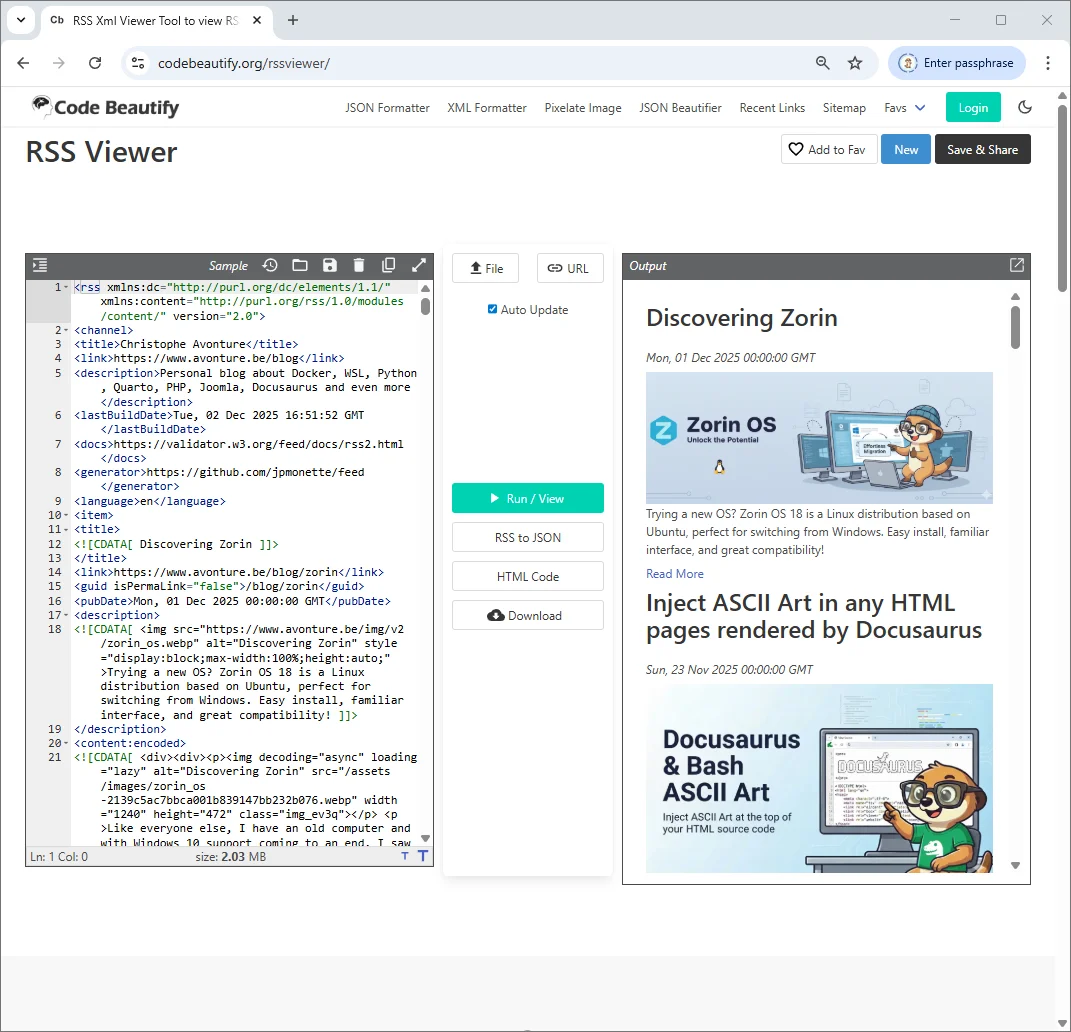
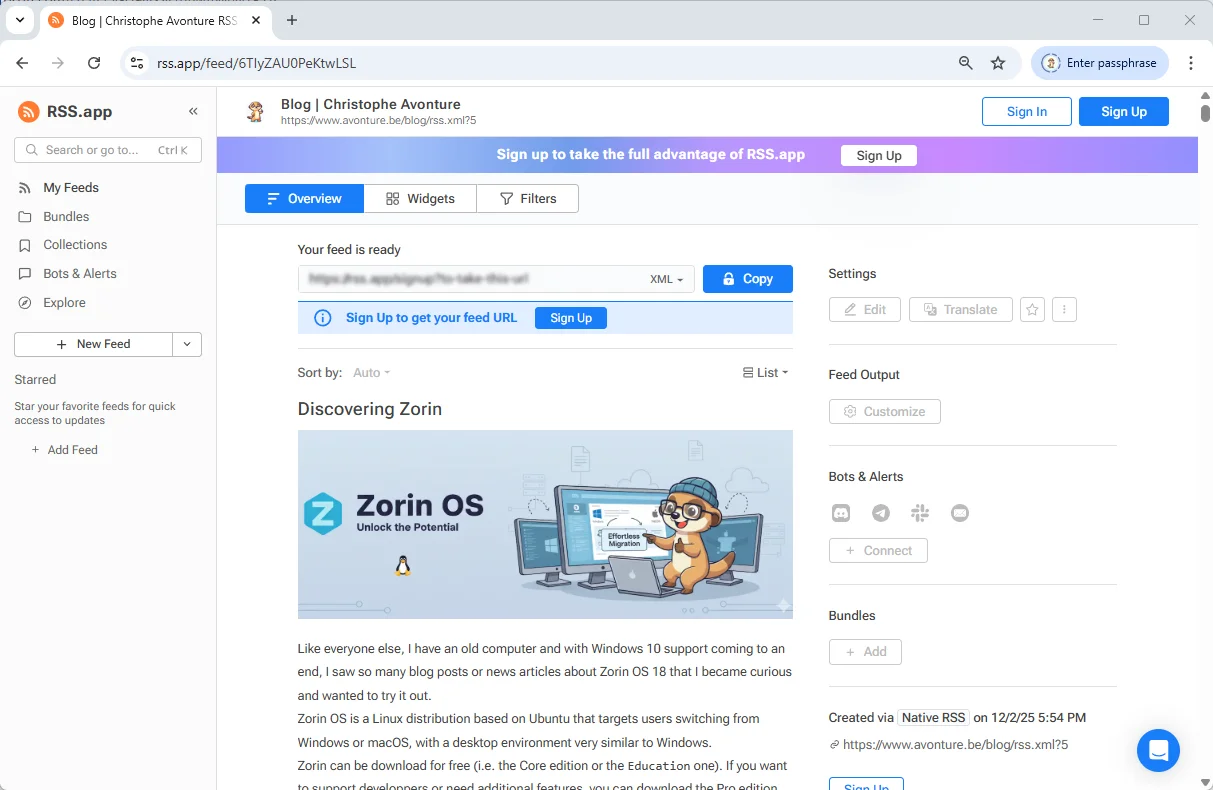
You can use another tool like https://rss.app/rss-feed but here, you must first upload your blog/rss.xml file to your production site first.
Why is this better?
As you can see, the new rss.xml file will now expose the introduction image but not only, you'll also have much more information like the HTML of your article.
View source
Remember, just press CTRL+U to see the XML source code.
RSS aggregators, even the older ones, will have access to the full content so they can display the article without having to grab it from your website.
Configuration options of the plugin
The plugin can be configured directly in your docusaurus.config.js file.
See below all optional options you can use:
const config = {
    // ...
    plugins: [
    [ "./plugins/blog-feed-plugin/index.js", {
        maxItems: 20,           // optional
        includeContent: true,   // optional
        includeImages: true,    // optional
        stripSelectors: [       // optional — add any site-specific UI selectors to remove
        ".custom-ads",
        ".share-buttons",
        ".newsletter-signup",
        ],
        ignorePatterns: ["**/_archived/**"], // optional
    }],
    ],
};

export default config;
-
maxItems (number, default:
20): Limit the number of items in the feed. By default, Docusaurus is only showing 20. The higher this number is, the larger the rss.xml file will be. You might be tempted to want all of the articles (in my case, nearly 215 at present), but that is not the primary purpose of an RSS file. This file is there to list the latest articles and allow you to see the most recent posts on your blog. So be... reasonable. -
includeContent (boolean, default:
true): Include the cleaned HTML body of each post in the<content>field. If you want to force people to visit your website to get the full content, just initialize this option tofalse. -
includeImages (boolean, default:
true): Add the post image at the top of the description and include an<enclosure>tag with proper MIME type. -
stripSelectors (string[], default: merged with defaults): Additional CSS selectors to remove from the article HTML. Critical selectors (
header,svg) are always removed. -
ignorePatterns (string[], default: [
"**/_archived/**"]): Glob patterns for excluding certain blog files.
Some tools
Visualization tools
While you're coding the plugin, just use some of these visualization tools to make sure the content is correctly displayed.
Validation tools
If you want to make sure your rss.xml is valid:
This article is part of the Creating Docusaurus components series:
- Change how Docusaurus will create img tags
- Overrides the generation of img tags with Docusaurus
- Organize Your Docusaurus Content with a Custom Series Component
- Providing a go to the top button in Docusaurus posts
- Creating a search&replace plugin for Docusaurus
- A component for showing code snippets in a Docusaurus blog
- A Docusaurus component that alerts readers the article is over a year old
- Showing the changelog of your post
- Inject ASCII Art in any HTML pages rendered by Docusaurus
- Best Practice - Customizing the Docusaurus RSS Feed for Full Content & Images
- Running some checks on your Docusaurus images
- Tags management in Docusaurus
- Automating TL;DR Summaries with Gemini AI
- Introducing the ProjectSetup Component - A Standardized Way to Share Project Structures
- How to indicate AI-assisted content in a Docusaurus blog
- Bring Your CLI Tutorials to Life with a Typewriter Terminal
- Meerkat Mischief: Sprinkling Easter Eggs Across my Blog
- AI-Powered Code Tooltips in Docusaurus — Explain Like I'm Five
- Adding Reader Reactions to Your Docusaurus Blog
- Your Blog Is Unreadable to an AI. Here Is the Fix.
- Shake Your Phone, Startle the Meerkat
- Add a "Copy as Markdown" Button to Your Docusaurus Blog
- Ask My Blog: Turning 259 Articles Into 2,160 Searchable Questions
- The Third Door: A Floating Chat Bubble, and the Feature Nobody Could Find
- Drawing a Map of My Own Blog
- Let Readers Flag Issues — A Multi-Type Feedback Widget for Docusaurus
Loading comments…
Related posts

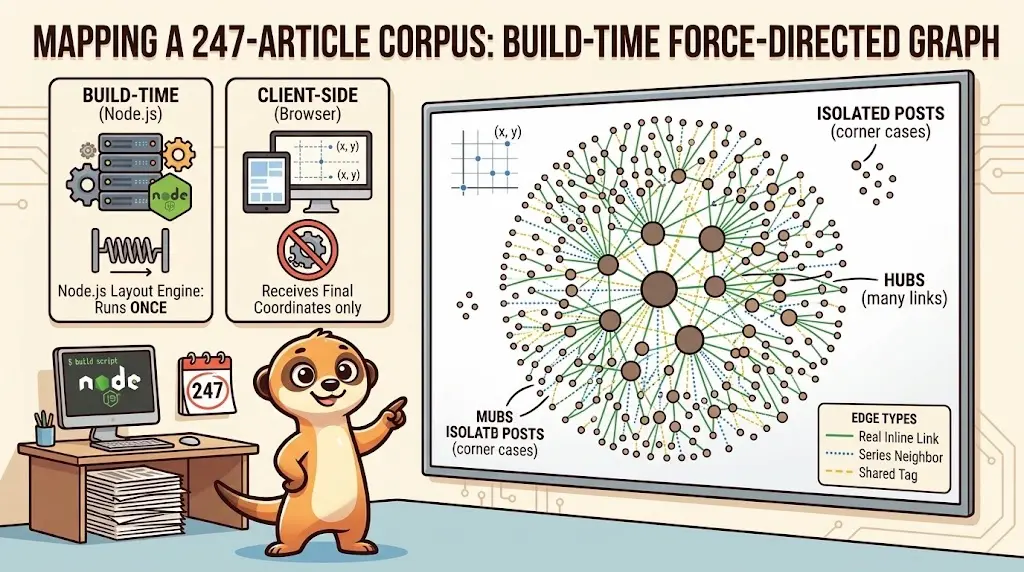
Drawing a Map of My Own Blog
October 8, 2026
Ask My Blog: Turning 259 Articles Into 2,160 Searchable Questions
September 28, 2026
Add a "Copy as Markdown" Button to Your Docusaurus Blog
September 10, 2026