The Third Door: A Floating Chat Bubble, and the Feature Nobody Could Find
A feature your visitors cannot find does not exist. This article adds a floating "Ask my blog" bubble to a Docusaurus site — a third entry point into the same question index, and the first one that needs no prior knowledge. Includes the overlay mutual-exclusion trick that keeps two independent floating dialogs from ever opening at once.


This article is part of the Creating Docusaurus components series:
- Change how Docusaurus will create img tags
- Overrides the generation of img tags with Docusaurus
- Organize Your Docusaurus Content with a Custom Series Component
- Providing a go to the top button in Docusaurus posts
- Creating a search&replace plugin for Docusaurus
- A component for showing code snippets in a Docusaurus blog
- A Docusaurus component that alerts readers the article is over a year old
- Showing the changelog of your post
- Inject ASCII Art in any HTML pages rendered by Docusaurus
- Best Practice - Customizing the Docusaurus RSS Feed for Full Content & Images
- Running some checks on your Docusaurus images
- Tags management in Docusaurus
- Automating TL;DR Summaries with Gemini AI
- Introducing the ProjectSetup Component - A Standardized Way to Share Project Structures
- How to indicate AI-assisted content in a Docusaurus blog
- Bring Your CLI Tutorials to Life with a Typewriter Terminal
- Meerkat Mischief: Sprinkling Easter Eggs Across my Blog
- AI-Powered Code Tooltips in Docusaurus — Explain Like I'm Five
- Adding Reader Reactions to Your Docusaurus Blog
- Your Blog Is Unreadable to an AI. Here Is the Fix.
- Shake Your Phone, Startle the Meerkat
- Add a "Copy as Markdown" Button to Your Docusaurus Blog
- Ask My Blog: Turning 259 Articles Into 2,160 Searchable Questions
- The Third Door: A Floating Chat Bubble, and the Feature Nobody Could Find
- Drawing a Map of My Own Blog
- Let Readers Flag Issues — A Multi-Type Feedback Widget for Docusaurus
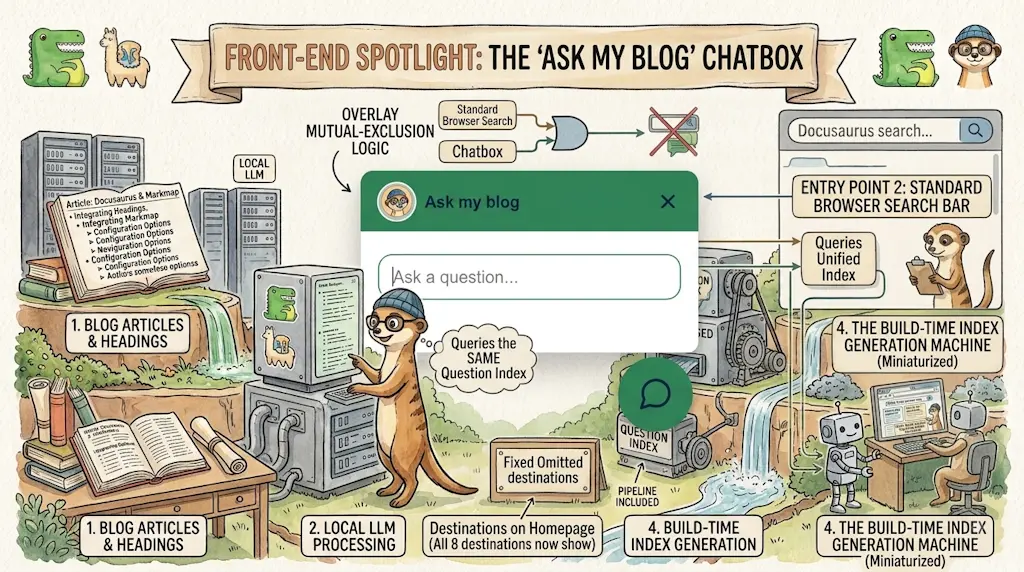
I had built a corpus map, a 2,050-question index and a six-mode command palette — and then noticed that every way into the question index required already knowing it was there. This article is the cheap half of that story: a floating chat bubble that opens the question search from any page, and a first-visit hint that mentions the keyboard shortcut once. Plus the small pub-sub trick that guarantees two independent floating dialogs never end up open at the same time.
There is a particular kind of embarrassment reserved for people who build things alone. I had spent weeks on features I was genuinely proud of: an interactive map of the whole blog, a question index generated by a local model, a command palette with six modes.
Then I asked myself a simpler question than usual: how would a reader who has never been here find the question index? There were exactly two ways in. Press Ctrl+K, then ? to switch the palette into question mode — which requires knowing both the shortcut and that the mode exists. Or navigate to /faq, which requires knowing the page is there.
Both doors were open. Both of them only worked for someone who had already read the article announcing them, which is to say: me.
What Changed
Two things, neither of them a new feature:
1. A floating bubble              2. A first-visit pill
   ┌────────────────┐               ┌─────────────────┐
   │ 🦫 Ask my blog │               │ Press ⌘K to     │
   ├────────────────┤               │ search      ✕   │
   │ [Ask a questi…]│               └─────────────────┘
   │  › How do I …  │                 once per browser,
   │  › What is …   │                 then never again
   └────────────────┘
     bottom-right, every page
The bubble is the interesting one, because it is the third way into exactly the same question index: Ctrl+K then ?, the standalone /faq page, and now a chat-shaped button that follows the reader around. Same corpus, same ranking, same results — three doors.
Why Three Doors Is Not Redundancy
I resisted the bubble for a while, on the grounds that the palette already did the job. That was wrong, and here is the reasoning that changed my mind:
- Each door serves a different reader. The palette serves people who already know it exists.
/faqserves search engines and people who want to browse a topic. The bubble serves the reader who is stuck in the middle of an article and would never think to press a keyboard shortcut. - A floating button is the one affordance everyone already understands. Nobody needs to be taught what a chat bubble in the corner does. That is precisely why it is worth spending a corner on — and why the panel header wears the same meerkat mascot that shows up everywhere else on this site.
- It costs almost nothing to add. The bubble does not reimplement search — it mounts the existing search component inside a panel. About 150 lines, most of them focus management.
- The expensive part was already paid for. The question corpus, the ranking, the lazy fetch: all of it existed. Adding an entry point to a built feature is the highest-leverage work available, and it is the work that gets skipped.
There is a limit to this reasoning, and it is worth stating before you go and add a fourth door. The test is not "how many entry points can I fit?" but "does this one reach a reader the others miss?". I had also planned a homepage tile pointing at the palette, and dropped it: the navbar already shows a permanently visible search box with the shortcut printed in it, on every page. Three doors serving three different readers, yes. Three reminders of the same door, no.
Building the Bubble
The component is deliberately thin. When the panel is closed, nothing search-related is mounted at all — so the 468 KB question corpus is still only fetched by a reader who actually opens it:
Need help here? Click the "Help" button above for setup instructions.
It is mounted once per page, in the same Layout swizzle that mounts the palette:
export default function LayoutWrapper(props) {
  return (
    <Layout {...props}>
      {props.children}
      <CommandPalette />
      <CommandPaletteHint />
      <AskMyBlogWidget />
    </Layout>
  );
}
One layout decision worth copying: the bubble reserves a fixed slot stacked above the scroll-to-top button's corner, rather than detecting that button's presence at runtime. Scroll-to-top is not mounted on every page, and a bit of empty space above it when it is absent is completely harmless — far more harmless than two floating buttons racing to occupy the same 60 pixels.
The Two-Overlays Problem
The palette and the bubble panel are independent floating dialogs, each openable from several places, and neither knows the other exists. Open one while the other is open and you get two modals stacked, two focus traps fighting, and two Esc handlers.
The fix is eight lines, and it lives in the palette's own bus module — so neither component has to import the other:
let activeCloser = null;

export function setActiveOverlay(closeFn) {
  if (activeCloser && activeCloser !== closeFn) activeCloser();
  activeCloser = closeFn;
  return () => {
    if (activeCloser === closeFn) activeCloser = null;
  };
}
Each dialog calls setActiveOverlay(close) when it opens, and calls the cleanup function it gets back when it closes. Whichever opens second closes whichever was open first. Adding a third overlay later requires changing nothing.
A Hint That Is Allowed to Appear Exactly Once (skip this if you just want the bubble)
Both the palette's pill and the bubble's pulse ring are first-visit hints, and both follow the same three rules:
- The
localStorageflag is written when the hint is shown, not when it is dismissed. A visitor who ignores it does not get it again on their next page. - The delays are staggered — the palette's pill at 4 or 10 seconds, the bubble's pulse at 15 — so the two never animate in together and read as a pop-up.
- The pulse ring is removed entirely under
prefers-reduced-motion, not just slowed down.
The palette's delay is deliberately different per page type, and the reason is worth stating: 10 seconds on an article exists so the pill never interrupts someone who has just started reading. The homepage has no reading to interrupt and is where visitors bounce fastest, so it gets 4 seconds — still long enough not to look like a load-time pop-up.
function delayFor(pathname) {
  if (HOME_PATH.test(pathname)) return HOME_DELAY_MS;
  if (ARTICLE_PATH.test(pathname)) return ARTICLE_DELAY_MS;
  return null;
}
Returning null — rather than a large number — is what makes "this path shows nothing" a distinct, readable state instead of a delay you have to squint at.
Conclusion
The features in this series took weeks. Making them findable took an afternoon, and it is entirely possible that the afternoon mattered more.
There is a failure mode specific to building your own tools: you are the one user who can never evaluate discoverability, because you cannot un-know where things are. Every door looks obvious from the inside. The only fix I have found is mechanical — list the entry points to a feature, and for each one write down what the reader has to already know in order to use it. Anything whose answer is "that this feature exists" is not an entry point at all.
And when in doubt, put a button in the corner. Everybody knows what it does.
This article is part of the Creating Docusaurus components series:
- Change how Docusaurus will create img tags
- Overrides the generation of img tags with Docusaurus
- Organize Your Docusaurus Content with a Custom Series Component
- Providing a go to the top button in Docusaurus posts
- Creating a search&replace plugin for Docusaurus
- A component for showing code snippets in a Docusaurus blog
- A Docusaurus component that alerts readers the article is over a year old
- Showing the changelog of your post
- Inject ASCII Art in any HTML pages rendered by Docusaurus
- Best Practice - Customizing the Docusaurus RSS Feed for Full Content & Images
- Running some checks on your Docusaurus images
- Tags management in Docusaurus
- Automating TL;DR Summaries with Gemini AI
- Introducing the ProjectSetup Component - A Standardized Way to Share Project Structures
- How to indicate AI-assisted content in a Docusaurus blog
- Bring Your CLI Tutorials to Life with a Typewriter Terminal
- Meerkat Mischief: Sprinkling Easter Eggs Across my Blog
- AI-Powered Code Tooltips in Docusaurus — Explain Like I'm Five
- Adding Reader Reactions to Your Docusaurus Blog
- Your Blog Is Unreadable to an AI. Here Is the Fix.
- Shake Your Phone, Startle the Meerkat
- Add a "Copy as Markdown" Button to Your Docusaurus Blog
- Ask My Blog: Turning 259 Articles Into 2,160 Searchable Questions
- The Third Door: A Floating Chat Bubble, and the Feature Nobody Could Find
- Drawing a Map of My Own Blog
- Let Readers Flag Issues — A Multi-Type Feedback Widget for Docusaurus
Related posts

Drawing a Map of My Own Blog
October 8, 2026
Ask My Blog: Turning 259 Articles Into 2,160 Searchable Questions
September 28, 2026
Add a "Copy as Markdown" Button to Your Docusaurus Blog
September 10, 2026
Shake Your Phone, Startle the Meerkat
August 27, 2026
