Ask My Blog: Turning 259 Articles Into 2,160 Searchable Questions
A local LLM reads every article on your blog and writes the questions a developer would actually type into a search bar, each one mapped to the exact heading that answers it. The result is a build-time question index searched with plain BM25 in the browser — no embeddings, no API key, no vector database. Full pipeline, plugin and component included.


This article is part of the Creating Docusaurus components series:
- Change how Docusaurus will create img tags
- Overrides the generation of img tags with Docusaurus
- Organize Your Docusaurus Content with a Custom Series Component
- Providing a go to the top button in Docusaurus posts
- Creating a search&replace plugin for Docusaurus
- A component for showing code snippets in a Docusaurus blog
- A Docusaurus component that alerts readers the article is over a year old
- Showing the changelog of your post
- Inject ASCII Art in any HTML pages rendered by Docusaurus
- Best Practice - Customizing the Docusaurus RSS Feed for Full Content & Images
- Running some checks on your Docusaurus images
- Tags management in Docusaurus
- Automating TL;DR Summaries with Gemini AI
- Introducing the ProjectSetup Component - A Standardized Way to Share Project Structures
- How to indicate AI-assisted content in a Docusaurus blog
- Bring Your CLI Tutorials to Life with a Typewriter Terminal
- Meerkat Mischief: Sprinkling Easter Eggs Across my Blog
- AI-Powered Code Tooltips in Docusaurus — Explain Like I'm Five
- Adding Reader Reactions to Your Docusaurus Blog
- Your Blog Is Unreadable to an AI. Here Is the Fix.
- Shake Your Phone, Startle the Meerkat
- Add a "Copy as Markdown" Button to Your Docusaurus Blog
- Ask My Blog: Turning 259 Articles Into 2,160 Searchable Questions
- The Third Door: A Floating Chat Bubble, and the Feature Nobody Could Find
- Drawing a Map of My Own Blog
- Let Readers Flag Issues — A Multi-Type Feedback Widget for Docusaurus
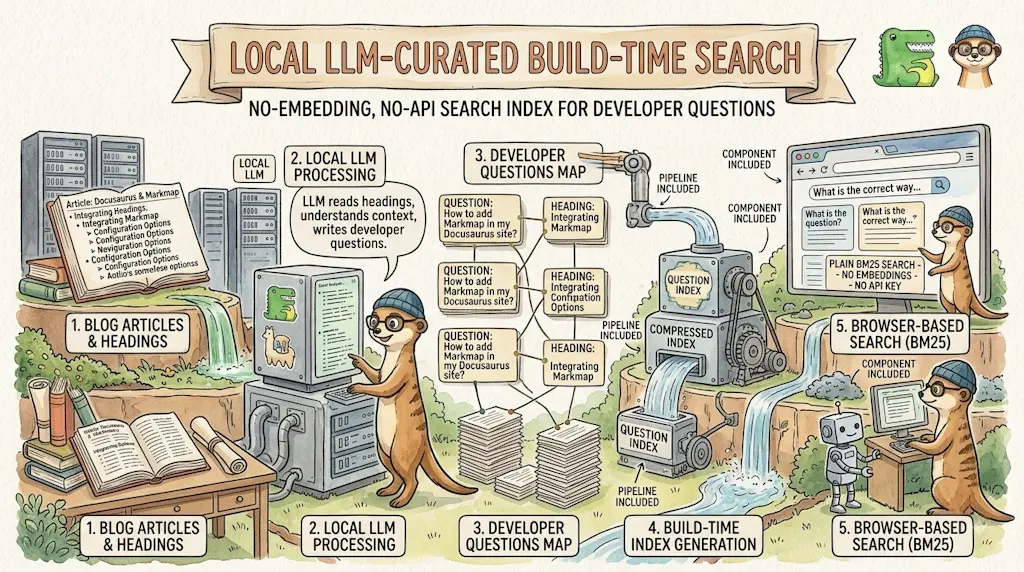
A site search only finds the words you wrote. A reader whose Docker image is too big types "my docker image is huge", not "optimizing layer caching" — and finds nothing. So I had a local Ollama model read all 259 of my articles and write, for each one, the 8 to 12 questions a developer would really type, each mapped to the heading that answers it. That produced 2,160 questions, served as a build-time index and searched in the browser with plain BM25. No embeddings, no vector database, no API key.
Search on a personal blog is almost always a disappointment, and it took me a while to understand why. It is not the search engine's fault — mine indexes every word of every page perfectly well. The problem is that it can only find the words I wrote.
I write "reducing the final image size through multi-stage builds". The reader in trouble types "my docker image is huge". Zero results. The article they needed is sitting right there, indexed, matched against a vocabulary they never used.
The usual answer to that is embeddings: turn everything into vectors, compare meanings instead of words. But that means a model in the browser, or an API call per keystroke, for a static blog with no backend. There is a much cheaper way to bridge two vocabularies — and it starts with noticing that the bridge only has to be built once.
What You Get
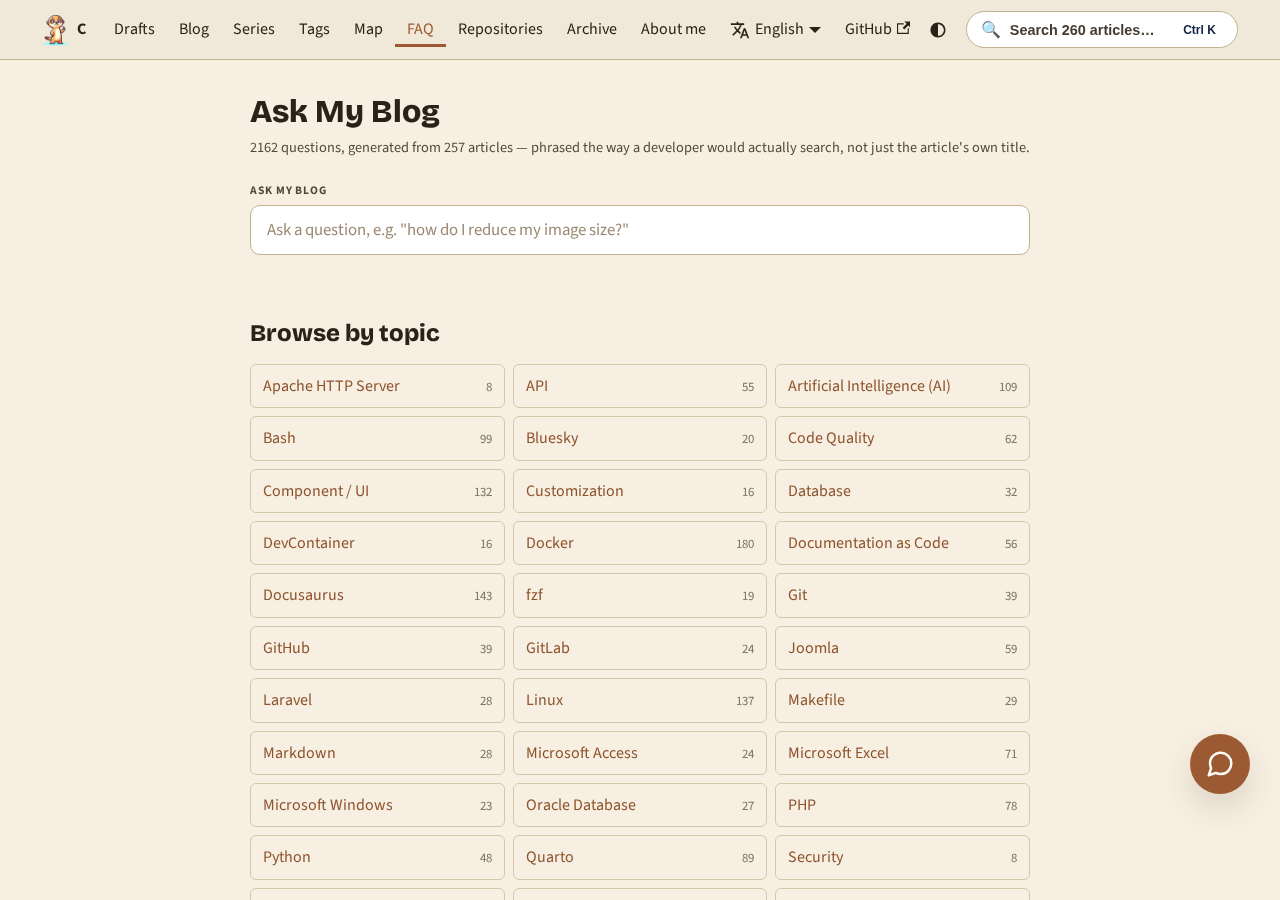
The /faq page opens on a hub: topic cards, one per main tag — Docker, AI, Bash, WSL, and more. Each card shows how many questions are filed under it. Click one and you land on a page listing every question for that topic, each pointing at the exact article heading that answers it:
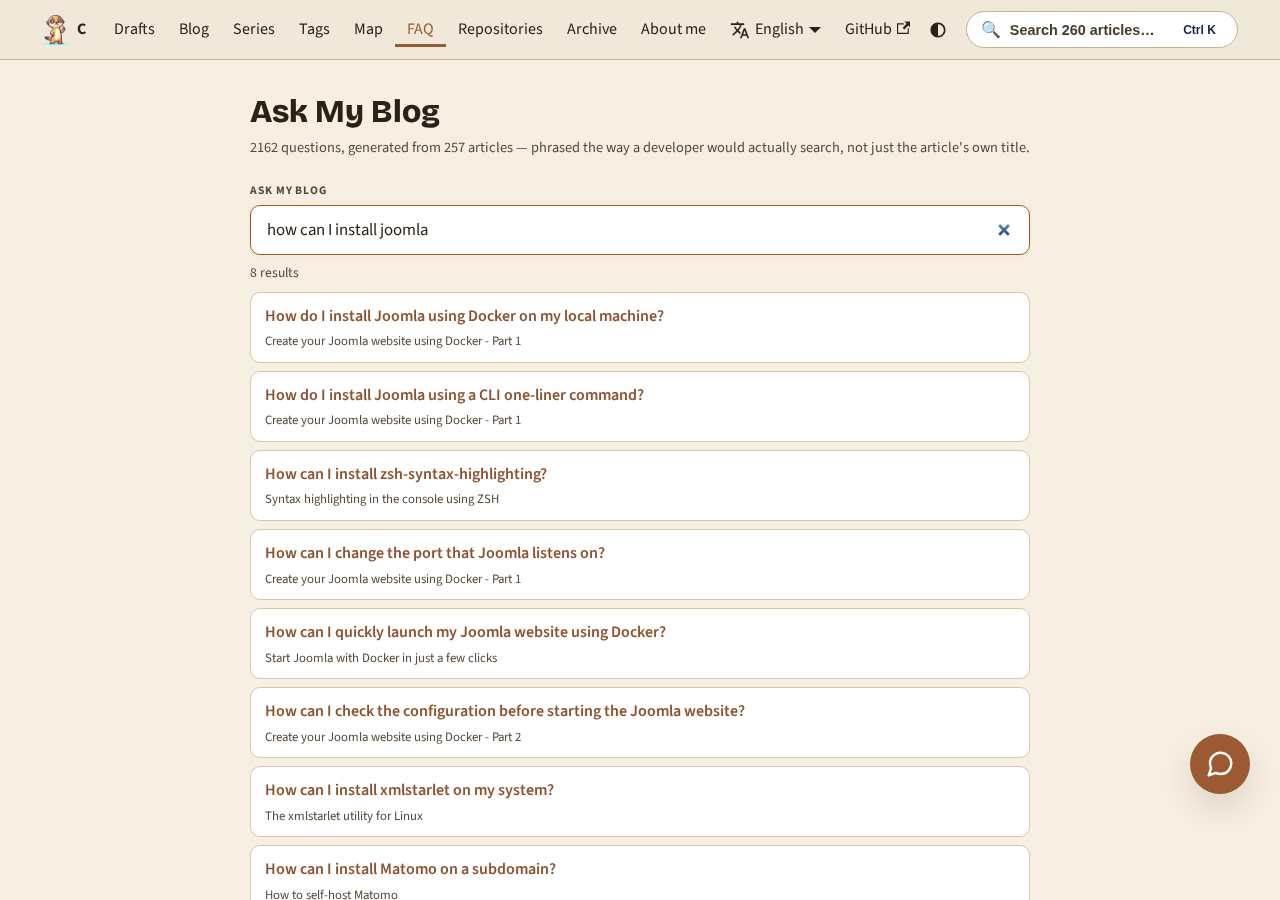
The same index also powers a search box on that page. Type a problem in your own words — "my docker image is huge", "fuzzy find a file in the terminal" — and you get questions back, not page titles. Each result points at the exact heading that answers it:
That is the whole idea, and the rest of this article is how it is built.
Why This Works Without a Model in the Browser
The insight is small and it is the whole article: the semantic work does not have to happen at search time.
- A reader's query and an article's prose are written in two different vocabularies. Something has to translate between them.
- That translation is a fixed property of the article. It does not depend on who is searching, or when. So it can be computed once and stored.
- Once a model has already phrased "how do I stop my Docker image being enormous?" and filed it next to the right heading, matching a reader's query against that sentence is a plain string-similarity problem. Twenty-year-old lexical ranking handles it perfectly.
- What ships to the browser is therefore a list of sentences and a scoring function — not a model, not a vector index, not a network call.
The build gets slower (about 11 seconds per article, once). Every reader after that gets an instant answer.
Generating the Questions
The generator asks a local Ollama instance for questions about one article, and writes them into a sidecar file next to it — the same convention my ELI5 tooltips already use for their own generated content:
$ time yarn questions blog/2025/09/12/docusaurus-go-top/index.md --force

✅ Written: blog/2025/09/12/docusaurus-go-top/index.md.questions.json
   8 questions.

real    0m11.147s

$ yarn questions:bulk --dry-run --limit 4

🔍 4 article(s) under blog (--limit 4).
  [SKIP] blog/2023/11/02/docker-php-run-script-or-website/index.md
  [SKIP] blog/2023/11/02/keepass-start-rdp/index.md
  [SKIP] blog/2023/11/02/welcome/index.md
  [SKIP] blog/2023/11/02/wslg-rpd-connection/index.md

Dry run — nothing written.
The result is a small JSON file, index.md.questions.json, committed alongside the article:
{ "version": 1, "model": "task-tiny:latest", "generated": "2026-08-12T13:24:09.634Z", "source": "index.md", "sourceHash": "981d607fb90f06dd35b65cdfa3d549560453a8ea", "questions": [ { "question": "How do I add a 'go to the top' button to my Docusaurus blog posts using a custom React component and theme override?", "anchor": "what-it-looks-like" }, { "question": "What are the steps to implement a 'scroll to top' button in Docusaurus blog posts?", "anchor": "how-it-works" }, { "question": "How can I add a 'go to the top' button to other pages in my Docusaurus site besides blog posts?", "anchor": "you-can-do-this-for-other-pages-for-sure" }, { "question": "What is the purpose of overriding the BlogPostItem page in Docusaurus for adding a 'go to the top' button?", "anchor": "overriding-the-blogpostitem-page" }, { "question": "How do I create and use a custom React component for the 'go to the top' button in Docusaurus blog posts?", "anchor": "how-it-works" }, { "question": "What is the CSS for styling the 'go to the top' button in Docusaurus blog posts?", "anchor": "how-it-works" }, { "question": "How do I inject the custom React component for the 'go to the top' button into my Docusaurus pages?", "anchor": "overriding-the-blogpostitem-page" }, { "question": "What is the purpose of swizzling in Docusaurus and how can it be used to add a 'go to the top' button to blog posts?", "anchor": "how-it-works" } ]}This is a metadata file that describes a documentation page about adding a 'go to the top' button to Docusaurus blog posts. It contains version information, a timestamp, and a list of eight question-and-anchor pairs that represent different ways someone might ask about or search for information on this topic. The anchors point to specific sections in the source document where answers can be found.
Three things make that output usable rather than merely plausible.
The model is told what "specific" means. The system prompt bans generic questions outright ("What is Docker?"), demands a mix of short keyword-style queries and full sentences, and forbids two questions that differ only by word order:
- Every question must be SPECIFIC to this article's actual content — never generic
  ("What is Docker?", "How does Markdown work?").
- Vary the phrasing style: some short keyword-style queries, some full questions.
- Each question maps to exactly one heading by index. Index 0 means "the article as a
  whole / introduction", not tied to a specific heading.
- Do not invent facts not supported by the material given.
The answer shape is enforced, not hoped for. Ollama accepts a JSON schema in format:, so the model cannot return prose, a Markdown list, or a differently-named field. The script still validates every item afterwards, and fails the whole article if fewer than five survive — a thin entry is worse than no entry.
Headings are resolved to real anchors. The prompt gives the model a numbered heading list and asks for an index; the script maps that index back to the slug Docusaurus itself will generate, using the same github-slugger package Docusaurus uses internally. A wrong index is not fatal — the question falls back to the top of the article rather than being thrown away.
Here is the whole generator:
Pick a small model on purpose
This runs on task-tiny, a 3B instruct model. Bigger local models produced no better questions in side-by-side comparison and ran roughly ten times slower. Writing search questions from a title, a description and a heading list is an extraction task, not a reasoning one — and 259 articles at 11 seconds each is a coffee break, while 259 at two minutes each is an afternoon.
Serving 2,160 Questions Three Different Ways
A Docusaurus plugin aggregates all 259 sidecars into one index. The interesting part is that it does not ship that index once — it ships it three times, in three different shapes, because it has three consumers with incompatible needs:
| Consumer | What it needs | How it gets it |
|---|---|---|
The /faq hub | 40 topic names and counts, grouped by main tag | setGlobalData — a few hundred bytes |
/faq/<topic> pages | One topic's questions, crawlable | addRoute + createData, code-split per route |
| The search box | The whole corpus | A plain static JSON file, fetched on demand |
That third row is the one that matters. The full corpus is 468 KB (63 KB gzipped), and the search box lives inside a component mounted on every page of the site. Exposing it through setGlobalData would have bundled all 468 KB into every page's JavaScript, whether or not anyone ever typed a character.
So the plugin writes it straight to disk as a static asset instead, and the client fetches it the first time someone actually opens the search box:
The fetch is cached at module scope, so the palette and the /faq page share one download — and a failed fetch clears the cache rather than poisoning it, so a reader who searched before the dev server finished building can simply try again:
And the search box itself:
Need help here? Click the "Help" button above for setup instructions.
Under the Hood (skip this if you just want the questions)
Querying the index from the command line
The JSON file is a plain array, so you can probe it outside the browser with a handful of lines. This is useful for debugging the index before shipping, or for checking whether a particular phrasing matches:
$ npx tsx --eval "
import { buildSearchIndex, search } from './src/components/AskMyBlog/utils.ts';
import fs from 'fs';
const rel = 'questions-index-plugin/static/questions-index.json';
const p = ['.docusaurus', '.docusaurus-dev'].map(d => d + '/' + rel).find(fs.existsSync);
if (p === undefined) throw new Error('Run yarn build or start the dev server first');
const corpus = JSON.parse(fs.readFileSync(p, 'utf8'));
const index = buildSearchIndex(corpus);
for (const r of search(index, process.argv[1], 4)) {
  console.log(r.question);
  console.log('    ' + r.title + '  ->  ' + r.permalink + (r.anchor ? '#' + r.anchor : ''));
}" "run docusaurus in docker"

How do I run my Docusaurus site using Docker?
    Running Docusaurus with Docker  ->  /blog/docusaurus-docker#run-docusaurus
What commands are used to build and run the production Docker image for Docusaurus?
    Running Docusaurus using Docker  ->  /blog/running-docusaurus-with-docker#build-and-run-the-production-image
How do I run Quarto Markdown in Docker?
    Running Quarto Markdown in Docker  ->  /blog/docker-quarto
How do I run Firefox in a Docker container?
    Docker - Run Graphical User Interfaces - Firefox, Chrome & GIMP  ->  /blog/docker-run-linux-gui#creating-our-own-chrome-docker-image
BM25 in forty lines
The ranking is Okapi BM25 — term frequency with saturation, plus length normalization, weighted by inverse document frequency. It is what Lucene and Elasticsearch use, and it fits in one small file because each "document" here is a single question of a dozen words.
Two adaptations were needed for that unusually short document length.
Prefix matching, expanded once per query. A reader typing docus has not finished the word yet, so an unknown token of three characters or more is expanded to every indexed term it prefixes. Below three characters a prefix matches too much of the vocabulary to mean anything, so short unknown tokens are dropped instead. Crucially the expansion happens once per query, not once per document — the scoring loop only ever sees real indexed terms.
A tokenizer that splits compounds without losing them. CaesiumCLT tokenized naively is one indivisible token, so a reader typing "caesium" matches nothing. Inserting a boundary before lowercasing fixes that — but then WordPress becomes word + press, and someone typing "wordpress" as one word matches neither half. The fix is a union rather than a replacement: keep both the split form and the whole form.
export function tokenize(text: string): string[] {
  const withBoundaries = text.replace(/([a-z0-9])([A-Z])/g, "$1 $2");
  const split = withBoundaries.toLowerCase().match(/[a-z0-9]+/g) || [];
  const whole = text.toLowerCase().match(/[a-z0-9]+/g) || [];
  return [...new Set([...split, ...whole])];
}
The duplicate problem
If forty articles each generate "How do I install Docker?", the index is useless — the reader gets forty identical rows and no signal. The plugin normalizes every question and drops every colliding instance, including the first. That last detail is deliberate: a question that is not specific to exactly one article has already failed the prompt's own rule, so keeping one copy would still ship a bad entry. Across my corpus this removes 5 questions out of 2,055. The prompt is doing most of the work; this is the safety net.
Sidecars are meant to be hand-edited
Generation is a first draft. Most entries are fine, some are a joke line lifted straight out of an article's prose and reformatted as a question. A tiny interactive pruner finds them by keyword and lets you delete by number:
$ yarn questions:edit "dinosaur"

blog/2024/05/17/some-article/index.md.questions.json
  [0] How do I install the CLI? → #installation
  [1] How can I play with a green dinosaur?
  [2] What does the --force flag do? → #options
Delete which number(s)? (space-separated, Enter to skip): 1
  ✅ Removed 1 question(s), 11 left.
Deleting a question never touches the article itself, which matters for the last piece.
Detecting drift
A generated question can silently rot: rename a heading and its anchor breaks; rewrite a section and the questions stop describing it. yarn questions:check compares each sidecar's stored sourceHash against the article's current content and reports STALE, plus articles that have no sidecar at all. It is report-only by default; --strict fails on stale entries but never on missing coverage, because a freshly written article legitimately has no questions until you run the generator for it.
The topic pages carry FAQ structured data
Each /faq/<topic> page emits FAQPage JSON-LD. Worth being honest about the payoff: Google restricted FAQ rich results in August 2023 to a narrow set of authoritative government and health sites, so a personal blog will not get the expandable snippet UI out of it. It is still correct, standards-compliant markup that other consumers read — just not a guaranteed win in the search results page.
Conclusion
I started this wanting semantic search and ended up not needing any semantics at runtime. The model did the hard part once, offline, on my own machine, for free — and what it left behind was 2,160 plain English sentences that ordinary lexical ranking handles beautifully.
That reframing is worth carrying elsewhere. "This needs a model" is very often "this needed a model, once, and now it needs a file". The version of your feature that runs a language model in every visitor's browser and the version that ships a JSON file computed at build time can produce the same answer — and only one of them still works when the API key expires.
My whole index, generated locally and committed to Git, weighs 63 KB on the wire. That is smaller than the banner image at the top of this article.
This article is part of the Creating Docusaurus components series:
- Change how Docusaurus will create img tags
- Overrides the generation of img tags with Docusaurus
- Organize Your Docusaurus Content with a Custom Series Component
- Providing a go to the top button in Docusaurus posts
- Creating a search&replace plugin for Docusaurus
- A component for showing code snippets in a Docusaurus blog
- A Docusaurus component that alerts readers the article is over a year old
- Showing the changelog of your post
- Inject ASCII Art in any HTML pages rendered by Docusaurus
- Best Practice - Customizing the Docusaurus RSS Feed for Full Content & Images
- Running some checks on your Docusaurus images
- Tags management in Docusaurus
- Automating TL;DR Summaries with Gemini AI
- Introducing the ProjectSetup Component - A Standardized Way to Share Project Structures
- How to indicate AI-assisted content in a Docusaurus blog
- Bring Your CLI Tutorials to Life with a Typewriter Terminal
- Meerkat Mischief: Sprinkling Easter Eggs Across my Blog
- AI-Powered Code Tooltips in Docusaurus — Explain Like I'm Five
- Adding Reader Reactions to Your Docusaurus Blog
- Your Blog Is Unreadable to an AI. Here Is the Fix.
- Shake Your Phone, Startle the Meerkat
- Add a "Copy as Markdown" Button to Your Docusaurus Blog
- Ask My Blog: Turning 259 Articles Into 2,160 Searchable Questions
- The Third Door: A Floating Chat Bubble, and the Feature Nobody Could Find
- Drawing a Map of My Own Blog
- Let Readers Flag Issues — A Multi-Type Feedback Widget for Docusaurus
Related posts

ai-explain: ELI5 for Scripts and Errors, Right in Your Terminal
November 12, 2026
Open WebUI — Beyond the Chat: Models, RAG, Tools and API Keys
October 26, 2026

ai-data: Let a Local LLM Write Your jq and awk One-Liners
October 22, 2026