Meerkat Mischief: Sprinkling Easter Eggs Across my Blog
A tour of eight small, discoverable easter eggs added to this Docusaurus blog — a hidden ASCII-art meerkat in the page source, a Konami-code sprite run, a console.log wink, a tab-away favicon swap, rotating 404 messages, a hidden sitemap comment and more — plus the real bugs (key-repeat, an AZERTY keyboard mismatch, a wrong emoji, a postBuild race condition, a blurry favicon) caught along the way.


This article is part of the Creating Docusaurus components series:
- Change how Docusaurus will create img tags
- Overrides the generation of img tags with Docusaurus
- Organize Your Docusaurus Content with a Custom Series Component
- Providing a go to the top button in Docusaurus posts
- Creating a search&replace plugin for Docusaurus
- A component for showing code snippets in a Docusaurus blog
- A Docusaurus component that alerts readers the article is over a year old
- Showing the changelog of your post
- Inject ASCII Art in any HTML pages rendered by Docusaurus
- Best Practice - Customizing the Docusaurus RSS Feed for Full Content & Images
- Running some checks on your Docusaurus images
- Tags management in Docusaurus
- Automating TL;DR Summaries with Gemini AI
- Introducing the ProjectSetup Component - A Standardized Way to Share Project Structures
- How to indicate AI-assisted content in a Docusaurus blog
- Bring Your CLI Tutorials to Life with a Typewriter Terminal
- Meerkat Mischief: Sprinkling Easter Eggs Across my Blog
- AI-Powered Code Tooltips in Docusaurus — Explain Like I'm Five
- Adding Reader Reactions to Your Docusaurus Blog
- Your Blog Is Unreadable to an AI. Here Is the Fix.
- Shake Your Phone, Startle the Meerkat
- Add a "Copy as Markdown" Button to Your Docusaurus Blog
- Ask My Blog: Turning 259 Articles Into 2,160 Searchable Questions
- The Third Door: A Floating Chat Bubble, and the Feature Nobody Could Find
- Drawing a Map of My Own Blog
- Let Readers Flag Issues — A Multi-Type Feedback Widget for Docusaurus
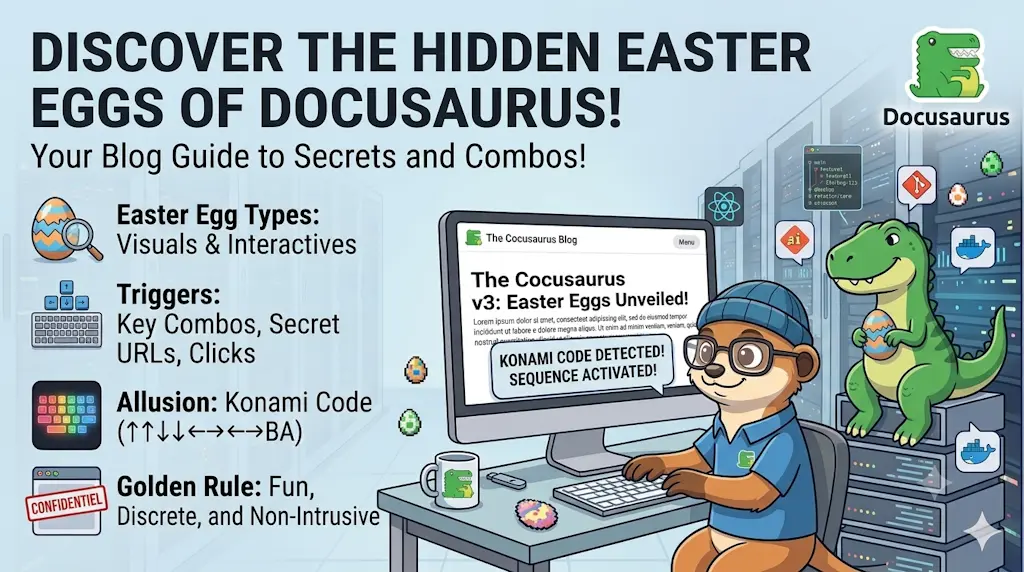
Beyond the meerkat mascot already visible on this blog, this blog hides eight small, deliberately discoverable easter eggs: an ASCII-art meerkat sitting right in the page source, a console.log wink, rotating 404 messages, a Konami-code sprite run, a tab-away title/favicon swap, an X-Powered-By HTTP header, a print-stylesheet footer, and a hidden comment in sitemap.xml. This article walks through every one of them with the actual source code, and — more usefully — the real bugs we shipped and caught along the way: a key-repeat race in the Konami handler, an AZERTY keyboard mismatch a real user (not our tests) found, a wrong emoji codepoint, a Docusaurus postBuild concurrency gotcha, and a favicon that was unreadable until we redesigned the crop.
You already know this site has a mascot: a meerkat that shows up on the 404 page, rides the "scroll to top" button, and hides in an ASCII-art HTML comment on every page. That last one got me thinking: if a comment in the page source is fun, what else could a curious visitor stumble upon?
So, this week-end, I asked myself — and Claude Code — a simple question: how far can we take this without it becoming annoying? The answer turned into eight small easter eggs — the ASCII-art comment revisited in detail, plus seven new additions — each following the same rule: if you're not looking for it, you'll never see it. No pop-ups, no confetti on page load, nothing that gets in a reader's way. Just quiet rewards for the curious.
The one rule behind all of this
Every easter egg on this list lives in the console, the source, the response headers, or a state the visitor has to trigger on purpose (leaving the tab, printing a page, typing a secret code). None of them ever appear in the normal reading flow.
1. The one that started it all: an ASCII-art meerkat in the page source
This is the easter egg that inspired everything else on this list, so it earns the top spot. Press CTRL+U on any page of this blog — or right-click and choose "View Page Source" — and right after the opening <!doctype html> line, before a single visible pixel has been described, you'll find a meerkat drawn entirely in ASCII characters, sitting inside an HTML comment:
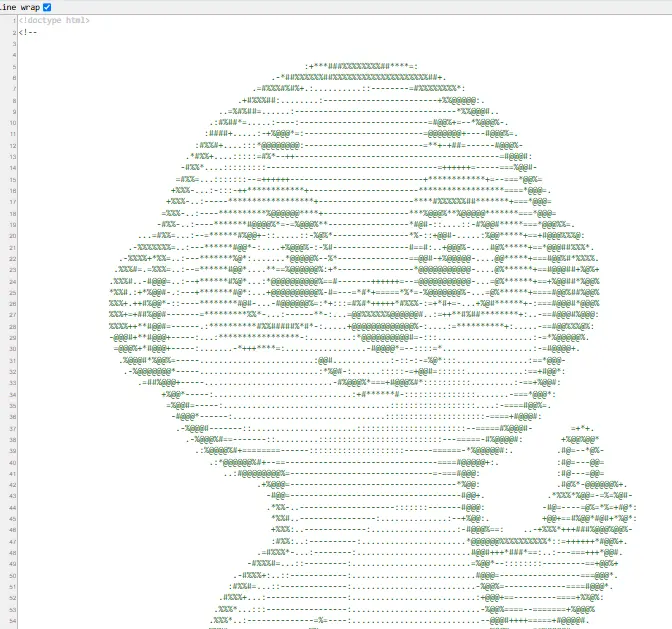
It's invisible in the rendered page — an HTML comment never reaches the screen — and it doesn't cost a single byte of layout or a single line of visible markup. It's purely a reward for anyone curious enough to look at the raw response.
Under the hood, a small postBuild plugin (plugins/ascii-injector/index.mjs) walks every generated HTML file after yarn docusaurus build finishes and inserts the contents of src/data/banner.txt as a comment right after the <!doctype html> tag. The plugin itself is built step by step in Inject ASCII Art in any HTML pages rendered by Docusaurus, and the banner comes from the same generator as the one in Bash - ASCII art:
$ yarn Docusaurus build
$ grep -A2 doctype build/index.html
<!doctype html>
<!--
Already covered in detail
This one has its own dedicated article — Inject ASCII Art in any HTML pages rendered by Docusaurus — with the full plugin source, how to convert your own logo to ASCII art, and a postBuild-only caveat (it won't show up while running yarn start in dev mode, only on a real build). We won't repeat all of it here; this entry exists mainly so the egg gets its rightful place in this list.
2. A console.log wink for DevTools visitors
The easiest one. If you open your browser's DevTools console on this blog, you'll see this:
// Excerpt from src/theme/Root.js
// Console easter egg: a little wink for visitors who open DevTools.// Runs once per full page load, not on every client-side route change.useEffect(() => { console.log( '%c \u{1F9AB} Curious, aren\'t you?', 'font-size:18px;font-weight:bold;color:#e8871e;', ); console.log( '%cThe meerkat sentry is watching this site too. If you enjoy digging around in the source, try the Konami code somewhere on this page...', 'font-size:12px;color:#888;', );}, []);This code runs once when the page first loads and prints a friendly message to the browser's developer console using styled text. It's a fun Easter egg that greets curious developers who open DevTools.
Nothing fancy: a styled console.log call (the %c directive lets you apply CSS to console output) that fires once per full page load. It also doubles as a hint, pointing curious readers toward the Konami code below.

Why useEffect(..., [])
An empty dependency array means this effect runs once when the component mounts — not on every client-side route change. Since Root wraps the whole app and survives navigation between pages, this is the right place for a "once per visit" easter egg.
3. A 404 page with a sense of humor
The 404 page already showed a meerkat illustration and a message. We turned the message into a small pool of five, picked at random on every load:
useState(() => …) with a function initializer ensures the random pick happens exactly once per mount, not on every re-render — important here since NotFound doesn't need to re-roll the message while the user reads it.
Try it: Click on this link inexisting_page then press F5 to get random message.
4. The star of the show: a Konami code easter egg
Type ↑ ↑ ↓ ↓ ← → ← → B A anywhere on this site (not in a text field) and a meerkat sprints across your screen. This is the one worth the most detail, because it's also the one that taught us the most.
Here is our running merkat; try it out!

More info about what's Konami code is? Consult this page on wikipedia.
The component
import { useEffect, useState, useRef, useCallback, type JSX } from "react";import runningImg from "@site/static/img/meerkat/suricate_running.webp";import styles from "./styles.module.css";import { translate } from "@docusaurus/Translate";
const KONAMI_CODE = [ "ArrowUp", "ArrowUp", "ArrowDown", "ArrowDown", "ArrowLeft", "ArrowRight", "ArrowLeft", "ArrowRight", "b", "a",];
const ARROW_KEYS = new Set(["ArrowUp", "ArrowDown", "ArrowLeft", "ArrowRight"]);
// Holding Shift to type "B"/"A" as capitals fires its own keydown for the// modifier itself first (event.key === "Shift"). Left unguarded, that keydown// doesn't match whatever arrow is next expected and resets progress to 0// before the "B"/"A" keydown even arrives — so the last two letters could// never be reached the moment someone shift-presses instead of typing plain// lowercase b/a.const MODIFIER_KEYS = new Set([ "Alt", "AltGraph", "CapsLock", "Control", "Fn", "FnLock", "Meta", "NumLock", "ScrollLock", "Shift", "Symbol", "SymbolLock",]);
// event.code reflects the physical key position on a QWERTY reference// layout, so on an AZERTY keyboard the key printed "A" reports 'KeyQ'.// event.key reflects the actual character produced, which matches what// players see printed on their own keycaps regardless of layout.const normalizeKey = (key: string) => (key.length === 1 ? key.toLowerCase() : key);
const RUN_DURATION_MS = 3000;
export default function KonamiEasterEgg(): JSX.Element | null { const [isRunning, setIsRunning] = useState(false); const progressRef = useRef(0);
const triggerRun = useCallback(() => { setIsRunning(true); console.log( "%c\u{1F9AB} Konami code accepted! Run, meerkat, run!", "font-size:14px;font-weight:bold;color:#e8871e;", ); window.setTimeout(() => setIsRunning(false), RUN_DURATION_MS); }, []);
useEffect(() => { const handleKeyDown = (event: KeyboardEvent) => { // Ignore auto-repeated keydowns fired while a key is held down: a // slightly-too-long "ArrowUp" press would otherwise inject extra // events and break a sequence that has two of the same key in a row. if (event.repeat) return; // event.key can be undefined at runtime (IME composition, synthetic events, // older browser bugs) despite TypeScript's DOM types declaring it string. if (!event.key) return; if (MODIFIER_KEYS.has(event.key)) return;
const key = normalizeKey(event.key); const expectedKey = KONAMI_CODE[progressRef.current]; if (key === expectedKey) { if (ARROW_KEYS.has(key)) { // Stop the arrow keys from scrolling the page mid-sequence. event.preventDefault(); } progressRef.current += 1; if (progressRef.current === KONAMI_CODE.length) { progressRef.current = 0; triggerRun(); } } else { progressRef.current = key === KONAMI_CODE[0] ? 1 : 0; } };
window.addEventListener("keydown", handleKeyDown); return () => window.removeEventListener("keydown", handleKeyDown); }, [triggerRun]);
if (!isRunning) { return null; }
return ( <img src={runningImg} alt={translate({ id: "konamiEasterEgg.alt", message: "A meerkat sprinting across the screen", })} className={styles.runner} /> );}This component detects when a user types the famous Konami code (up, up, down, down, left, right, left, right, B, A) and triggers a fun animation of a meerkat running across the screen for three seconds. It handles keyboard input carefully to ignore key repeats and modifier keys that could interrupt the sequence, normalizing key values to work across different keyboard layouts.
The logic keeps a useRef cursor into a KONAMI_CODE array of KeyboardEvent.code values (not .key — .code reflects the physical key position, so the sequence works the same on an AZERTY keyboard as on a QWERTY one). Each keydown either advances the cursor, resets it, or — on a full match — mounts a runner <img> for 3 seconds:
It's mounted once, globally, from src/theme/Root.js:
import KonamiEasterEgg from '@site/src/components/KonamiEasterEgg';

// ...

return (
  <>
    {children}
    <KonamiEasterEgg />
  </>
);
Try it right now
Seriously — click anywhere on this page to make sure it has focus, then type ↑ ↑ ↓ ↓ ← → ← → B A. This exact component is running on the page you're reading.
The bug that nearly killed the fun
After shipping this, real-world testing turned up a genuine bug: typed slowly and deliberately, the sequence sometimes just... didn't trigger. The cause was auto-repeat. Hold ArrowUp even a fraction of a second too long — which is very natural when you're carefully recalling a sequence — and the browser fires several keydown events with repeat: true before you release the key. Since the sequence needs ArrowUp twice in a row, one held press can inject an extra ArrowUp event right when the handler expects ArrowDown, silently resetting the whole thing.
The fix is one guard clause:
const handleKeyDown = (event) => {
  // Ignore auto-repeated keydowns fired while a key is held down: a
  // slightly-too-long "ArrowUp" press would otherwise inject extra
  // events and break a sequence that has two of the same key in a row.
  if (event.repeat) return;

  // ...
};
We verified the fix with Playwright rather than just eyeballing it — dispatching a synthetic keydown with repeat: true confirmed the handler now ignores it, and a full quick-tap run of the sequence still triggers the animation. If your easter egg (or any keyboard shortcut, really) involves two identical keys back-to-back, don't skip this check.
The bug a real user found that automated testing missed
The key-repeat fix shipped, tests were green — and the feature still didn't work for a real visitor. The report: "I try the combination but nothing happens." The cause turned out to be the keyboard, not the code: on a Belgian AZERTY keyboard, the physical key printed A sits exactly where a QWERTY keyboard has Q (and vice-versa). The original implementation matched on event.code, which reports the physical position of the key on a QWERTY reference layout — so pressing the keycap labeled "A" on an AZERTY keyboard produced code: 'KeyQ', not 'KeyA'. The user's own diagnosis nailed it: typing what looked like "B, Q" on their keyboard worked, because that physical position maps to KeyA.
The fix is to match on event.key instead — the actual character produced, which respects whatever layout the visitor has configured:
// event.code reflects the physical key position on a QWERTY reference
// layout, so on an AZERTY keyboard the key printed "A" reports 'KeyQ'.
// event.key reflects the actual character produced, which matches what
// players see printed on their own keycaps regardless of layout.
const normalizeKey = (key) => (key.length === 1 ? key.toLowerCase() : key);

// ...

const key = normalizeKey(event.key);
if (key === expectedKey) { /* ... */ }
Arrow keys were never affected — ArrowUp, ArrowDown, ArrowLeft, ArrowRight are identical strings for both .code and .key on every layout. The bug only bit the two letter keys at the end of the sequence, and only for the roughly 15–20% of keyboards worldwide that aren't QWERTY.
Lesson
Our Playwright test caught the key-repeat regression because it dispatched real, sequential events — but it never caught the layout bug, because Playwright's virtual keyboard defaults to QWERTY. Automated tests validate the logic you thought to test; they don't replace a human with different hardware. If a feature involves typed input, .key is almost always the right choice over .code — reserve .code for cases where you deliberately want physical key position (game movement controls, for instance, where WASD should stay in the same physical spot regardless of layout).
5. Tab-away easter egg: title and favicon swap
Leave this tab and come back — the title changes to "Come back, the meerkat is on watch! 👀" and the favicon swaps to a dozing meerkat. Both revert the instant the tab regains focus:

// Excerpt from src/theme/Root.js
const sleepingFaviconUrl = useBaseUrl('/img/favicon-sleeping.png');
// Title bar easter egg: greet visitors who leave the tab and come back,// swapping the favicon for a dozing meerkat while they're away.useEffect(() => { const originalTitle = document.title; const faviconLink = document.querySelector('link[rel="icon"]'); const originalFavicon = faviconLink?.href;
const handleVisibilityChange = () => { if (document.hidden) { document.title = 'Come back, the meerkat is on watch! \u{1F440}'; if (faviconLink) faviconLink.href = sleepingFaviconUrl; } else { document.title = originalTitle; if (faviconLink && originalFavicon) faviconLink.href = originalFavicon; } };
document.addEventListener('visibilitychange', handleVisibilityChange); return () => document.removeEventListener('visibilitychange', handleVisibilityChange);}, [location, sleepingFaviconUrl]);This code creates a fun easter egg that detects when a user switches away from the browser tab and changes the page title and favicon to show a 'sleeping meerkat' message. When they come back to the tab, it restores the original title and favicon. The effect sets up a listener for visibility changes and cleans it up when the component unmounts.
The visibilitychange event and document.hidden are the standard way to detect this — no polling needed. useBaseUrl (a Docusaurus hook) resolves the favicon path correctly regardless of the site's configured base URL, the same helper used elsewhere on this site for image sources.
6. A wink in the HTTP headers
This one is invisible unless you check the Network tab or run curl -I. It lives in nginx.conf, right in the HTTPS server block:
add_header X-Powered-By "Meerkat-Sentry/1.0" always; — a small, harmless header for anyone who inspects response headers out of habit.
7. Print stylesheet easter egg
Print an article (Ctrl+P) and a small footer note appears on the printed page:
@media print only applies its rules when the browser is generating a print preview or an actual printout — it's invisible in the normal browsing experience, which is exactly the point.
8. Sitemap.xml gets a comment too
The least likely to ever be found, and the one that produced the most interesting bug. The idea: slip a small XML comment as the first child of <urlset> in the generated sitemap.xml. A comment there is valid XML and ignored by every sitemap parser and crawler, so it can't break indexing.
/** * Docusaurus Plugin: sitemap-easter-egg * * Purpose: * Slips a small, valid XML comment right after the <urlset> opening tag of the * generated sitemap.xml, for the rare visitor who reads sitemaps for fun. * * A comment placed as the first child of <urlset> is valid XML and is ignored * by every sitemap parser/crawler, so it can't break indexing. * * Usage: * - Save this plugin as `plugins/sitemap-easter-egg/index.mjs` * - Add it to `docusaurus.config.js` plugins array. * * Note: Docusaurus runs every plugin's postBuild hook concurrently, so the * official sitemap plugin may not have written sitemap.xml yet when this * hook starts. We poll briefly for the file before giving up. */
import { promises as fs } from "node:fs";import path from "node:path";
const POLL_ATTEMPTS = 15;const POLL_INTERVAL_MS = 300;
async function readWhenReady(filePath) { for (let attempt = 0; attempt < POLL_ATTEMPTS; attempt += 1) { try { return await fs.readFile(filePath, "utf8"); } catch (err) { if (err.code !== "ENOENT" || attempt === POLL_ATTEMPTS - 1) { throw err; } await new Promise((resolve) => setTimeout(resolve, POLL_INTERVAL_MS)); } } return undefined;}
export default function sitemapEasterEggPlugin() { return { name: "sitemap-easter-egg-plugin",
async postBuild({ outDir, siteConfig }) { const sitemapPath = path.resolve( outDir, siteConfig?.presets?.[0]?.[1]?.sitemap?.filename || "sitemap.xml", );
let xml; try { xml = await readWhenReady(sitemapPath); } catch (err) { console.warn( `[sitemap-easter-egg] sitemap.xml not found, skipping: ${err.message}`, ); return; }
const comment = "<!-- Hi there! A meerkat sentry reviewed every URL in this sitemap. -->";
if (xml.includes(comment)) { return; }
const urlsetTag = /<urlset[^>]*>/i; if (!urlsetTag.test(xml)) { console.warn("[sitemap-easter-egg] <urlset> tag not found, skipping."); return; }
const updated = xml.replace(urlsetTag, (m) => `${m}${comment}`); await fs.writeFile(sitemapPath, updated, "utf8"); console.log("[sitemap-easter-egg] Comment injected into sitemap.xml"); }, };}This Docusaurus plugin adds a hidden Easter egg comment into the generated sitemap.xml file. It waits for the sitemap to be created, then injects a witty comment right after the opening <urlset> tag—a spot that XML parsers ignore, so it won't break search engine indexing.
Registered the same way as the ASCII-art injector:
What we ended up with
The eight easter eggs
- ASCII-art meerkat — hidden in the page source, right after
<!doctype html> - Console.log wink — a styled message for anyone with DevTools open
- Rotating 404 messages — five random, mascot-flavored variants
- Konami code —
↑ ↑ ↓ ↓ ← → ← → B Asends a meerkat running across the screen - Tab-away swap — title and favicon change while the tab is hidden, and revert on return
- X-Powered-By header — a wink in the HTTP response headers
- Print stylesheet — a small footer note on printed pages
- Sitemap.xml comment — a hidden, XML-valid comment as the first child of
<urlset>
None of these change how a single reader reads a single article. That was the whole point — a blog's job is still to be read, not to perform tricks at the reader. But for the developers, the crawlers, the DevTools-curious, and the people who actually print articles or inspect response headers, there's now a little more personality hiding just under the surface. So cool no?
That list has since grown by one: every egg above assumes a keyboard or an open DevTools panel, which is no use to anyone reading on a phone — so shaking the phone now startles the mascot full-screen for a couple of seconds, no keyboard involved.
If you're running your own Docusaurus blog and have a mascot, a logo, or even just a favorite color: pick one or two of these — they're all small, self-contained, and none of them require touching your actual content. Start with the one that matches where your readers already are (DevTools console if your audience is developers, HTTP headers if it's other bloggers who poke at things, print CSS if people print your recipes or tutorials) and grow from there.
This article is part of the Creating Docusaurus components series:
- Change how Docusaurus will create img tags
- Overrides the generation of img tags with Docusaurus
- Organize Your Docusaurus Content with a Custom Series Component
- Providing a go to the top button in Docusaurus posts
- Creating a search&replace plugin for Docusaurus
- A component for showing code snippets in a Docusaurus blog
- A Docusaurus component that alerts readers the article is over a year old
- Showing the changelog of your post
- Inject ASCII Art in any HTML pages rendered by Docusaurus
- Best Practice - Customizing the Docusaurus RSS Feed for Full Content & Images
- Running some checks on your Docusaurus images
- Tags management in Docusaurus
- Automating TL;DR Summaries with Gemini AI
- Introducing the ProjectSetup Component - A Standardized Way to Share Project Structures
- How to indicate AI-assisted content in a Docusaurus blog
- Bring Your CLI Tutorials to Life with a Typewriter Terminal
- Meerkat Mischief: Sprinkling Easter Eggs Across my Blog
- AI-Powered Code Tooltips in Docusaurus — Explain Like I'm Five
- Adding Reader Reactions to Your Docusaurus Blog
- Your Blog Is Unreadable to an AI. Here Is the Fix.
- Shake Your Phone, Startle the Meerkat
- Add a "Copy as Markdown" Button to Your Docusaurus Blog
- Ask My Blog: Turning 259 Articles Into 2,160 Searchable Questions
- The Third Door: A Floating Chat Bubble, and the Feature Nobody Could Find
- Drawing a Map of My Own Blog
- Let Readers Flag Issues — A Multi-Type Feedback Widget for Docusaurus
Loading comments…
Related posts

Preview Your Local Docusaurus Site on Your Phone
November 16, 2026
Drawing a Map of My Own Blog
October 8, 2026
Ask My Blog: Turning 259 Articles Into 2,160 Searchable Questions
September 28, 2026
Add a "Copy as Markdown" Button to Your Docusaurus Blog
September 10, 2026