Your Blog Is Unreadable to an AI. Here Is the Fix.
A growing share of your readers arrive through an AI assistant — and what they get is your HTML, wrapped in navigation, React widgets and collapsed accordions. This article generates a plain-Markdown mirror of every article, a /llms.txt index, and per-series full-text bundles, by degrading the MDX source rather than converting the rendered HTML. Includes the fallback rule that makes the export impossible to break.


This article is part of the Creating Docusaurus components series:
- Change how Docusaurus will create img tags
- Overrides the generation of img tags with Docusaurus
- Organize Your Docusaurus Content with a Custom Series Component
- Providing a go to the top button in Docusaurus posts
- Creating a search&replace plugin for Docusaurus
- A component for showing code snippets in a Docusaurus blog
- A Docusaurus component that alerts readers the article is over a year old
- Showing the changelog of your post
- Inject ASCII Art in any HTML pages rendered by Docusaurus
- Best Practice - Customizing the Docusaurus RSS Feed for Full Content & Images
- Running some checks on your Docusaurus images
- Tags management in Docusaurus
- Automating TL;DR Summaries with Gemini AI
- Introducing the ProjectSetup Component - A Standardized Way to Share Project Structures
- How to indicate AI-assisted content in a Docusaurus blog
- Bring Your CLI Tutorials to Life with a Typewriter Terminal
- Meerkat Mischief: Sprinkling Easter Eggs Across my Blog
- AI-Powered Code Tooltips in Docusaurus — Explain Like I'm Five
- Adding Reader Reactions to Your Docusaurus Blog
- Your Blog Is Unreadable to an AI. Here Is the Fix.
- Shake Your Phone, Startle the Meerkat
- Add a "Copy as Markdown" Button to Your Docusaurus Blog
- Ask My Blog: Turning 259 Articles Into 2,160 Searchable Questions
- The Third Door: A Floating Chat Bubble, and the Feature Nobody Could Find
- Drawing a Map of My Own Blog
- Let Readers Flag Issues — A Multi-Type Feedback Widget for Docusaurus
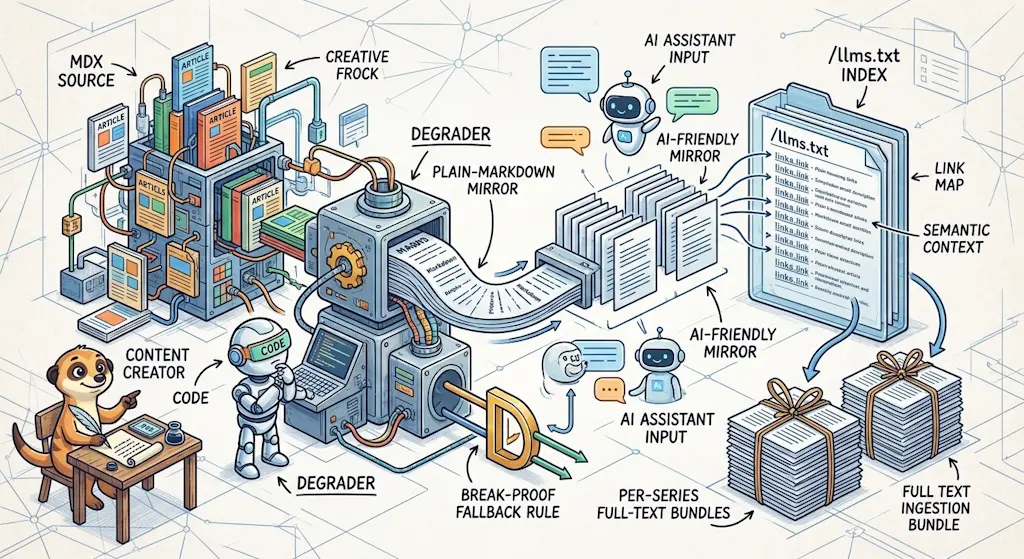
llms.txt is a proposed convention for making a site legible to AI assistants — and an unproven one: no major assistant (ChatGPT, Claude, Perplexity) publicly confirms reading it. I explored it anyway, mostly because this blog is already written with Claude Code doing most of the file work, so maintaining a llms.txt mirror costs almost nothing. What I found while building it: the published HTML, wrapped in navigation, React widgets, and 107 collapsed <Snippet> accordions, is genuinely less complete than the source I wrote. The fix is a build-time plugin that emits a plain-Markdown mirror of every article, a /llms.txt index and one full-text bundle per series. The key decision: degrade the MDX source, never the rendered HTML — and never let an unknown component fail the export.
I wanted to explore the llms.txt track, mostly out of curiosity, not because I had any evidence readers were arriving through an assistant. The idea — proposed by Answer.AI's Jeremy Howard in September 2024 — is to publish a plain-Markdown index of a site at /llms.txt, so an assistant does not have to fight a React app to find the actual content. It is far from an established practice: none of ChatGPT, Claude, or Perplexity publicly confirm that their retrieval pipeline reads the file, and it may never catch on the way robots.txt or sitemap.xml did. What tipped it for me is that this blog is already written with Claude Code doing most of the file work, so keeping a llms.txt mirror in sync would not be a chore I carry by hand — it would just be another build step. When trying something costs that little, you just try it.
What Gets Generated
One yarn build, three artifacts, all static:
$ yarn build

[markdown-export] Mirroring 247/248 blog posts to Markdown…
[markdown-export] Done — 247 article(s) in /llms.txt, 247/247 mirrored, 0 failed.
The first is /llms.txt (see mine online)— the site index, in the format llmstxt.org proposes: a title, a one-line summary, and then every article as a link plus its description, grouped by topic:
# Christophe Avonture

> Personal blog about Docker, WSL, Python, Quarto, PHP, Joomla, Docusaurus and even more

247 articles. Each has a plain-Markdown mirror at its own permalink plus `.md` (e.g. `https://www.avonture.be/blog/<slug>.md`).

## Series (full-text bundles)

Each link is every article in that series, concatenated in reading order — one request instead of many.

- [Bluesky Docusaurus component](https://www.avonture.be/llms/bluesky-docusaurus-component.txt) — 2 article(s)
- [Building and testing REST APIs](https://www.avonture.be/llms/building-and-testing-rest-apis.txt) — 5 article(s)
- [code quality](https://www.avonture.be/llms/code-quality.txt) — 10 article(s)
  … 22 more series …

## component

- [A component for showing code snippets in a Docusaurus blog](https://www.avonture.be/blog/docusaurus-snippets) — Learn how to build a custom React component to embed dynamic code snippets in your Docusaurus blog for a more interactive reader experience.
- [A Docusaurus component that alerts readers the article is over a year old](https://www.avonture.be/blog/docusaurus-old-notice) — Displays a warning banner when the page content is over a year old
  … 245 more articles, grouped under 40 topic headings …
The second is a plain-Markdown mirror of every single article, at its own URL plus .md. Take the scroll-to-top button article, fetch /blog/docusaurus-go-top.md, and you get this — no JSX, no accordions, every code file inlined in full:
<!-- canonical-url: https://www.avonture.be/blog/docusaurus-go-top published: 2025-09-12 generated-at: 2026-08-12T14:55:47.056Z This is a static plain-Markdown mirror generated at build time. Visit the canonical URL above for the fully rendered page, with images and interactive components.-->
# Providing a go to the top button in Docusaurus posts
> Learn how to easily add a "go to the top" button, often with a fun animated icon, to your Docusaurus blog posts using a custom React component and theme override.
---
**TL;DR**
This article is a quick tutorial on how to add a 'scroll to top' button to your Docusaurus blog. It walks you through implementing a custom `<ScrollToTopButton>` React component, including its CSS for styling. You'll learn how to override the default `BlogPostItem` theme component to automatically inject the button at the bottom of every blog post. The guide also provides tips on adding the button to other parts of your site, such as the blog archive or custom pages.
More on smartphones than on computers; it's pretty nice to have a *Back to top of page* button to avoid dislocating your thumb.
 [Docux](https://github.com/Juniors017), a friend, recently developed this feature and I was really happy to add it, especially since it's terribly easy to use and adds a fun element; it's cool.
Just scroll down any page of this blog to see a little meerkat appear in the bottom right corner. Click on it and take the lift back to the top of the page.
## What it looks like
Here is this very page, scrolled down. The meerkat sits in the bottom right corner, floating above your own content:
> Screenshot — https\://www\.avonture.be/blog/docusaurus-go-top>> 
Up close, it's a round button holding whatever icon you hand it:
…This is a Markdown document about adding a 'scroll to top' button to Docusaurus blog posts. It explains that you can create a custom React component with styling and override the theme to inject it into every post, and mentions there's a fun meerkat icon example on this site.
The third is the one I would not have thought of on my own: one full-text bundle per series, at /llms/<series-slug>.txt, concatenating every article of that series in reading order. The Docusaurus components bundle is 710 KB of pure Markdown — 23 articles that an assistant can pull in a single request instead of 23.
Why the Source, and Never the HTML
Every tool in this space converts rendered HTML back to Markdown. That is the wrong direction, and the reason is not aesthetic:
- The HTML has already lost information. This blog folds 107 code snippets into collapsed
<Snippet>accordions, some components render nothing until hydration, and images sit behind lazy loading — an HTML-to-Markdown pass can only recover what the HTML contains, and the HTML contains less than the source. - The source is already Markdown. An MDX file is Markdown with some JSX sprinkled in it. Going source → Markdown means handling a few dozen component names; going HTML → Markdown means reverse-engineering an entire rendering pipeline.
- The generated file is genuinely better than the page.
<Snippet source="./files/compose.yaml">becomes a fenced code block containing the whole file. A reader of the mirror gets the code the reader of the page has to click to reveal. - Nothing is invented. Every component on this blog either wraps content the author typed, or points at a file on disk. There is no component that fabricates content at runtime — so a source-level degradation can be complete by construction.
The result is not a lossy export of my site. It is a more complete version of it.
Building It
The degradation table
My articles are not plain Markdown: they are MDX, Markdown with a few dozen custom React components mixed in — <Snippet> for a collapsible code block, <AlertBox> for a callout, <Link> for a cross-reference, and so on. Each one exists to add a bit of interactivity to the page, and each one is exactly what a Markdown mirror cannot render as-is. So the plugin has to know, one component at a time, what plain Markdown it should turn into. The whole thing is a remark pipeline: parse the MDX source into an AST, walk it, replace each JSX node with plain-Markdown nodes, then stringify. Each component gets one rule:
| Component | Uses | Degradation |
|---|---|---|
Snippet | 917 | fenced block; source= (841×) resolved and inlined in full |
Link | 779 | [text](href) |
AlertBox | 546 | > **{title}:** … (variant becomes the keyword) |
Terminal | 455 | ```bash block; source= (146×) resolved |
TLDR | 253 | > **TL;DR** … |
BrowserWindow | 98 | children, plus a > Screenshot — {url} caption |
StepsCard | 55 | ordered list |
ProjectSetup | 28 | ### Project: {folderName} then each Snippet as a titled block |
Details | 18 | left as <details> — valid Markdown already |
Prerequisite | 10 | bullet list |
Columns / Column | 9 | sequential sections |
Reaction, ScrollToTopButton, Bluesky, RelatedPosts, … | ~15 | removed — interface, not content |
Trees / Folder / File | 0 | nothing to do (see below) |
That last row is my favorite line in the whole plugin. Those components exist because a remark plugin turns an ASCII directory tree in the source into React components. Not applying that plugin gives the original ASCII tree back for free. The correct rule was to write no rule at all.
The orchestrator
The plugin runs in postBuild, degrades each live article, writes the mirrors, then builds the two indexes on top of whatever succeeded:
Register it like any other plugin:
plugins: [
  "./plugins/markdown-export-plugin/index.cjs",
  // ...
],
Self-hosted? Watch the MIME type
/blog/my-slug (like /blog/docusaurus-llms-txt for this article) is a directory containing index.html, so its sibling /blog/my-slug.md creates no route conflict — that one is free. But Apache has no built-in MIME mapping for .md, so without AddType text/markdown .md in .htaccess, the browser offers a download instead of displaying the file.
The One Rule That Makes This Safe
An unknown component never fails the export. Its wrapper is dropped and its children take its place. No exceptions, no errors, ever.
That single rule is what allows a 900-line degradation table to sit in a build pipeline without becoming a liability. Add a component in six months, forget to write a rule, and the worst case is that its wrapper vanishes while its content survives.
But a silent fallback is a slow leak, so the plugin records every component it did not recognize and warns once per build. That warning, not the table, is what keeps coverage at 100% over time — the table is frozen the day you write it; the warning notices the day you break it.
Making It Discoverable
Generating a file is not publishing it: without a link pointing at it, nothing — crawler or human — ever finds /llms.txt or a per-series bundle on its own. Four hooks close that gap, each targeting a different consumer:
1. llms.txt links its own bundles. The index opens with a "Series (full-text bundles)" section. It is the only place they are ever referenced.
2. A site-wide <link rel="alternate">, in headTags, so it is server-rendered on every page — exactly how RSS has always been discovered:
{
  tagName: "link",
  attributes: {
    rel: "alternate",
    type: "text/markdown",
    href: "https://www.avonture.be/llms.txt",
    title: "llms.txt — full site index in Markdown, for LLMs and readers",
  },
},
3. A per-article equivalent, pointing at that article's own mirror, injected by a tiny component wired into the blog post page:
// Points crawlers/tools that scan <link rel="alternate"> at this exact// article's plain-Markdown mirror (written by plugins/markdown-export-plugin,// see src/components/CopyAsMarkdown for the human-facing equivalent). Same// discovery pattern as RSS's <link rel="alternate" type="application/rss+xml">,// scoped to a single page instead of the whole site — the site-wide// counterpart (pointing at /llms.txt) lives in docusaurus.config.js's// headTags, since that one applies to every page, not just blog posts.import type { JSX } from "react";import Head from "@docusaurus/Head";import { useBlogPost } from "@docusaurus/plugin-content-blog/client";import { translate } from "@docusaurus/Translate";
export default function MarkdownAlternate(): JSX.Element { const { metadata } = useBlogPost();
return ( <Head> <link rel="alternate" type="text/markdown" href={`${metadata.permalink}.md`} title={translate({ id: "markdownAlternate.title", message: "Plain-Markdown mirror of this article", })} /> </Head> );}This React component adds a discovery link to each blog post's HTML head, pointing crawlers and tools to a plain-Markdown version of the article. It works similarly to how RSS feeds advertise themselves with alternate links, but scoped to individual pages rather than the entire site.
4. A breadcrumb in robots.txt. There is no standard directive for this — it is a comment, read by anything already parsing that file and looking for one. It cost two lines.
One honest limitation
The human-facing "View this series as plain Markdown" link on /series/<slug> is invisible to a crawler that does not run JavaScript: that page is a client-side React Router route, so its link never appears in server-rendered HTML. The two <link rel="alternate"> tags above do not have that problem — which is exactly why the discovery hooks that matter live in headTags and in a component, not in a page body.
And then there is the part no code can do for you: submitting to the directories. The correct ones are the ones the official spec page links to. I got llmstxt.site and directory.llmstxt.cloud registered; llmstxthub.com had a broken submission form the day I tried. Worth ten minutes.
Conclusion
What I like about the result has less to do with AI adoption than I expected going in:
- Anyone can
curlan article and get it whole. Not just a bot — a script, a colleague, me on a slow connection — gets the full text with no HTML, no JavaScript, no navigation to strip out by hand first. - The blog is bot-friendly regardless of whether
llms.txtitself ever catches on. A plain-Markdown version of every article now exists as a side effect, independent of that convention's fate. - A Markdown file drops straight into a text editor or an LLM's context window. No more select-all-and-delete-the-navbar before an article is actually usable somewhere else.
/llms.txtdoubles as an inventory of the blog — every article, one line each, grouped by topic. A table of contents I did not have before, generated for free.- The per-series bundles turn 23 requests into one. Handy for an assistant pulling context, just as handy for a reader who wants an entire series in a single file to read or archive.
- None of it needs to be remembered. It is a build step, not a habit — which is exactly why an unproven convention was worth one hour to try in the first place.
If the 107 collapsed <Snippet> accordions that started this whole thing are new to you, that component is worth its own read.
This article is part of the Creating Docusaurus components series:
- Change how Docusaurus will create img tags
- Overrides the generation of img tags with Docusaurus
- Organize Your Docusaurus Content with a Custom Series Component
- Providing a go to the top button in Docusaurus posts
- Creating a search&replace plugin for Docusaurus
- A component for showing code snippets in a Docusaurus blog
- A Docusaurus component that alerts readers the article is over a year old
- Showing the changelog of your post
- Inject ASCII Art in any HTML pages rendered by Docusaurus
- Best Practice - Customizing the Docusaurus RSS Feed for Full Content & Images
- Running some checks on your Docusaurus images
- Tags management in Docusaurus
- Automating TL;DR Summaries with Gemini AI
- Introducing the ProjectSetup Component - A Standardized Way to Share Project Structures
- How to indicate AI-assisted content in a Docusaurus blog
- Bring Your CLI Tutorials to Life with a Typewriter Terminal
- Meerkat Mischief: Sprinkling Easter Eggs Across my Blog
- AI-Powered Code Tooltips in Docusaurus — Explain Like I'm Five
- Adding Reader Reactions to Your Docusaurus Blog
- Your Blog Is Unreadable to an AI. Here Is the Fix.
- Shake Your Phone, Startle the Meerkat
- Add a "Copy as Markdown" Button to Your Docusaurus Blog
- Ask My Blog: Turning 259 Articles Into 2,160 Searchable Questions
- The Third Door: A Floating Chat Bubble, and the Feature Nobody Could Find
- Drawing a Map of My Own Blog
- Let Readers Flag Issues — A Multi-Type Feedback Widget for Docusaurus
Loading comments…
Related posts
Drawing a Map of My Own Blog
October 8, 2026
Ask My Blog: Turning 259 Articles Into 2,160 Searchable Questions
September 28, 2026
Add a "Copy as Markdown" Button to Your Docusaurus Blog
September 10, 2026