Hurl — Chain Your HTTP Calls in a Recipe Anyone Can Read
Hurl replaces the curl + jq + export dance with one plain-text .hurl file that logs in, keeps the token, calls the protected API and checks every answer with assertions. Readable by non-developers, runnable as a test suite by the API developer, and shippable to a customer who just wants the data in a database every night.


This article is part of the Building and testing REST APIs series:
- Don't query your PostgreSQL db anymore, prefer PostgREST
- Using Postman to play with API
- Python - Fast API - Create your JSON API in Python in one minute
- API REST - How to write good APIs
- Bruno - A postman-like tool - GUI and CLI
- Hurl — Chain Your HTTP Calls in a Recipe Anyone Can Read
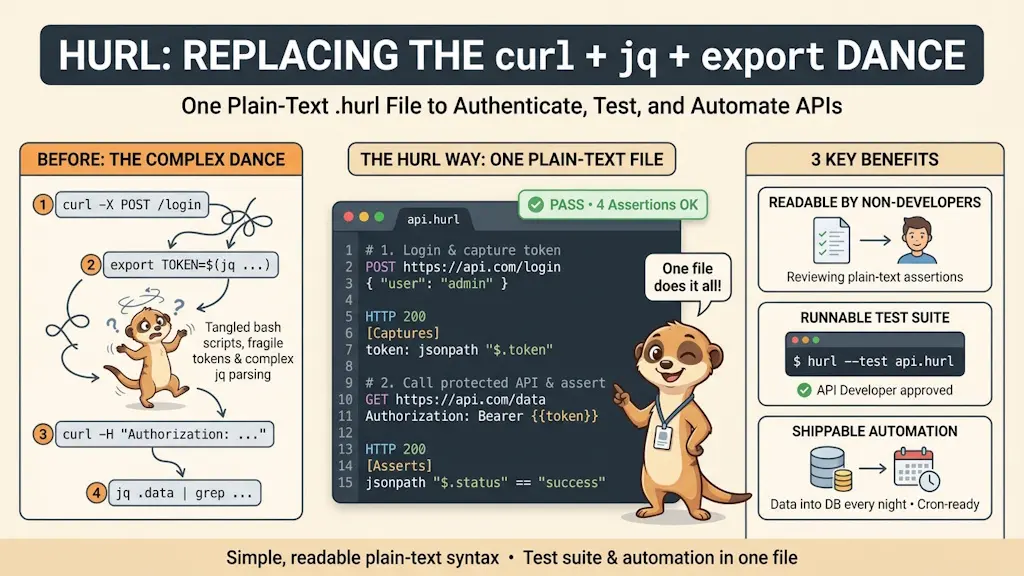
Hurl is a free, open-source command-line tool that reads a plain-text .hurl file, sends the HTTP requests it describes from top to bottom, and checks every response against the assertions written under it. A token captured from the first answer feeds the second request, so "log in, then call the protected API" is one file instead of two curl calls glued with jq. The same file is a readable recipe for a non-developer, a test suite for the API developer, and a nightly data export for the customer.
Calling a protected API with curl always goes the same way: a first curl to get a token, jq to dig it out of the JSON, a shell variable to keep it, a second curl with -H "Authorization: Bearer $TOKEN", and then... I look at the answer with my own eyes and decide it is fine. And when a colleague, or a customer, asks "how do I call that API?", I send them a shell script they cannot read.
Hurl turns that into a small text file anyone can read, which chains the calls by itself and checks each answer before going on.
What Hurl Does For You
Here is the curl way of logging in on DummyJSON — a free fake REST API — then asking "who am I?" with the token received:
#!/usr/bin/env bashset -euo pipefail
# Step 1. Log in, then dig the token out of the JSON answer with jqTOKEN=$(curl --silent --fail \ --header 'Content-Type: application/json' \ --data "{\"username\": \"${API_USERNAME}\", \"password\": \"${API_PASSWORD}\"}" \ https://dummyjson.com/auth/login | jq --raw-output '.accessToken')
# Step 2. Call the protected endpoint with that tokencurl --silent --fail \ --header "Authorization: Bearer ${TOKEN}" \ https://dummyjson.com/auth/me | jq '{username, email}'
# ...and checking the answer is still up to youThis script logs into an API by sending credentials, extracts the access token from the JSON response, then uses that token to call a protected endpoint and displays the username and email fields. It's a typical two-step authentication flow where you trade credentials for a temporary token that proves who you are.
$ API_USERNAME=emilys API_PASSWORD=emilyspass ./login-curl.sh
{
  "username": "emilys",
  "email": "emily.johnson@x.dummyjson.com"
}
And here is the same two-step conversation, written for Hurl:
# Step 1. Log in and get an access tokenPOST https://dummyjson.com/auth/loginContent-Type: application/json{ "username": "{{username}}", "password": "{{password}}"}HTTP 200[Captures]token: jsonpath "$.accessToken"
# Step 2. Use the token to ask "who am I?"GET https://dummyjson.com/auth/meAuthorization: Bearer {{token}}HTTP 200[Asserts]jsonpath "$.username" == "{{username}}"jsonpath "$.email" endsWith "@x.dummyjson.com"This Hurl script tests a login flow by first sending credentials to get an access token, then using that token to verify the authenticated user's identity. It demonstrates a common pattern where one HTTP request's response data feeds into the next request's headers.
No jq, no shell variable, no quoting puzzle around the JSON body: the token captured at step 1 is simply {{token}} at step 2. And the two lines under [Asserts] verify the answer — the curl script leaves that to you. Run it:
$ hurl --test --variable username=emilys --secret password=emilyspass login.hurl
Success login.hurl (2 request(s) in 3142 ms)
--------------------------------------------------------------------------------
Executed files:    1
Executed requests: 2 (0.6/s)
Succeeded files:   1 (100.0%)
Failed files:      0 (0.0%)
Duration:          3145 ms (0h:0m:3s:145ms)
Now with a wrong password:
$ hurl --test --variable username=emilys --secret password=oops login.hurl
error: Assert status code
  --> login.hurl:8:6
   |
   | POST https://dummyjson.com/auth/login
   | ...
 8 | HTTP 200
   |      ^^^ actual value is <400>
   |

Failure login.hurl (1 request(s) in 118 ms)
--------------------------------------------------------------------------------
Executed files:    1
Executed requests: 1 (8.2/s)
Succeeded files:   0 (0.0%)
Failed files:      1 (100.0%)
Duration:          122 ms (0h:0m:0s:122ms)
Hurl points at the exact line that failed, says what it got instead, never sends the second request, and exits with a non-zero code — which is all a script, a cron job or a CI pipeline needs to know.
Why It Works
- One file is the whole recipe. Every step of the conversation sits in the same file, in the order it happens. What
[Captures]keeps from an answer — a token, an id, a cookie — is a variable for every request below it. - A non-developer can read it. An address, a few
Name: valuelines, the expected answer. No pipes, no escaped quotes, no$(...). Someone who has never opened a terminal can still tell what the file does, and spot the URL that changed. - The checks travel with the requests. The expected status and the
[Asserts]checklist live right under the request they verify, so the file documents the API and its contract. - No secret in the file. Only blanks like
{{password}}, filled at run time; values passed with--secretare masked in every log Hurl prints. - It is curl underneath. Hurl is built on libcurl: proxies, certificates and HTTP/2 behave exactly like the
curlyou already trust. - One binary, three systems. Windows, Linux and macOS, free and open source (Apache 2.0), maintained by Orange.
Installing Hurl
Hurl is packaged for every system; take the first line that matches yours.
$ brew install hurl            # macOS, Linux and WSL (Homebrew)
$ winget install Orange-OpenSource.Hurl   # Windows
Debian / Ubuntu: the official .deb (Hurl is not in the Ubuntu archive)
Ubuntu does not package Hurl, but every GitHub release ships a .deb, its checksum and a signed build-provenance attestation:
$ VERSION=8.1.0
$ curl -LO "https://github.com/Orange-OpenSource/hurl/releases/download/${VERSION}/hurl_${VERSION}_amd64.deb"
$ curl -LO "https://github.com/Orange-OpenSource/hurl/releases/download/${VERSION}/hurl_${VERSION}_amd64.deb.sha256"
$ sha256sum -c "hurl_${VERSION}_amd64.deb.sha256"
$ gh attestation verify "hurl_${VERSION}_amd64.deb" --repo Orange-OpenSource/hurl
$ sudo apt install "./hurl_${VERSION}_amd64.deb"
The checksum only proves the download was not truncated; the gh attestation verify line is the one proving the file was built by Hurl's own GitHub workflow.
Nothing to install: the Docker image
$ docker run --rm ghcr.io/orange-opensource/hurl:8.1.0 --version
Then, in every command of this article, replace hurl by docker run --rm -v "$PWD":/work -w /work ghcr.io/orange-opensource/hurl:8.1.0. To pass the HURL_VARIABLE_... and HURL_SECRET_... variables of the test-suite chapter, add -e HURL_VARIABLE_username -e HURL_SECRET_password right after --rm: a container does not inherit your shell's environment.
Check it is on your PATH:
$ hurl --version
hurl 8.1.0 (x86_64-alpine-linux-musl) libcurl/8.23.0 OpenSSL/3.5.9 zlib/1.3.2 brotli/brotli/1.2.1 zstd/zstd/1.5.7 c-ares/1.34.9 libidn2/2.3.8 nghttp2/1.70.0
Anatomy of a .hurl File
A .hurl file is a list of entries, run from top to bottom. Each entry is a request followed, optionally, by the response it expects:
| Part | Example | Meaning |
|---|---|---|
| Method and URL | POST https://dummyjson.com/auth/login | the only mandatory line |
| Headers | Authorization: Bearer {{token}} | one Name: value per line, right below |
| Sections | [Query], [Form], [BasicAuth], [Options] | query string, form fields, credentials, per-request options |
| Body | a JSON object, an XML document or raw text | sent as is, after the headers |
| Status | HTTP 200 | the answer must have that code, or Hurl stops |
[Captures] | token: jsonpath "$.accessToken" | keep a value from the answer for later |
[Asserts] | jsonpath "$.username" == "emilys" | the checklist on the answer |
Lines starting with # are comments, for humans only.
The {{ }} blanks
A name between double curly braces is filled in just before the request leaves:
| Blank | Filled with |
|---|---|
{{username}} | a variable given on the command line, in a file or in the environment |
{{token}} | a value captured by a previous entry |
{{newUuid}} | a fresh random UUID, generated at every run — handy for a trace id |
{{newDate}} | the current date and time, ISO 8601 |
Because the file only holds blanks, it can be committed and shared: nobody can use it without the values.
Filling the Blanks Without Leaking Secrets
Four ways to give Hurl its values, from the most explicit to the most automatic:
| Option | Example | Note |
|---|---|---|
--variable | --variable username=emilys | printed as is in verbose logs |
--secret | --secret password=emilyspass | replaced by *** everywhere Hurl prints something |
--variables-file | --variables-file vars.env | one name=value per line |
| Environment | HURL_VARIABLE_username=emilys, HURL_SECRET_password=... | perfect for CI, where secrets already live in the environment |
The usual pattern keeps credentials in a .env file — loaded by the shell — that never gets committed, and the recipe in the .hurl file that does. Time to try it on your machine: the two files below are the login.hurl recipe from the beginning of this article and its .env.
Need help here? Click the "Help" button above for setup instructions.
$ source .env && hurl --test --variable "username=${API_USERNAME}" --secret "password=${API_PASSWORD}" login.hurl
Success login.hurl (2 request(s) in 3132 ms)
--------------------------------------------------------------------------------
Executed files:    1
Executed requests: 2 (0.6/s)
Succeeded files:   1 (100.0%)
Failed files:      0 (0.0%)
Duration:          3135 ms (0h:0m:3s:135ms)
The masking of --secret is not limited to the command line. With --very-verbose, Hurl dumps the request it sends — as the equivalent curl command — and the response it receives, and the password is hidden in both, including in the user profile DummyJSON sends back:
* curl --header 'Content-Type: application/json' --data $'{\n  "username": "emilys",\n  "password": "***"\n}' 'https://dummyjson.com/auth/login'
...
* {"id":1,"firstName":"Emily","lastName":"Johnson",...,"username":"emilys","password":"***",...}
A verbose log can therefore be pasted in a ticket without a second thought.
Assertions: the Checklist on Every Answer
HTTP 200 says the server answered "OK". It says nothing about what it answered: an empty list, a missing field and a half-written CSV all come back with a 200. That is the job of [Asserts].
This file asks DummyJSON for all its users and checks the list is complete and well-formed:
# Every user must have a first name, a last name and an emailGET https://dummyjson.com/users[Query]limit: 0select: firstName,lastName,emailHTTP 200[Asserts]header "Content-Type" contains "application/json"jsonpath "$.users" isCollectionjsonpath "$.users" count == 208jsonpath "$.total" == 208jsonpath "$.users[?!@.firstName]" not existsjsonpath "$.users[?!@.lastName]" not existsjsonpath "$.users[?!@.email]" not existsjsonpath "$.users[0].email" matches /^[a-z.]+@x\.dummyjson\.com$/duration < 5000This Hurl test file validates that a JSON API endpoint returns user data with required fields. It fetches all users from a dummy API, checks that the response is valid JSON with exactly 208 users, ensures every user has a first name, last name, and email address, verifies the email format matches a pattern, and confirms the response arrives within 5 seconds.
Line by line:
header "Content-Type" contains ...— the server says it is sending JSON.jsonpath "$.users" isCollectionthencount == 208—$.usersis a list, with exactly 208 entries.jsonpath "$.users[?!@.firstName]" not exists— keep only the users with no first name, and there must be none. Read the three lines together as "every user has a first name, a last name and an email".matches /.../— a regular expression on a value.duration < 5000— the answer arrived in less than five seconds.
Run it — every check passes:
$ hurl --test users.hurl
Success users.hurl (1 request(s) in 3104 ms)
--------------------------------------------------------------------------------
Executed files:    1
Executed requests: 1 (0.3/s)
Succeeded files:   1 (100.0%)
Failed files:      0 (0.0%)
Duration:          3108 ms (0h:0m:3s:108ms)
Now break one check on purpose: on line 11, change jsonpath "$.total" == 208 into jsonpath "$.total" == 200, then run the same command again. Hurl shows the expected value next to the actual one:
$ hurl --test users.hurl
error: Assert failure
  --> users.hurl:11:0
   |
   | GET https://dummyjson.com/users
   | ...
11 | jsonpath "$.total" == 200
   |   actual:   integer <208>
   |   expected: integer <200>
   |

Failure users.hurl (1 request(s) in 102 ms)
--------------------------------------------------------------------------------
Executed files:    1
Executed requests: 1 (9.5/s)
Succeeded files:   0 (0.0%)
Failed files:      1 (100.0%)
Duration:          105 ms (0h:0m:0s:105ms)
Put 208 back on line 11 before going on: the next chapters run this file again.
An empty filter is not an empty list
A JSONPath filter that matches nothing returns no value in Hurl, not an empty array. So "nobody is missing a first name" is written not exists; isEmpty would fail with actual: none.
The predicates you will use most
| Predicate | Example |
|---|---|
==, !=, >, >=, <, <= | jsonpath "$.total" >= 100 |
contains, startsWith, endsWith | body startsWith "Name,Code" |
matches | jsonpath "$.email" matches /@example\.com$/ |
exists, isEmpty, count | jsonpath "$.users" count > 0 |
isCollection, isString, isInteger, isBoolean | jsonpath "$.users" isCollection |
isIsoDate, isUuid | jsonpath "$.createdAt" isIsoDate |
Any predicate can be negated with not, and the queries go well beyond JSON: status, header, cookie, body, bytes, xpath, regex, sha256, duration, url, redirects...
Beyond JSON
httpbin.org is a free service that echoes back what it receives — perfect to try the other kinds of requests. This single file sends a form (the shape of an OAuth2 client_credentials call), uses basic authentication, generates a trace id, expects a 404 on purpose, checks an HTML page with XPath and follows redirects:
$ hurl --test features.hurl
Success features.hurl (8 request(s) in 3998 ms)
--------------------------------------------------------------------------------
Executed files:    1
Executed requests: 8 (2.0/s)
Succeeded files:   1 (100.0%)
Failed files:      0 (0.0%)
Duration:          4002 ms (0h:0m:4s:2ms)
Eight requests for six entries: following the two redirects of the last entry costs two more.
Three details worth noticing in it:
HTTP 404is a perfectly valid expectation. Testing that a deleted resource is really gone, or that a wrong token is really refused, is as important as testing the happy path.- A JSON key containing a dash is written with brackets:
$.headers['X-Trace-Id'], not$.headers.X-Trace-Id. [Options]changes the behavior of one request only — herelocation: truefollows redirects, andredirects count == 2checks how many hops were made.
Downloading a file, and checking it first
output: writes the response body to a file instead of the terminal — a CSV list of countries from a public GitHub dataset, here:
# Download a CSV file, check it, keep itGET https://raw.githubusercontent.com/datasets/country-list/main/data.csv[Options]output: countries.csvHTTP 200[Asserts]header "Content-Type" contains "text/plain"bytes count > 1000body startsWith "Name,Code"body contains "Belgium,BE"body split "\n" count > 200This Hurl script downloads a CSV file of countries from GitHub, saves it locally, and then verifies the download was successful by checking the HTTP response status, content type, file size, and that it contains the expected CSV data.
$ hurl --test countries.hurl
Success countries.hurl (1 request(s) in 3240 ms)
--------------------------------------------------------------------------------
Executed files:    1
Executed requests: 1 (0.3/s)
Succeeded files:   1 (100.0%)
Failed files:      0 (0.0%)
Duration:          3243 ms (0h:0m:3s:243ms)

$ head -4 countries.csv
Name,Code
Afghanistan,AF
Albania,AL
Algeria,DZ
body startsWith guarantees the column titles are there, in the right order; body split "\n" count > 200 makes sure the file was not cut in the middle. And when one of those checks fails, Hurl does not write the file at all: a bad answer never lands on disk.
For the API Developer: .hurl Files as Tests
Seen from the side of whoever builds the API, a folder of .hurl files is a test suite: each file is a scenario, each [Asserts] line a test. Give Hurl several files and --test runs them in parallel, then prints one summary; two more flags produce an HTML report for humans and a JUnit XML file for the CI:
$ HURL_VARIABLE_username=emilys HURL_SECRET_password=emilyspass hurl --test --report-html report/ --report-junit junit.xml *.hurl
Success countries.hurl (1 request(s) in 105 ms)
Success users.hurl (1 request(s) in 137 ms)
Success login.hurl (2 request(s) in 223 ms)
Success features.hurl (8 request(s) in 971 ms)
--------------------------------------------------------------------------------
Executed files:    4
Executed requests: 12 (12.2/s)
Succeeded files:   4 (100.0%)
Failed files:      0 (0.0%)
Duration:          986 ms (0h:0m:0s:986ms)
The two HURL_... variables are written in front of the command, so they only exist for that one run. An export would keep HURL_SECRET_password in your shell, and every later --secret password=... would then stop with secret 'password' can't be reassigned.
Twelve requests in the four files created so far, done in the time of the slowest one. The exit code tells the pipeline what happened: 0 everything passed, 2 a .hurl file could not be parsed, 3 a request could not be sent at all (DNS, TLS, timeout...), 4 an assertion failed.
To run the same scenarios against your laptop, the staging server and production, replace the host by a blank — on line 2 of users.hurl:
GET {{base_url}}/users
The host is now chosen on the command line. Here it is still DummyJSON; on your own API, it would be http://localhost:8000 on your laptop and the staging address in the CI, with the very same files:
$ HURL_VARIABLE_username=emilys HURL_SECRET_password=emilyspass hurl --test --variable base_url=https://dummyjson.com *.hurl
Success countries.hurl (1 request(s) in 96 ms)
Success login.hurl (2 request(s) in 161 ms)
Success users.hurl (1 request(s) in 170 ms)
Success features.hurl (8 request(s) in 977 ms)
--------------------------------------------------------------------------------
Executed files:    4
Executed requests: 12 (12.1/s)
Succeeded files:   4 (100.0%)
Failed files:      0 (0.0%)
Duration:          991 ms (0h:0m:0s:991ms)
Unlike unit tests, these talk to the real, running API — routing, authentication, serialization and database included — exactly the way a client will.
For the API Consumer: a Recipe You Can Hand Over
Now the other side. Your customer wants the product catalog in their own reporting database, refreshed every night. Instead of a documentation page and a "good luck", send them this file:
# Daily export of the product catalog, for the reporting database
# Step 1. Log inPOST https://dummyjson.com/auth/loginContent-Type: application/json{ "username": "{{username}}", "password": "{{password}}"}HTTP 200[Captures]token: jsonpath "$.accessToken"
# Step 2. Download the catalog, check it, then save itGET https://dummyjson.com/auth/productsAuthorization: Bearer {{token}}[Query]limit: 0select: title,category,price,stock[Options]output: products.jsonHTTP 200[Asserts]jsonpath "$.products" count > 100jsonpath "$.products[?!@.title]" not existsjsonpath "$.products[?@.price <= 0]" not existsThis is a Hurl script that automates a two-step process: first it logs into an API to get an access token, then it uses that token to download a product catalog with specific fields, saves it to a file, and validates that the data looks reasonable (more than 100 products, all have titles, all have positive prices).
They can read it — log in, download the catalog, check there are more than a hundred products, all with a title and a positive price, save it — and run it:
$ hurl --test --variable username=emilys --secret password=emilyspass products.hurl
Success products.hurl (2 request(s) in 134 ms)
--------------------------------------------------------------------------------
Executed files:    1
Executed requests: 2 (14.6/s)
Succeeded files:   1 (100.0%)
Failed files:      0 (0.0%)
Duration:          137 ms (0h:0m:0s:137ms)
products.json is now on disk, and DuckDB turns it into a table with one SQL statement — no import tool, no schema to declare. The command below uses the Docker-based duckdb function of that article, where --write allows writing catalog.duckdb in the current folder; with a native DuckDB, drop --write:
CREATE OR REPLACE TABLE products AS SELECT unnest(products, recursive := true) FROM read_json_auto('products.json');
SELECT category, count(*) AS items, sum(stock) AS in_stockFROM productsGROUP BY categoryORDER BY in_stock DESCLIMIT 5;This script loads product data from a JSON file into a table, then queries it to show the top 5 product categories ranked by how many items are in stock, including a count of products per category.
$ duckdb --write catalog.duckdb < load.sql
┌─────────────────────┬───────┬──────────┐
│      category       │ items │ in_stock │
│       varchar       │ int64 │  int128  │
├─────────────────────┼───────┼──────────┤
│ kitchen-accessories │    30 │     1656 │
│ groceries           │    27 │     1417 │
│ sports-accessories  │    17 │      871 │
│ smartphones         │    16 │      695 │
│ mobile-accessories  │    14 │      531 │
└─────────────────────┴───────┴──────────┘
Put both steps in a script, and let cron run it every night. cron does not load your shell functions, so the script calls the duckdb-cli image built in the DuckDB article directly:
0 2 * * * /home/me/catalog/refresh-catalog.sh >> /home/me/catalog/refresh.log 2>&1
This is where the assertions pay for themselves. The night the API answers 200 with an empty list, or a price at zero, Hurl refuses the answer, writes nothing, and set -e stops the script before DuckDB: the database keeps yesterday's data instead of being silently emptied, and refresh.log names the exact line that failed.
Already Have a curl Command?
Hurl ships with hurlfmt, which converts a curl command line into a Hurl entry — the quickest way to move a shell history into a file:
$ echo "curl -X POST https://dummyjson.com/auth/login -H 'Content-Type: application/json' -d '{\"username\":\"emilys\",\"password\":\"emilyspass\"}'" | hurlfmt --in curl
POST https://dummyjson.com/auth/login
Content-Type: application/json
```
{"username":"emilys","password":"emilyspass"}
```
Add an HTTP 200 and a couple of assertions below it, and the one-off command has become a reusable check.
Hurl, curl and the GUI Clients
curl | Hurl | |
|---|---|---|
| Readable by a non-developer | 😕 | 🙂 |
| Chain several calls | shell variables + jq | [Captures], in one file |
| Check each answer | by eye | HTTP 200 + [Asserts] |
| Hide secrets in logs | ❌ | --secret |
| Native on Windows | 😕 | ✅ |
If you prefer clicking to typing, Postman and Bruno cover the same ground with a graphical interface. Hurl is the opposite choice: no UI at all, a text file that diffs nicely in a pull request and runs identically on a laptop, in CI and in a crontab.
Conclusion
The token dance from the beginning of this article — curl, jq, a variable, curl again, then squint at the output — is now one readable file that logs in, keeps the token, calls the API and verifies the answer, field by field. The developer runs a folder of them as a test suite; the customer runs one every night to feed a database, protected by the very same assertions. Start with the request you type most often: run it through hurlfmt, add one [Asserts] line, and commit it next to the code that depends on that API.
This article is part of the Building and testing REST APIs series:
- Don't query your PostgreSQL db anymore, prefer PostgREST
- Using Postman to play with API
- Python - Fast API - Create your JSON API in Python in one minute
- API REST - How to write good APIs
- Bruno - A postman-like tool - GUI and CLI
- Hurl — Chain Your HTTP Calls in a Recipe Anyone Can Read
Related posts



Bruno - A postman-like tool - GUI and CLI
August 7, 2025
API REST - How to write good APIs
May 19, 2025

Python - Fast API - Create your JSON API in Python in one minute
February 9, 2025