ai-review, ai-secrets, ai-commit: Three zsh Checks Before Every git Commit
Three zsh functions that together form a local, offline pre-commit quality gate: ai-review catches SOLID violations and naming issues, ai-secrets separates real hardcoded credentials from false positives, and ai-commit drafts the Conventional Commits message once the diff is actually clean.


This article is part of the Ollama daily use series:
- Installing Ollama and get local AI
- Accessing Ollama across your local network
- ai-test: Generate Missing Unit Tests From Your Terminal With a Local LLM
- ai-review, ai-secrets, ai-commit: Three zsh Checks Before Every git Commit
- AnythingLLM: Chat With All Your Scattered Documentation
- ai-translate & ai-summarize: Confidential Documents, Handled 100% Locally
- ai-diagram: From a Sentence (or a compose.yaml) to a Mermaid Diagram
- ai-data: Let a Local LLM Write Your jq and awk One-Liners
- ai-explain: ELI5 for Scripts and Errors, Right in Your Terminal
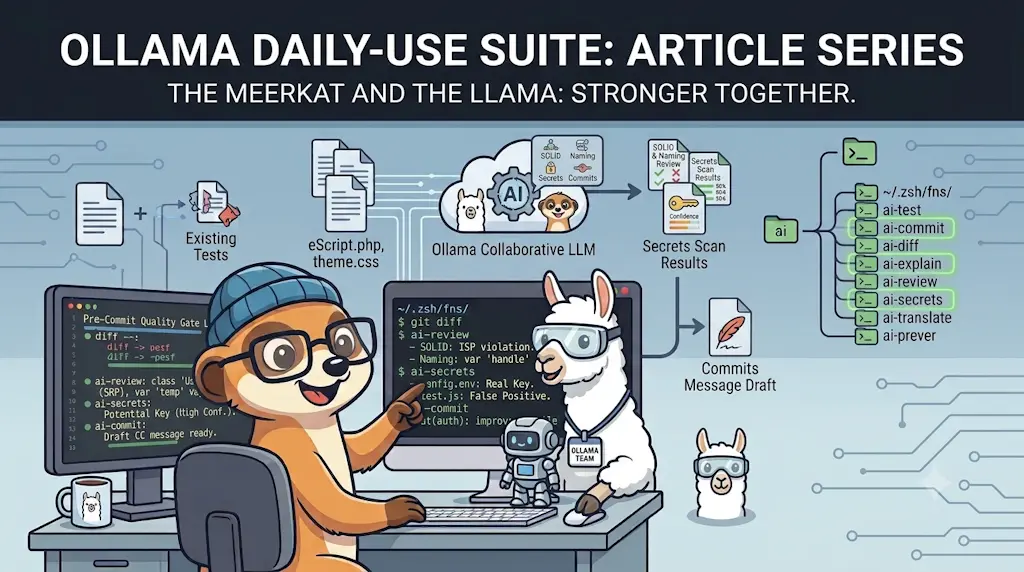
This article adds three functions to the "Ollama daily use" series — ai-review, ai-secrets, and ai-commit — that together cover the moment right before a git commit. All three read the same git diff --staged, so they share a single extracted helper (_git_staged_diff) instead of repeating the same guard clauses three times. The workflow is intentional: review first, catch any secrets second, write the commit message last — once the diff is actually what you want it to be.
The moment right before a git commit is probably the most valuable one in the whole development cycle to pause and look at what you've actually written. Not because something is necessarily wrong — usually it isn't — but because that's when the diff is small and bounded. One more minute of review when you can still see every changed line clearly is worth more than an hour of archaeology later.
I already have pre-commit hooks running phpcbf, PHPStan and friends. Those catch rules. What they don't catch is judgment: a method that quietly grew three responsibilities, 0.21 on line 20 that should have a name (like discount_rate), $d that was a lazy parameter name three months ago and is unreadable today — or, more critically, a real database password that slipped into a config diff.
These three functions fill that gap, locally, without a cloud subscription.
What ai-review Catches Before You Even Write a Commit Message
ai-review reads your staged diff and flags what a linter can't: a method quietly doing three things at once, a magic number that should have a name, a parameter that used to make sense. Here's a staged diff with a few deliberate issues planted in it:
Four genuine issues surfaced, under four of the five fixed headings the prompt allows. "Long functions" stayed empty — the model decided 26 lines didn't cross that line, and the prompt explicitly told it not to invent a section just to fill it.
Read-only, on purpose
ai-review never touches the diff, never blocks a commit, never writes anything. It prints a review to your terminal. What you do with it is your call.
Why It's Built This Way
- All three read the same
git diff --staged— they share one helper for the guard clauses (repo check, empty diff, size warning) instead of repeating them three times. ai-secretsruns a cheap regex first; the model is only called when something actually looks suspicious, so a clean diff costs zero model calls.ai-commitnever commits by itself — the default answer is "no," you explicitly typeyto accept oreto edit.- The order isn't arbitrary: review while you can still fix the diff, check for secrets once it's the diff you meant to write, then write the message for what you've actually cleaned up.
Installing the Three Functions
All three build on a shared _ollama.zsh foundation (introduced in ai-test) that owns the guard clauses once, instead of each function repeating them:
Add the three functions on top of it. Save each file in ~/.zsh/fns/ under the name shown above it (mkdir -p ~/.zsh/fns first if the folder doesn't exist yet), pasting its content:
If an earlier article of this series already made your ~/.zshrc load that folder, there's nothing else to set up. Otherwise, add these lines at the end of ~/.zshrc — they source every .zsh file in the folder:
for fn_file in ~/.zsh/fns/*.zsh; do
  source "$fn_file"
done
Then open a new terminal (or run exec zsh), and check that the shell knows the three functions:
type ai-review ai-secrets ai-commit
Each one should answer … is a shell function from …; not found means the ~/.zshrc loop is missing.
ai-secrets: Catching Real Credentials
A plain regex scanner can't tell 'password' => 'Sup3rSecret!' (a real leak) from 'password' => getenv('DB_PASSWORD') (the right pattern) — both lines contain "password" next to an =. That's exactly the gap the model closes:
Two lines matched the regex, both containing "password." The model correctly separated them: one is a real leak with a concrete fix, the other is the exact getenv() pattern that fix should follow — correctly left alone.
A safety net, not a guarantee
This catches what shows up in a text diff. It won't catch a secret split across multiple commits, baked into a binary, or encoded in a way the regex doesn't recognize. Treat it as a second pair of eyes before a commit, not a replacement for a real secrets-scanning tool in CI.
ai-commit: Writing the Message for the Diff You've Just Cleaned Up
Once the diff is what you actually want to commit, hand it to ai-commit instead of typing "fix" for the fourth time this week — it already contains everything needed to describe what changed:
A properly scoped fix(api): message with a short explanatory body, generated in the two or three seconds it takes the model to read a four-line diff.
Nothing commits itself
ai-commit only ever calls git commit after an explicit y or e. Pressing Enter, Escape, or anything else aborts cleanly.
Under the Hood: _git_staged_diff (skip this if you just want to use it)
The guard clauses shared by all three functions — repo check, empty-diff check, size ceiling — live in one place:
_git_staged_diff() {
  local caller="${1:-ai}"
  local max="${AI_DIFF_MAX_CHARS:-12000}"

  if ! git rev-parse --is-inside-work-tree >/dev/null 2>&1; then
    echo "${caller}: not inside a git repository" >&2
    return 1
  fi

  local diff
  diff=$(git diff --staged)

  if [[ -z "$diff" ]]; then
    echo "${caller}: nothing staged — run 'git add' first" >&2
    return 1
  fi

  if (( ${#diff} <= max )); then
    print -r -- "$diff"
    return 0
  fi

  echo "${caller}: staged diff is large (${#diff} chars) — sending a structural summary instead of the full diff." >&2

  local summary
  summary="$(git diff --staged --stat)

--- FILE AND HUNK HEADERS ONLY (full diff omitted, ${#diff} chars) ---
$(print -r -- "$diff" | grep -E '^(diff --git|new file|deleted file|rename (from|to)|@@)')"

  if (( ${#summary} > max )); then
    summary="${summary[1,$max]}
[…summary truncated…]"
  fi

  print -r -- "$summary"
}
Every function above calls _git_staged_diff and gets back the diff — or exits cleanly with a clear message. In the original versions of these functions, those guard clauses were copy-pasted into each one — a classic SRP violation hiding in plain sight. One responsibility, one place, now.
The size ceiling deserves a word, because I learned it the hard way: staging a few hundred files and running ai-commit on a 490 KB diff gives you a worse commit message, not a longer one — the model's context window overflows and what comes back is vague or empty. So past AI_DIFF_MAX_CHARS (12 000 by default, override it in your shell if your model has room), the helper stops sending the content and sends the shape instead: the per-file --stat, plus every file and hunk header. Those @@ lines carry the enclosing function name git puts after them, so the model still knows which files changed, how much, and where — enough for a decent feat(scope): line, without drowning.
Why the prompt is piped into jq, not passed as an argument
In _ollama_query you'll see print -r -- "$prompt" | jq -Rs … rather than the more obvious jq -n --arg prompt "$prompt". That's deliberate: Linux caps a single command-line argument at 128 KB (MAX_ARG_STRLEN), regardless of the much larger total ARG_MAX. Pass a big diff or a long source file as --arg and jq dies before it starts, with argument list too long. A pipe has no such limit, and jq -R -s slurps stdin as one raw string — escaping quotes, backslashes and newlines exactly like --arg would.
Running Them Together
These three aren't a pipeline — you don't have to run all three, and you don't have to run them in order. But the order makes sense when you do:
# 1. Look at the diff for design issues
ai-review

# 2. Fix anything worth fixing, then re-stage
git add -p

# 3. Make sure you haven't accidentally left a real credential
ai-secrets

# 4. Write the commit message for the diff you've now cleaned up
ai-commit
Each function is also reachable directly (ai-review, ai-secrets, ai-commit) or via the ai dispatcher — type bare ai, pick a function from the fzf menu, and if the function needs a parameter the menu collects it interactively before running. All three register themselves with one line each — AI_COMMANDS[review]=..., AI_COMMANDS[secrets]=..., AI_COMMANDS[commit]=... — and declare AI_PARAMS[...]=none, since they read the staged diff themselves and need no argument.
That registry is what makes the family extensible. ai-blog-search joined it later with the same two lines — except it declares AI_PARAMS[blog-search]="text", so the menu prompts for a question first, and it queries an AnythingLLM workspace rather than Ollama directly.
Conclusion
None of these three functions does anything you couldn't do manually. ai-review is a slower version of reading your own diff. ai-secrets is a faster version of grep -i password. ai-commit is a draft of the message you were going to write anyway. The value isn't in the individual capabilities — it's in the fact that all three run locally, take under ten seconds each, and slot into the moment you're already in: staged, ready to commit, just before you actually do. That's the only moment when the cost of "fix it now" is still lower than the cost of "fix it later."
This article is part of the Ollama daily use series:
- Installing Ollama and get local AI
- Accessing Ollama across your local network
- ai-test: Generate Missing Unit Tests From Your Terminal With a Local LLM
- ai-review, ai-secrets, ai-commit: Three zsh Checks Before Every git Commit
- AnythingLLM: Chat With All Your Scattered Documentation
- ai-translate & ai-summarize: Confidential Documents, Handled 100% Locally
- ai-diagram: From a Sentence (or a compose.yaml) to a Mermaid Diagram
- ai-data: Let a Local LLM Write Your jq and awk One-Liners
- ai-explain: ELI5 for Scripts and Errors, Right in Your Terminal
Loading comments…
Related posts

ai-explain: ELI5 for Scripts and Errors, Right in Your Terminal
November 12, 2026
Open WebUI — Beyond the Chat: Models, RAG, Tools and API Keys
October 26, 2026

ai-data: Let a Local LLM Write Your jq and awk One-Liners
October 22, 2026
Ask My Blog: Turning 259 Articles Into 2,160 Searchable Questions
September 28, 2026