ai-test: Generate Missing Unit Tests From Your Terminal With a Local LLM
Turn your local Ollama model into an on-demand unit test generator. A zsh function that reads a Bash, PHP or Python file, detects whether you already have tests for it, prints only the missing Bats/Pest/Pytest cases needed for full coverage, offers to save them where the framework expects them, and runs the suite in a throw-away Docker container.


This article is part of the Ollama daily use series:
- Installing Ollama and get local AI
- Accessing Ollama across your local network
- ai-test: Generate Missing Unit Tests From Your Terminal With a Local LLM
- ai-review, ai-secrets, ai-commit: Three zsh Checks Before Every git Commit
- AnythingLLM: Chat With All Your Scattered Documentation
- ai-translate & ai-summarize: Confidential Documents, Handled 100% Locally
- ai-diagram: From a Sentence (or a compose.yaml) to a Mermaid Diagram
- ai-data: Let a Local LLM Write Your jq and awk One-Liners
- ai-explain: ELI5 for Scripts and Errors, Right in Your Terminal
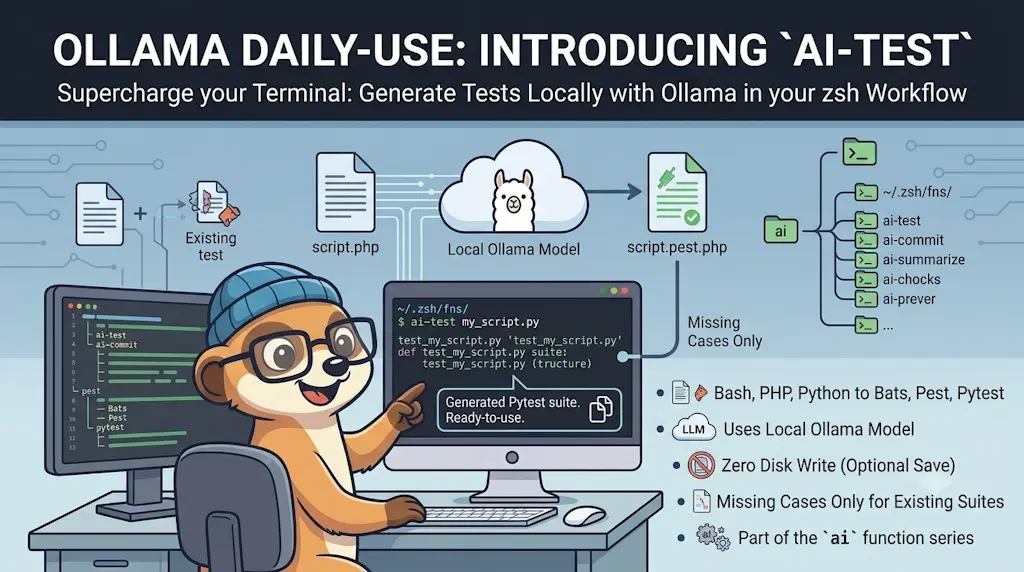
ai-test turns your local Ollama model into an on-demand unit test generator. Point it at a Bash, PHP or Python file, review the generated tests, save them if you like, then run them immediately in Docker — all without leaving your terminal. It supports Bats (Bash), Pest (PHP) and Pytest (Python).
This article opens the Ollama daily use series: small tools that turn a local LLM into a practical terminal companion instead of another browser tab.
Let's stop pretending: we all know unit tests are necessary, and almost nobody enjoys writing them. There's always an excuse — a tight deadline, a Bash script that was only supposed to be temporary, the sheer tedium of mocking dependencies. We promise ourselves we'll add them later, and later is the moment the technical debt explodes in production.
ai-test does the grunt work instead. Point it at a file, get a Bats, Pest or Pytest suite back, read it, save it, run it — all from the terminal, all on your machine.
What ai-test Does For You
Take greet.sh, a small script that asks for a name and a language. One command, and a full Bats suite comes back — trimmed to three tests below, the real run produced more than fifteen:
That's the whole pitch: one command, a suite you can read in a minute, two confirmations, and a green run telling you it isn't decorative. Nothing was installed to run those tests, and nothing left the machine.
Why It Works
Four ideas, and none of them require you to read a line of zsh yet:
- The extension decides everything — framework, naming convention, and where the file lands.
- The prompt carries your project layout. The model never sees a path, only a blob of text;
ai-testcomputes the destination first, then dictates how the suite must load the code. - It reads the tests you already have and asks for the gaps only, appended to the existing file.
- It validates in a throw-away container, so a suite that looks right has to prove it passes.
Installing It
Two files to drop into ~/.zsh/fns/, one new shell. First, the one hard dependency — jq, used to build the JSON payload sent to Ollama:
Prerequisite: jq
Verify:
You also need Ollama running somewhere reachable — I've covered installing it and exposing it across my network before; mine sits idle most of the day, so why not point it at the one task I keep postponing?
Two optional tools: bat and docker (click if you want the details)
bat — if it is installed, the generated code is syntax-highlighted before it hits your terminal. If not, ai-test falls back to plain output. Watch out for one Debian/Ubuntu quirk: the bat name was already taken by bacula-console-qt, so apt install bat installs the binary as batcat. That's why the _ai_bat helper probes both spellings instead of hard-coding bat.
Prerequisite: bat
Verify:
docker — only needed for the "run the suite now" step at the very end. ai-test skips that step with a message when docker isn't on your PATH.
Prerequisite: docker
Verify:
Now the two files. _ollama.zsh holds everything the series shares — the query helper, the command registry, and the ai entry point — while ai-test.zsh is the function itself:
Need help here? Click the "Help" button above for setup instructions.
If you already set up the ~/.zsh/fns/ autoloader from my ripgrep article, you're done: open a new shell. If not, here's what to add to your existing ~/.zshrc:
export OLLAMA_MODEL="qwen3-coder:30b"       # optional, this is already the default
export AI_TEST_PHP_IMAGE="php:8.4-cli"      # optional, override to match your project's PHP
export AI_TEST_PY_IMAGE="python:3.14-slim"  # optional, same idea for Python

for fn_file in ~/.zsh/fns/*.zsh; do
  source "$fn_file"
done
The exports go above the loop on purpose: the AI_TEST_* defaults are applied at source time, so anything you set afterwards would arrive too late.
One Entry Point: ai
Open a new shell and type ai, with no argument. Instead of having to remember what you called your functions six months ago, you get an fzf picker listing every command that registered itself — today just test, tomorrow whatever else the series adds:
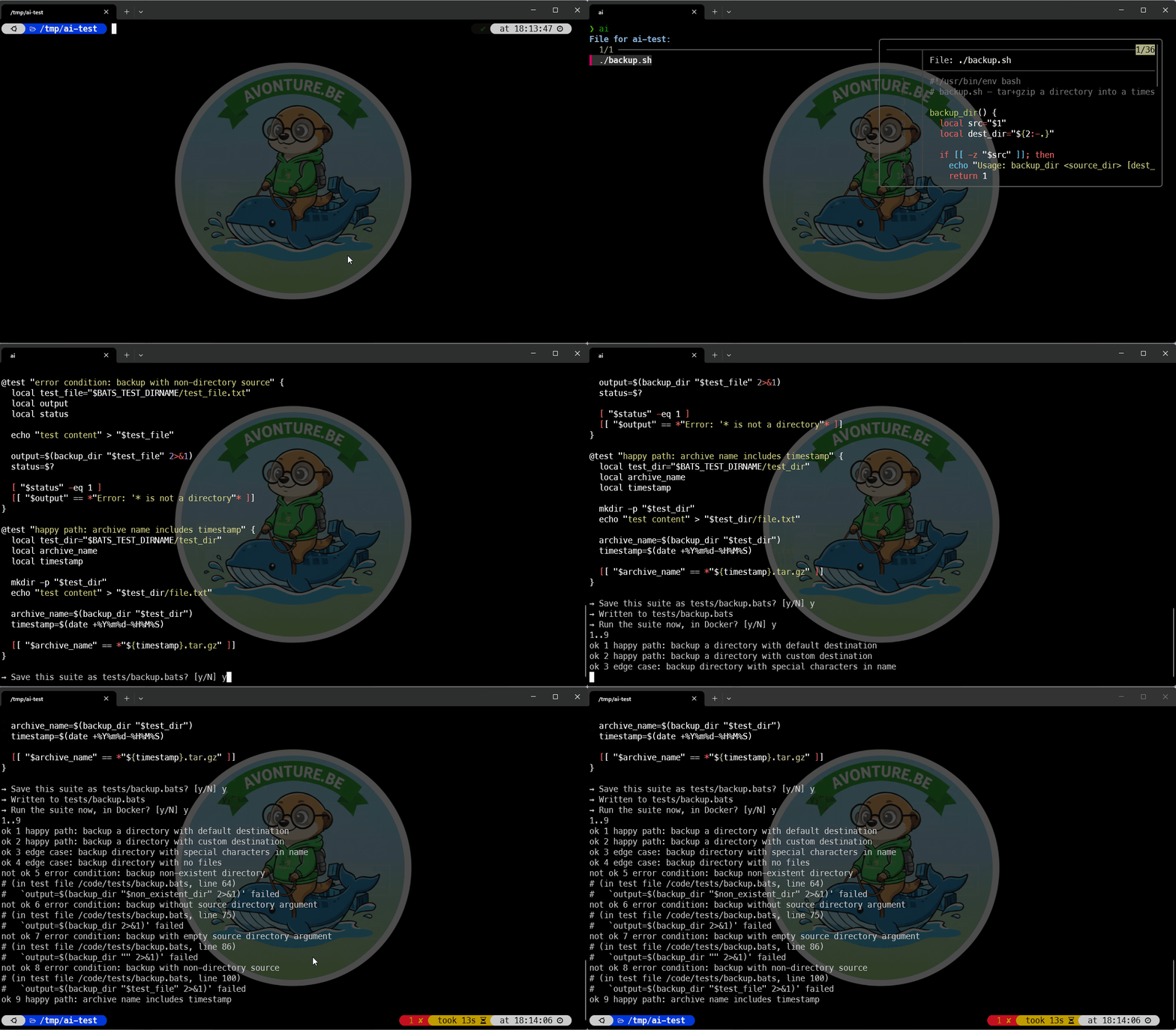
Pick one and it runs. If you already know what you want, ai test greet.sh dispatches straight to ai-test and skips the menu entirely — the two forms are equivalent, one is discoverable and, the other is fast.
Read before you trust
Generated tests are a draft, not a guarantee — read them like a pull request from a junior contributor. Running the suite proves it executes; only reading it proves it checks something.
More Demos
A Real Script, and the Gaps It Fills
greet.sh was a warm-up. backup.sh is a different beast — an external command, a timestamp, and real filesystem side effects:
ai-test backup.sh came back with ten tests, all green. Here are the first three:
❯ ai-test backup.sh

→ No test file found for 'backup' — generating a full Bats suite.

setup() {
  source "$BATS_TEST_DIRNAME/../backup.sh"
}

@test "happy path: backup a directory with default destination" {
  local test_dir="$BATS_TEST_DIRNAME/test_dir"
  local archive_name
  mkdir -p "$test_dir"
  echo "test content" > "$test_dir/file1.txt"
  mkdir -p "$test_dir/subdir"
  echo "sub content" > "$test_dir/subdir/file2.txt"

  archive_name=$(backup_dir "$test_dir")
  [ -f "$archive_name" ]
  [ -n "$archive_name" ]
  [[ "$archive_name" == *.tar.gz ]]
}

@test "happy path: backup a directory with custom destination" {
  local test_dir="$BATS_TEST_DIRNAME/test_dir"
  local dest_dir="$BATS_TEST_DIRNAME/dest"
  local archive_name
  mkdir -p "$test_dir"
  echo "test content" > "$test_dir/file1.txt"

  archive_name=$(backup_dir "$test_dir" "$dest_dir")
  [ -f "$archive_name" ]
  [ -n "$archive_name" ]
  [[ "$archive_name" == "$dest_dir"/* ]]
  [[ "$archive_name" == *.tar.gz ]]
}

@test "edge case: backup directory with special characters in name" {
  local test_dir="$BATS_TEST_DIRNAME/test dir with spaces"
  local archive_name
  mkdir -p "$test_dir"
  echo "test content" > "$test_dir/file.txt"

  archive_name=$(backup_dir "$test_dir")
  [ -f "$archive_name" ]
  [ -n "$archive_name" ]
}

→ Save this suite as tests/backup.bats? [y/N] y

→ Written to tests/backup.bats

→ Run the suite now, in Docker? [y/N] y
1..3
ok 1 happy path: backup a directory with default destination
ok 2 happy path: backup a directory with custom destination
ok 3 edge case: backup directory with special characters in name
Now run the very same command a second time:
$ ai-test backup.sh

→ Found existing tests: tests/backup.bats — asking only for the coverage gaps.

@test "error condition: tar fails when source directory is empty" {
  local test_dir="$BATS_TEST_DIRNAME/empty_dir"
  local archive_name
  mkdir -p "$test_dir"

  archive_name=$(backup_dir "$test_dir" 2>&1)
  [ -n "$archive_name" ]
  [[ "$archive_name" == *"Error: tar failed"* ]]
}
ai-test found the tests/backup.bats it wrote a minute ago, sent it to the model along with the source, and asked for the missing cases only. Instead of re-reading ten tests I already trust, I'm reviewing one new, focused addition — and it gets appended to the existing file, not written to a second one that would duplicate the setup().
That's the mode you'll use the most: every time you add a branch to a function, a second run asks the model for what changed and nothing else.
The Same Command, in PHP and in Python
Two Bash demos might give the impression this is a shell-scripting toy, so let's be explicit: the only thing that changes between languages is the extension you type. Here's a PHP class small enough to keep in your head, doing the one thing every project ends up rewriting:
And its Python equivalent in spirit — two pure functions, a few guard clauses, no I/O:
Run ai-test src/Slug.php and ai-test src/prices.py, and everything behaves the same way: same prompt, same two confirmations, same throw-away container. Only the destination changes — tests/Unit/SlugTest.php and tests/test_prices.py, both resolved from the project root (composer.json for PHP, pyproject.toml or setup.py for Python) rather than from src/.
Under the Hood (skip this if you just want to use it)
The Logic, Step by Step
- Register itself with
AI_COMMANDS[test]=...— the one line that putsai-testin theaimenu. - Walk up to the project root (
.git,composer.json,pyproject.toml…), derive where the suite should live, and look for an existing test file using each ecosystem's naming convention:<name>.bats,<Name>Test.php,test_<name>.py/<name>_test.py. - Build one of two prompts — "write a full suite", or "here's the source and the current tests, give me only what's missing" — and, in the first case, append the bootstrap paragraph.
- Send it through
_ollama_query, strip the Markdown fences the model adds despite being told not to, and pretty-print the result withbatif it's available.
Three things worth calling out in _ollama.zsh itself:
- The leading underscore is deliberate: the loader (
for fn_file in ~/.zsh/fns/*.zsh) sources files alphabetically and_sorts before any letter, soAI_COMMANDSandai()always exist before anai-*.zshfile tries to register itself into them. _ollama_querypings${host}/api/tagsfirst, with a two-second timeout, and fails loudly if Ollama isn't reachable — better an immediate error than acurlhanging for thirty seconds against a stopped container. It also builds its JSON payload withjq, so quotes, backslashes and newlines in the source code I'm about to paste into the prompt are escaped for me. Note that the prompt is piped intojqrather than passed as a--argvalue: Linux caps a single command-line argument at 128 KB, and a big file or a long diff would otherwise blow up withargument list too long.AI_COMMANDSis a plain associative array, and that is why one line of registration is enough to make a new function show up in theaimenu — no central list to maintain, no file to edit when the series grows.
The One Instruction That Makes the Difference
That bootstrap paragraph in step 3 is what decides whether a generated suite works or is completely inert.
The rule is simple: a test can only call code it has loaded, and the model never sees where that code lives. It receives a blob of text, never a path. Ask for a suite without saying anything else, and you get well-named tests with sensible assertions that all fail the same way — command not found, exit code 127 — because nothing ever loaded the file under test.
ai-test computed the save path a step earlier, so it doesn't hope: _ai_test_bootstrap dictates the loading line, in the form each ecosystem expects.
- Bats — each test runs in a fresh shell that has loaded nothing but the
.batsfile, so the suite must open with asetup()that sources the script._ai_relative_tocomputes the path from the test's folder to the source, sosrc/lib/tool.shsaved astests/tool.batsyieldssource "$BATS_TEST_DIRNAME/../src/lib/tool.sh". - Pytest —
tests/test_tool.pycan'timport toolunless the project root is on the path. Rather than let the model writesys.pathincantations, the Docker run setsPYTHONPATH=/codeand the prompt says "import the module directly, do not touch sys.path". - Pest — the class is autoloaded by Composer, so what the model needs is the namespace:
_ai_test_bootstrapgreps thenamespaceline out of the source and hands over a ready-madeusestatement. No namespace declared? It falls back to arequire_oncewith the computed relative path.
Give the model the layout, not just the code
This generalizes well beyond tests. When an LLM writes code that will live in a specific place in a specific project, most of its mistakes come from the context you didn't give it — file paths, import roots, namespaces, conventions. Those are things your script already knows, and every fact you hand over is a fact the model no longer has to guess wrong.
Where the File Gets Saved
The suite is printed in your console first: you read it there, and nothing has touched your disk yet. Then ai-test asks if you want to keep it — and since it knows the framework, it proposes the path that framework expects, so you never have to remember whether Pest wants tests/Unit/ or tests/Feature/:
| Source | Framework | Proposed path |
|---|---|---|
backup.sh | Bats | tests/backup.bats |
src/Backup.php | Pest | tests/Unit/BackupTest.php |
src/backup.py | Pytest | tests/test_backup.py |
Note that tests/ hangs off the project root, not off the source file's folder: src/Backup.php proposes tests/Unit/BackupTest.php at the top of the repository, not the nonsensical src/tests/Unit/BackupTest.php.
It still asks first
Nothing is written without an explicit y, and if the target file already exists the question becomes an unambiguous "… already exists. Overwrite it?". Anything else — including just pressing Enter — prints → Not saved. and stops there. Generated code shouldn't land in your repository by accident.
Running the Suite Without Installing a Test Runner
Installing a test runner for code I might delete thirty seconds later is an absurd amount of setup, so ai-test runs the suite in a container instead. Bats publishes an official image whose entrypoint is bats itself, which makes it a one-liner:
The three images are overridable through AI_TEST_BATS_IMAGE, AI_TEST_PHP_IMAGE and AI_TEST_PY_IMAGE — see the ~/.zshrc block above.
Your code is mounted read-write
The container gets the project folder, not a copy of it, because the tests have to create temporary files next to the code. It's a throw-away container (--rm), but it is running generated code against your working tree — one more reason to read the output before answering y.
Write for the Test You Haven't Written Yet
Here's the greet.sh from the top of this article:
It's tiny, but it already has everything a test suite cares about: two functions, a default value, and three ways to fail. Run on its own, it's just an interactive prompt:
The last three lines are what makes the whole exercise possible:
if [[ "${BASH_SOURCE[0]}" == "${0}" ]]; then
  main "$@"
fi
main runs only when the script is executed, never when it is sourced. Without that guard, the setup() of the generated suite would source greet.sh, hit read -rp "What is your first name? ", and hang forever on input that never comes.
Which gives the two habits that make any script testable: put the logic in functions that take arguments and print results, and wrap the interactive part in a BASH_SOURCE guard. Skip them, and the best model in the world can only generate tests that hang.
Choosing Your Model
This isn't a one-model-fits-all situation. On a 24GB card, qwen3-coder:30b gives noticeably better test coverage reasoning than the smaller 1.5b/7b variants I compared in my network access article — it's slower, but for a task you run a handful of times a day, not thousands, the extra ten seconds don't matter. If you're VRAM-constrained, drop to qwen2.5-coder:7b and expect a good happy-path suite with weaker edge-case coverage; you'll do more of the thinking yourself.
Conclusion
Two files to copy into ~/.zsh/fns/, one new shell, and the script you were never going to test becomes ai-test greet.sh: a full suite, green, in the time it takes to make coffee — nothing installed, nothing leaving your machine.
Grab greet.sh above and try it on your own scripts. Then look at the one you've been avoiding for months, the backup.sh of your repository, and run it there too: worst case you throw the output away, best case you finally have a suite.
This article is part of the Ollama daily use series:
- Installing Ollama and get local AI
- Accessing Ollama across your local network
- ai-test: Generate Missing Unit Tests From Your Terminal With a Local LLM
- ai-review, ai-secrets, ai-commit: Three zsh Checks Before Every git Commit
- AnythingLLM: Chat With All Your Scattered Documentation
- ai-translate & ai-summarize: Confidential Documents, Handled 100% Locally
- ai-diagram: From a Sentence (or a compose.yaml) to a Mermaid Diagram
- ai-data: Let a Local LLM Write Your jq and awk One-Liners
- ai-explain: ELI5 for Scripts and Errors, Right in Your Terminal
Loading comments…
Related posts
ai-explain: ELI5 for Scripts and Errors, Right in Your Terminal
November 12, 2026
Open WebUI — Beyond the Chat: Models, RAG, Tools and API Keys
October 26, 2026

ai-data: Let a Local LLM Write Your jq and awk One-Liners
October 22, 2026
Ask My Blog: Turning 259 Articles Into 2,160 Searchable Questions
September 28, 2026