Python - Fast API - Create your JSON API in Python in one minute
Build your first Python JSON API with FastAPI in under a minute! This tutorial covers Docker setup, automated API documentation (Swagger/ReDoc), and hot-reload for rapid development.

This article is over a year old but was reviewed on July 30, 2026 — the content is still accurate.
This article is part of the Building and testing REST APIs series:
- Don't query your PostgreSQL db anymore, prefer PostgREST
- Using Postman to play with API
- Python - Fast API - Create your JSON API in Python in one minute
- API REST - How to write good APIs
- Bruno - A postman-like tool - GUI and CLI

Create your first Python JSON API with FastAPI in just one minute. This tutorial guides you through setting up a basic API using Docker, from a simple 'Hello World' to a more interactive joke generator. You'll learn how to leverage FastAPI's powerful features like automatic, interactive API documentation (Swagger and ReDoc) and how to configure a development environment with hot-reloading for rapid development cycles.
TLDR: one minute is the time you'll need to copy/paste two files' content and to run one Docker statement.
Sounds crazy but it's TRUE. You'll just need one minute to create the example provided here below i.e. create your project's directory, create two files and run two Docker statements and ... it's done.
As PHP programmer, when I've taken time to read a blog article about FastAPI I thought Nodidju ! Ç' n'est nén pussibe (For Christ's sake! It can't be true).
With just two files, we'll build our own Docker image with Python and FastAPI installed and to code our REST API application. No more than two!
Impossible to not try immediately and ... wow ... that's TRUE!
Here's the result: surf to http://127.0.0.1:82 and get your first JSON answer.

Why It Works
main.pydefines one route (/) with a couple of lines of Python — FastAPI turns that function into a working HTTP endpoint, no boilerplate server setup.- The
Dockerfilebundles Python, FastAPI and your code into one ~184MB image, so there's nothing to install on your host besides Docker itself.
Creating our first API
Like always, we'll build a fully working example. It couldn't be simpler; you'll see.
Please create a dummy folder and jump in it:
$ mkdir /tmp/fastapi && cd $_
In that folder, please create a new file called Dockerfile with the following content:
# We'll use the latest version of Python and the smaller image in size (i.e. `slim`)FROM python:slim
# We'll define the default folder in the image to /appWORKDIR /app
# The only dependency we need is fastapiRUN pip install --no-cache-dir 'fastapi[standard]'
# We need to copy our Python script in the imageCOPY main.py main.py
# And we'll run FastAPI and call our script. We'll expose the script on port 82CMD ["fastapi", "run", "main.py", "--port", "82"]This Dockerfile creates a lightweight Python container running a FastAPI application. It starts with a minimal Python image, installs FastAPI, copies your application code into the container, and configures it to run on port 82.
The final image size will be about 184MB i.e. almost nothing.
As you've seen, we need a file called main.py; let's create it:
from fastapi import FastAPI
app = FastAPI()
@app.get("/")def read_root(): return {"Hello": "World"}This code creates a basic web API using FastAPI that listens for requests to the root URL path and responds with a JSON message. When someone visits the home page, the server returns a dictionary containing a greeting.
This very straightforward code defines a route called /. It's a GET method and we'll return a JSON object:
{
  "Hello": "World"
}
You know what? It's already done.
Running our API
We need to build our Docker image and run it:
Once done, just surf to http://127.0.0.1:82 and you'll obtain the same JSON answer already shown at the top of this article; crazy no?
Automated documentation of your API
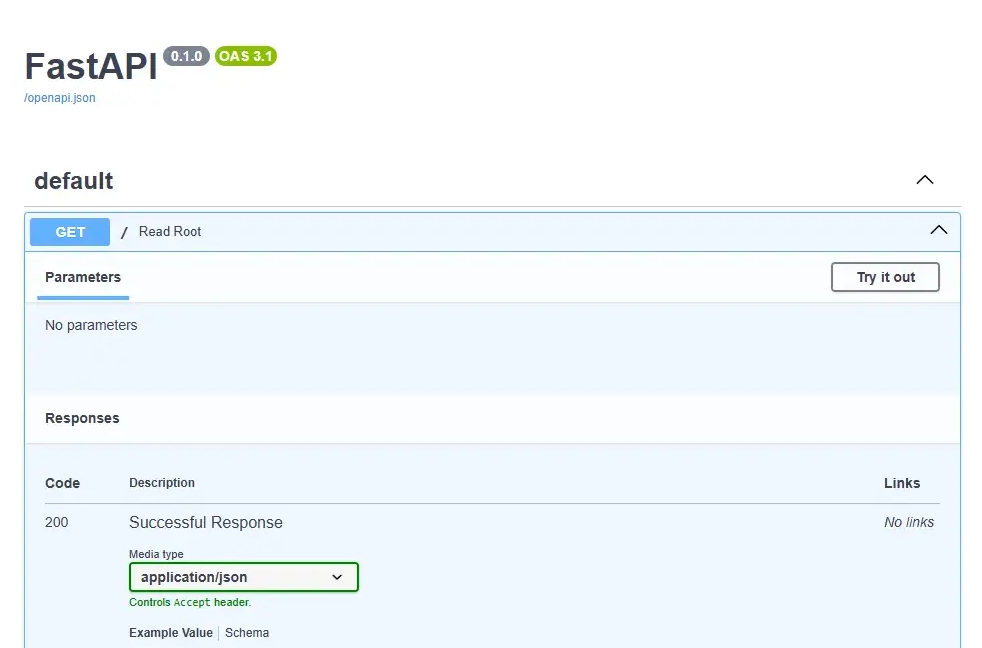
And it's just the beginning: FastAPI comes with a self-documented API based on the OpenAPI schema. That schema is not just documentation: it can be linted too, see Validate your OpenAPI schema against the Belgif REST standards.
Please jump to http://127.0.0.1:82/docs and you'll see it in action:
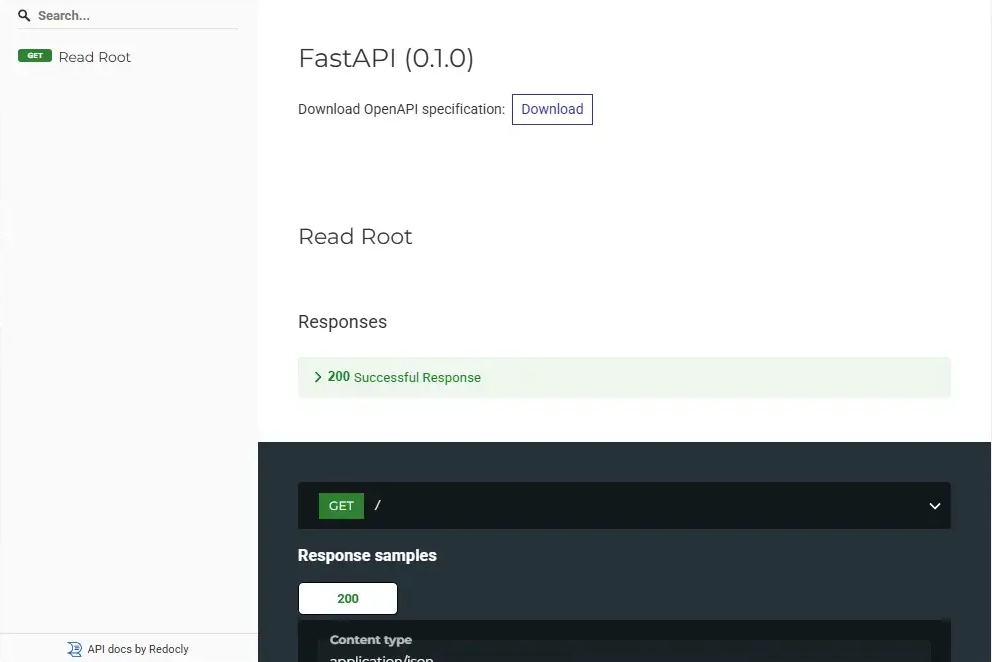
There is a second, alternative template called ReDoc. You can access it using the redoc endpoint i.e. http://127.0.0.1:82/redoc:
Let's play - Creating a joke generator
We'll build a joke generator script. Our objective will be to get a random joke or a specific one (like Give me the third joke you know).
For this, we'll update our main.py script and because we'll probably make more than one change, we'll mount our host folder to the container.
Why? Mounting our folder inside the container will allow us to make changes to the script and just refresh the web page to see the change.
The only thing we need to do is to run our container like this: docker run -v .:/app -p 82:82 python-fastapi ... but it didn't work as expected.
FastAPI is using Uvicorn under the hood
Uvicorn is a web server implementation for Python. Uvicorn has a built-in cache mechanism so even if we've updated the source of our main.py script, we'll still get the old version.
We should start Uvicorn with a "hot reload" mechanism.
Recreating the Docker Image for Hot Reload (skip this if docker run -v .:/app already refreshed for you)
First stop the running container: go back to your console and press CTRL+C to stop the running container. We'll also remove the container. You can do this by going to Docker Desktop; click on the Containers menu and kill your Python - Fastapi container. Remove also the image called python-fastapi.
Note
python-fastapi is the name of the Docker image we've built earlier.
If you prefer the command line, you can achieve the same result by running these two commands:
Now, please copy/paste the following content to your existing Dockerfile:
# We'll use the latest version of Python and the smaller image in size (i.e. `slim`)FROM python:slim
# We'll define the default folder in the image to /appWORKDIR /app
# The only dependency we need is fastapiRUN pip install --no-cache-dir 'fastapi[standard]'
# We need to copy our Python script in the imageCOPY main.py main.py
// highlight-start# Run Uvicorn with hot reload so any changes to our main.py script will force# the server to invalidate the cache and refresh the page.CMD ["uvicorn", "main:app", "--reload", "--host", "0.0.0.0", "--port", "82"]// highlight-endThis Dockerfile creates a lightweight Python container for running a FastAPI web application. It installs FastAPI, copies your Python script into the container, and starts a development server that automatically reloads whenever you make changes to the code.
Rebuild the image and run a new container, now with a volume, by running these commands:
Now we have a Docker image with hot reload and we've mounted our folder in the container.
Please edit your main.py script like this:
from fastapi import FastAPI
app = FastAPI()
@app.get("/")def read_root(): # highlight-next-line return {"Hello": "Belgium!"}This code creates a basic web API using FastAPI that responds to GET requests at the root URL with a simple JSON message. When someone visits the root path, the server will return a dictionary containing a greeting.
Refresh your web page, you'll see Hello Belgium!. Change your main.py and replace Belgium! by France. Reload your web page; you'll see Hello France. So, nice, we've a hot reload and we can really start to play.
Our joke generator
We'll update our main.py script like this:
// highlight-next-linefrom random import choicefrom fastapi import FastAPI
app = FastAPI()
// highlight-startjokes = [ "Why do programmers always mix up Halloween and Christmas? Because Oct 31 == Dec 25", "Why don't programmers like nature? Because it's full of bugs!", "How many programmers does it take to change a light bulb? None. That's a hardware problem.", "What do you call 8 hobbits? A hobbyte", "What is this [“hip”, ”hip”]? hip hip array!"]
@app.get("/jokes")async def get_jokes(): """ Returns a random joke from the list. """ return {"joke": choice(jokes)}
@app.get("/jokes/{joke_id}")def read_item(joke_id: int): """ Returns a specific joke (between 0 and 4). """ try: return {"joke": jokes[joke_id]} except IndexError: return {"error": f"Joke with ID {joke_id} not found."}, 404// highlight-endThis is a FastAPI web application that serves programmer jokes through two HTTP endpoints. One endpoint returns a random joke each time it's called, and the other returns a specific joke by its position in the list, with error handling for invalid positions.
You immediately see it I think:
- I've defined an array with five, hardcoded, jokes;
- I've defined a new route called
/jokesand that one will display a random joke - And finally I've defined a
jokes/{joke_id}to be able to target a specific joke (like "Give me the second joke you know").
Use an external file instead of hardcoding jokes
As an exercise; just remove the initialisation part of the jokes array and, instead, read jokes from a text file. It would be really easy to do.
Go back to your browser and surf to the jokes endpoint (http://127.0.0.1:82/jokes) and, hop, you've a random joke.

Just refresh the page; again and again. Every time you'll get a random joke (from a list of 5).
If you want a specific one, just put an ID after like http://127.0.0.1:82/jokes/1

Note
Please note that the array start at position 0 so the first joke is this one: http://127.0.0.1:82/jokes/0.
Our jokes endpoints are documented automatically
And looking back to the documentation (http://127.0.0.1:82/docs); we've now three routes and, take a look, the Python docstring is used to describe the route.
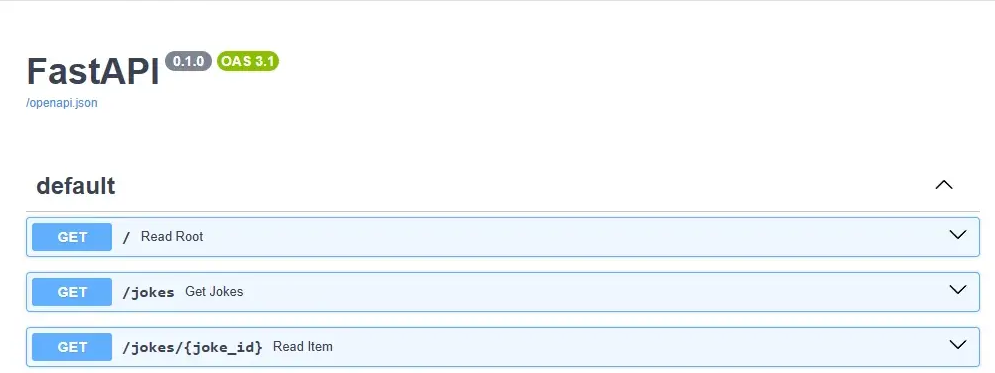
Really, really impressive!
Docs are interactive
And, more impressive, you can play directly from the documentation i.e. you can run the jokes endpoint. There is a button Try it out then Execute to see the endpoint in action.
More info https://fastapi.tiangolo.com/tutorial/first-steps/#interactive-api-docs
Discover FastAPI
Don't wait any longer, go to https://fastapi.tiangolo.com/ to see more examples.
And before publishing your API to the world, take five minutes to read API REST - How to write good APIs: naming your endpoints and choosing your HTTP status codes correctly costs nothing on day one and a lot on day one hundred.
Also read the long tutorial on Real Python - Using FastAPI to Build Python Web APIs.
This article is part of the Building and testing REST APIs series:
- Don't query your PostgreSQL db anymore, prefer PostgREST
- Using Postman to play with API
- Python - Fast API - Create your JSON API in Python in one minute
- API REST - How to write good APIs
- Bruno - A postman-like tool - GUI and CLI
Loading comments…
Related posts



Bruno - A postman-like tool - GUI and CLI
August 7, 2025
API REST - How to write good APIs
May 19, 2025

Using Postman to play with API
May 8, 2024