Quarto includes short code
Learn how to use the Quarto includes short code to break down long documents into multiple, organized files, making your writing process easier.

This article is over a year old but was reviewed on July 30, 2026 — the content is still accurate.
This article is part of the Discovering Quarto series:
- Running Quarto Markdown in Docker
- Quarto conditional display
- Use Quarto and create a PowerPoint slideshow
- Using variables from external file in your Quarto project
- Some tips and tricks for Quarto when rendering as a reveal.js slideshow
- Quarto Callout Blocks
- Quarto includes short code
- Quarto Inline style
- My favorite Quarto extensions
- Using Mustache templating with Quarto
- Make your Quarto project Devcontainer-Ready — No More Setup Headaches
- Quarto - How I Built a Self-Documenting Ecosystem for 50+ Projects

This article shows Quarto's {{< include >}} short code, which lets you split a long document into several smaller Markdown files and merge them at render time by referencing their relative paths from a main .qmd file.
Using the Quarto includes short code, writing a long document can easily be broken down into several smaller ones.
includes splits a document into fixed chunks. When the repeated part is the same structure filled with different values, Using Mustache templating with Quarto and Using variables from external file in your Quarto project are the right tools.
Imagine the following main.qmd file:
# My thesis in Latin
{{< include chapter1.md >}}
{{< include chapter2.md >}}This is a Quarto markdown document that serves as a thesis written in Latin. It uses Quarto's include syntax to pull in the content from two separate chapter files, assembling them into a single document.
Quarto will then merge the three files when you render main.qmd.
Docker image with Quarto
If you don't have yet a Docker image with Quarto, read this article Running Quarto Markdown in Docker.
Includes tag
The tag is simple, you just need to specify the relative path to the file to include. Get in-depth syntax on the official documentation.
Result
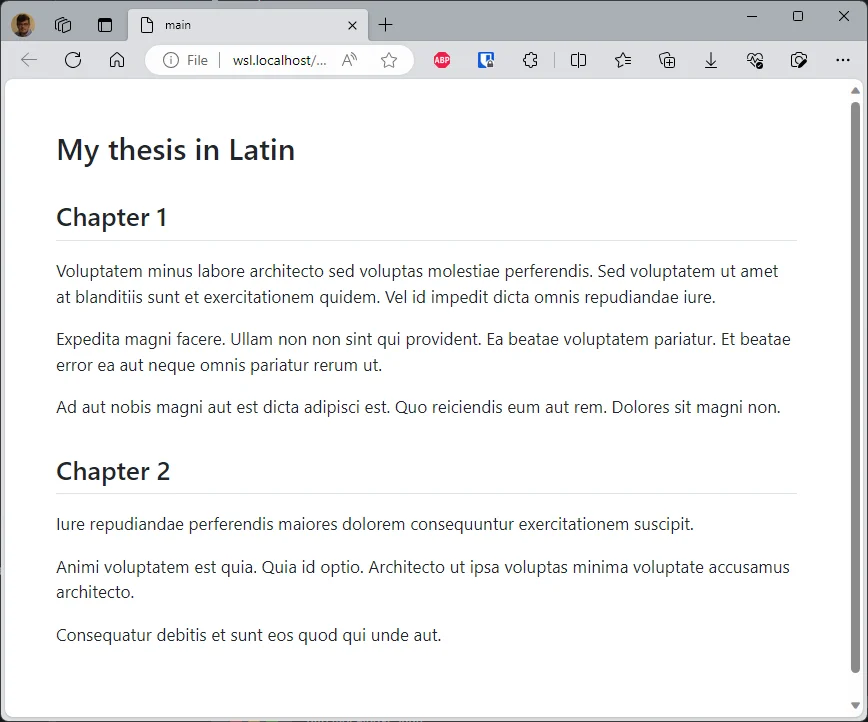
Running quarto render main.qmd --to html on the main.qmd file shown above merges the
included files into one document:
Here's what's actually inside each included file.
Here is some dummy content for chapter1.md:
## Chapter 1

Voluptatem minus labore architecto sed voluptas molestiae perferendis. Sed voluptatem ut amet at blanditiis sunt et exercitationem quidem. Vel id impedit dicta omnis repudiandae iure.

Expedita magni facere. Ullam non non sint qui provident. Ea beatae voluptatem pariatur. Et beatae error ea aut neque omnis pariatur rerum ut.

Ad aut nobis magni aut est dicta adipisci est. Quo reiciendis eum aut rem. Dolores sit magni non.
And for chapter2.md:
## Chapter 2

Iure repudiandae perferendis maiores dolorem consequuntur exercitationem suscipit.

Animi voluptatem est quia. Quia id optio. Architecto ut ipsa voluptas minima voluptate accusamus architecto.

Consequatur debitis et sunt eos quod qui unde aut.
Now, by running, f.i., quarto render main.qmd --to html, Quarto will merge these two files (and main.qmd) into the rendered page shown above.
What is a `.qmd` file?
For Quarto, the extension isn't very important: whether it's .qmd or .md, there's no difference in treatment.
On the other hand, it's probably more interesting for us to use the .qmd extension when using a Quarto-specific syntax, as is the case here.
This article is part of the Discovering Quarto series:
- Running Quarto Markdown in Docker
- Quarto conditional display
- Use Quarto and create a PowerPoint slideshow
- Using variables from external file in your Quarto project
- Some tips and tricks for Quarto when rendering as a reveal.js slideshow
- Quarto Callout Blocks
- Quarto includes short code
- Quarto Inline style
- My favorite Quarto extensions
- Using Mustache templating with Quarto
- Make your Quarto project Devcontainer-Ready — No More Setup Headaches
- Quarto - How I Built a Self-Documenting Ecosystem for 50+ Projects
Related posts


GitLab - Running Docker-out-of-Docker in your CI
June 15, 2025

Using Mustache templating with Quarto
May 15, 2025