Quarto - How I Built a Self-Documenting Ecosystem for 50+ Projects
A deep dive into how I engineered a fully automated documentation ecosystem using Quarto and Docker, transforming documentation from a chore into a high-performance build pipeline.


This article is part of the Discovering Quarto series:
- Running Quarto Markdown in Docker
- Quarto conditional display
- Use Quarto and create a PowerPoint slideshow
- Using variables from external file in your Quarto project
- Some tips and tricks for Quarto when rendering as a reveal.js slideshow
- Quarto Callout Blocks
- Quarto includes short code
- Quarto Inline style
- My favorite Quarto extensions
- Using Mustache templating with Quarto
- Make your Quarto project Devcontainer-Ready — No More Setup Headaches
- Quarto - How I Built a Self-Documenting Ecosystem for 50+ Projects
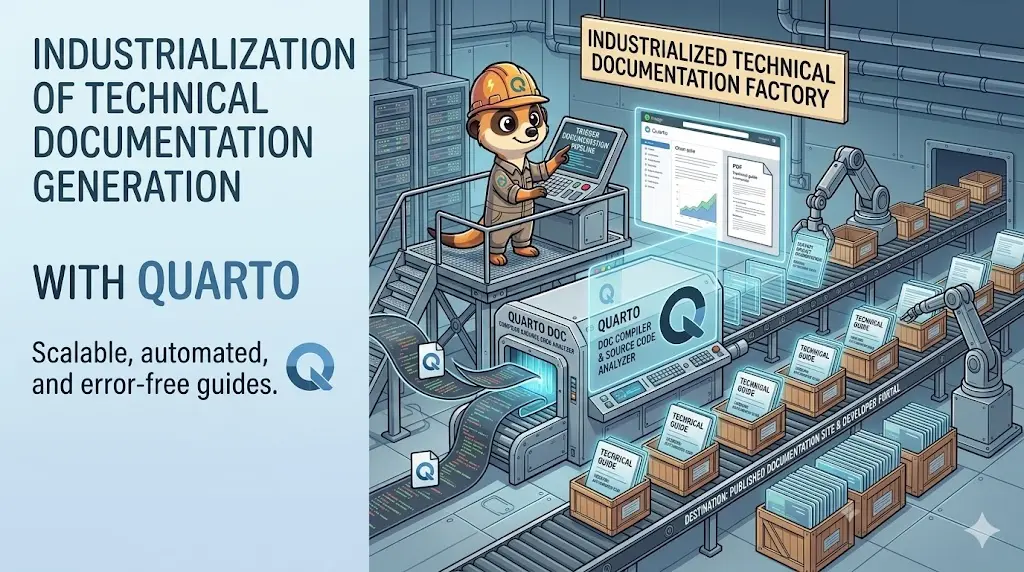
This blog post explores how I built a self-documenting ecosystem for over 50 projects using Quarto and Docker, automating the documentation process and ensuring it stays up-to-date with the codebase.
As a developer, I like writing code and documentation, but I need to be honest: it's difficult to keep documentation up-to-date. The moment you write it, it becomes outdated. This is a problem I've faced repeatedly throughout my career. I wanted to find a way to automate the documentation process, ensuring that it always reflects the current state of the codebase.
You build a beautiful API, you write a manual, and then… you change your code. The structure of your answer is quite different, the error message is no longer the same, you've published a v1.1 while your documentation was still about v1.0, and many things like that.
What can I do to try to solve this problem? Can we automate the documentation process? Can we make it self-updating? Can we make it so that when I change my code, my documentation changes too? The short answer is: yes, we can. And that's what I did with Quarto.
Let's see how we can industrialize our documentation process with Quarto and Docker, creating a self-documenting ecosystem that scales across multiple projects.
🚀 The "Wow" Moment
Once the lab is running (covered under Installation below), open the folder in VS Code, click "Reopen in Container", then in the terminal type: ./scripts/preview.sh.
You'll get something like this:
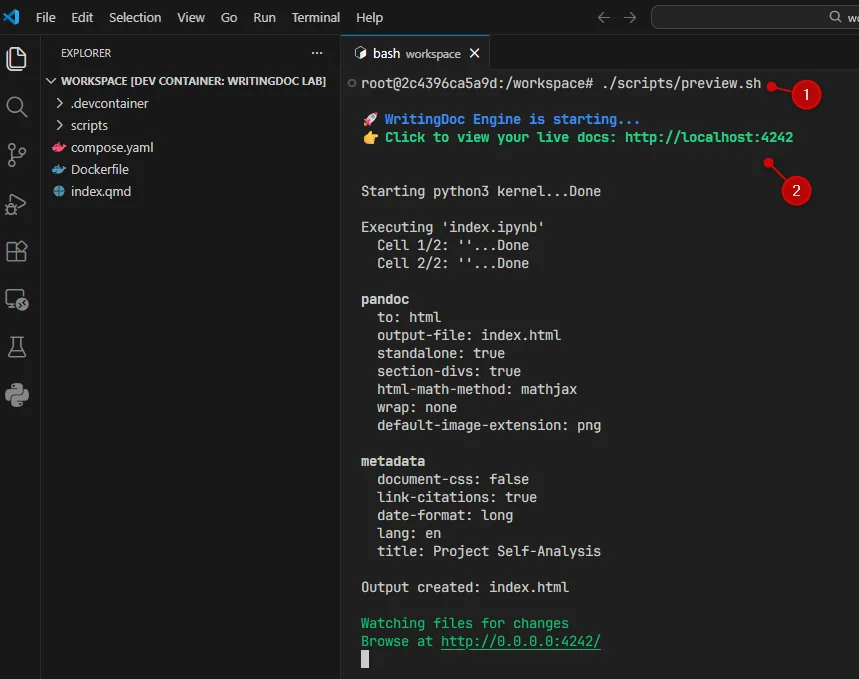
Do a Ctrl + Click on the URL (http://localhost:4242), and it will open your browser with the rendered Quarto document. You should see the Mermaid diagrams generated by our Python scripts.
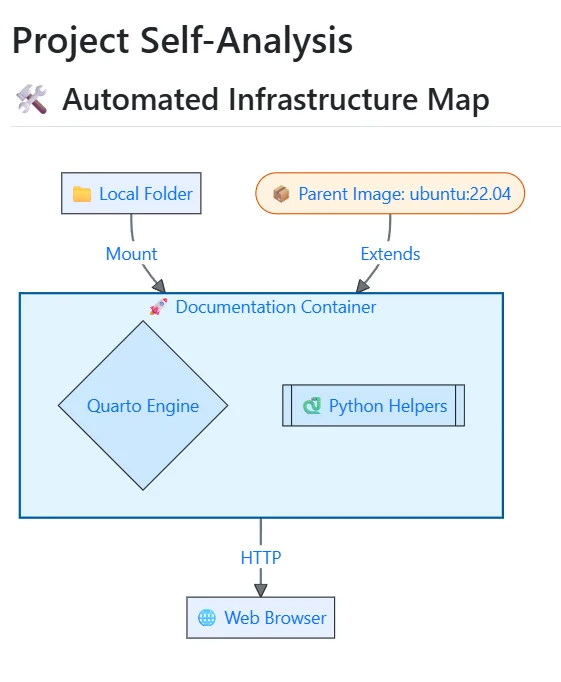
Great no? But where does this diagram come from? It's generated by the render_project_arch() function in our project_viz.py script. That script looks at our compose.yaml and our Dockerfile to understand the structure of our project and generates a Mermaid diagram based on that.
Let's look at the output of our file_stats.py script. It analyzes the files in our project and generates a report that is rendered directly in our Quarto document.
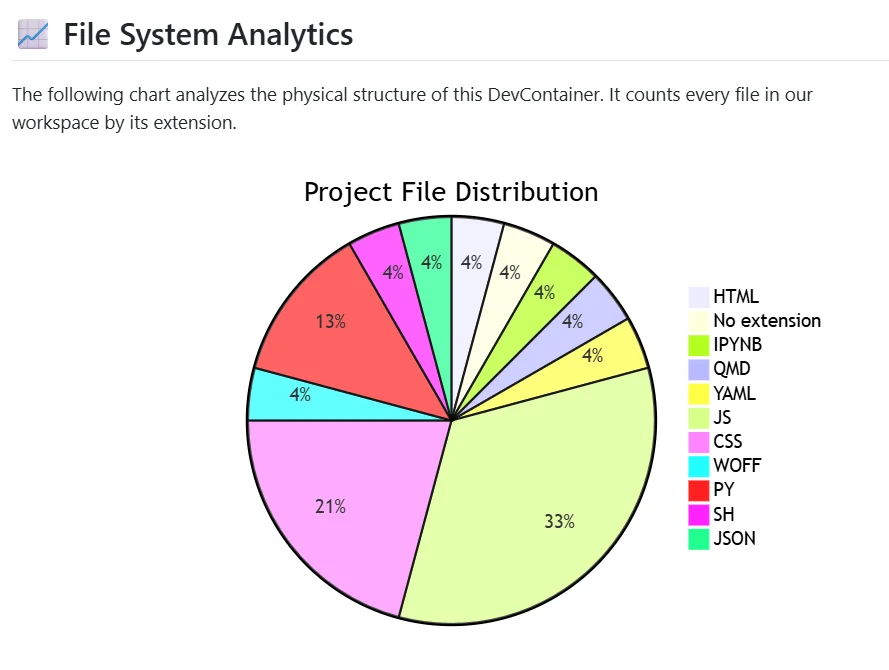
This is in real-time. If you add a new file to the project, save it, and refresh the browser, you'll see the new file appear in the stats and the architecture diagram update accordingly.
The my_feature.py script generates a simple Mermaid diagram based on a list of items. You can change the list in the script, save it, and see the diagram update in real-time.

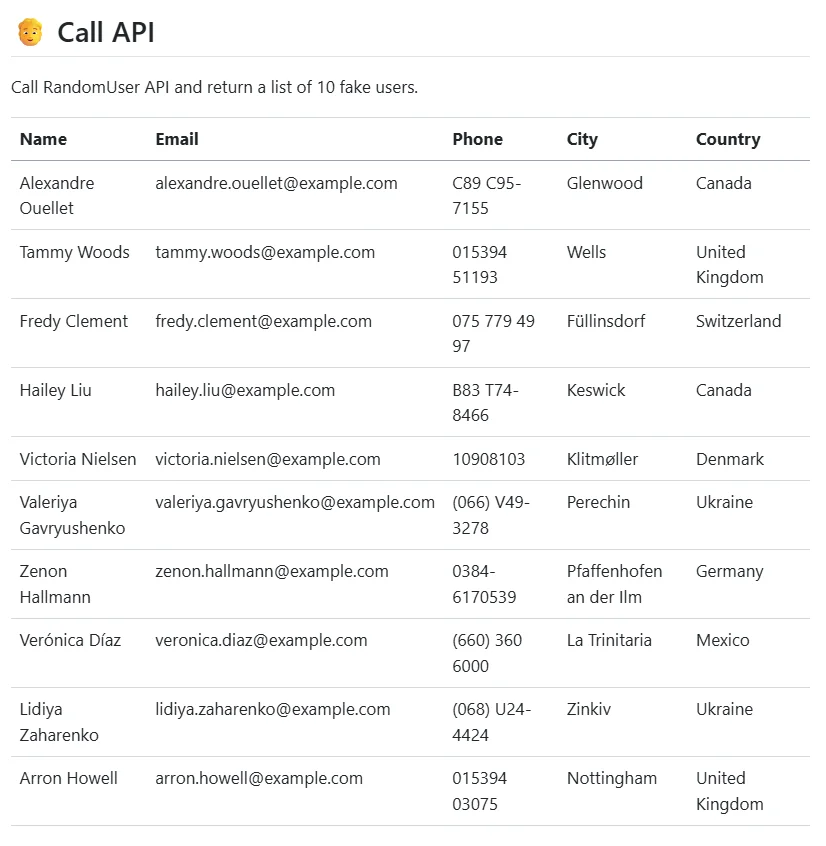
And last but not least, the call_api.py script can be used to call a live API during the render process. This means you can pull real data from your production or staging environment and include it in your documentation, all while keeping your credentials secure with the Secrets Resolver.
Why It Works
Most people think Doc-as-Code is just "saving Markdown in Git." It's not. It's about runtime execution.
- A Quarto document isn't static Markdown — a
{python}code block embedded in the document actually executes during render, not before it. output: asistells Quarto to treat whatever that Python function prints as raw Markdown (or Mermaid) instead of literal text — so a function that returns a diagram becomes a rendered diagram, not a code listing.- Because the diagram is generated from the live
compose.yamlandDockerfile, changing the infrastructure and re-rendering updates the diagram automatically — no manual redraw, ever.
Installation — The "Wow" Lab: Build Your First Doc-Engine in 5 Minutes
Here is a concrete, ready-to-use setup. This Dockerfile creates an environment where Quarto can "talk" to custom Python scripts to generate Mermaid diagrams on the fly. The Python-to-Mermaid part alone is detailed in Documentation as Code - Transform Your Infrastructure into Beautiful Diagrams with Python and Mermaid; here we plug it into Quarto.
1. The Orchestrator (compose.yaml)
2. The Engine (Dockerfile)
We install Quarto and configure the PYTHONPATH so our document can import our custom "Feature" library from anywhere.
3. The Experience (.devcontainer/devcontainer.json)
This is where the magic happens. We tell VS Code which extensions to install and how to behave. Make your Quarto project Devcontainer-Ready — No More Setup Headaches goes through that file line by line.
4. Our Python scripts
We'll use a few, simple, Python scripts to generate content for our documentation. For example, my_feature.py contains a simple function that generates a Mermaid diagram based on a list of items, file_stats.py analyzes the project files and generates a report, and project_viz.py creates a visual representation of the project structure.
5. The Document (index.qmd)
This is where we write our Quarto document. Instead of static Markdown, we can execute Python code directly in our document to generate dynamic content. For example, we can call our my_feature.py script to generate a Mermaid diagram based on the current state of our code.
See the three {python} blocks in the document? This is where the magic happens. That's where we execute our Python code. The output of that code is directly rendered in the document.
When Quarto sees the block below, it will execute the render_project_arch() function from our project_viz.py script (that feature has to be present in the PYTHONPATH). This function will generate a Mermaid diagram based on the current state of our project, and Quarto will render it directly in the document.
```{python}
#| echo: false
#| output: asis
from project_viz import render_project_arch
render_project_arch()
```
The output: asis option tells Quarto to treat the output as raw Markdown. This means that if our Python script outputs a Mermaid diagram, Quarto will render it as a diagram instead of just displaying the code.
The full project
Here is the full project structure. You can copy this setup and run it on your machine to see how it works in practice. The easiest way to do this is to click on the Generate install script button then on the Copy button. Start a terminal and paste the command. It will create a /tmp/quarto_industrialisation folder with all the files and the Docker setup ready to go.
Need help here? Click the "Help" button above for setup instructions.
My real use case
In my 50-project ecosystem, I took this "Lab" concept and turned it into an industrial-strength WritingDoc Base Image.
Most documentation setups start with a "minimal" image. That's a mistake. "Minimal" means "slow startup." I went the opposite way. My image is a 2.5GB beast, but it follows a "Zero-Wait" philosophy.
I baked everything in: Quarto, Python, Node.js, Mermaid-CLI, and every linter known to man. When a writer opens a project in a VS Code DevContainer, they don't wait for apt-get or pip install. The environment is alive and ready the moment the window opens. If you want the beginner-friendly version of this idea, see Make your Quarto project Devcontainer-Ready — this ecosystem is that same principle taken to 50 projects.
Doc-as-Code: The Python AST Magic
The real "Wow" factor started when I stopped copy-pasting code into Markdown. I wrote a suite of Python "Features" that use AST (Abstract Syntax Tree) analysis to read my source code.
Actually, I've more than 40 different "Features" that can analyze my codebase, extract information, and generate documentation automatically.
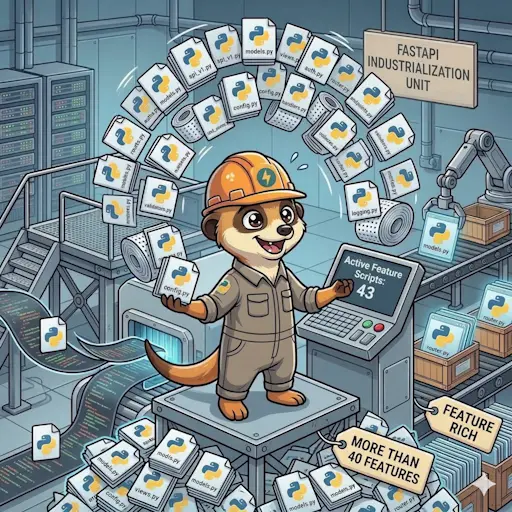
A few examples of these features:
🧠 Python AST Semantic Analyzers
🗄️ Live Database Introspection
🎨 Format-Aware Mermaid Engine
🔐 Secure Authenticated API Orchestrator
env: prefix) so credentials never touch Git.🖥️ Terminal High-Fidelity Capture
⚙️ GitLab CI/CD Infrastructure Mapper
includes and extends. Generates a visual architecture of CI/CD stages with human-readable job descriptions.🐳 Docker Ecosystem Visualizers
📋 "Invisible" TODO Dashboard
<!-- TODO: -->) across the project to generate a consolidated internal backlog — invisible in the final customer-facing PDF or Word export.✨ Dynamic Workspace Assistant
📊 Smart Multi-Format Data Viewer
🏗️ Language-Aware Project Scaffolder
file.python.fastapi.qmd) to instantly generate a complete, tailored documentation structure based on the specific technologies in the project.Visualizing the Invisible: Mermaid & Caching
Quarto is able to render Mermaid.js while rendering a documentation as a website, but it will not work for offline outputs like Word or PDF.
I solved this by building an Advanced Mermaid Renderer. In my setup, the renderer is format-aware. If you're viewing the HTML preview, it serves sharp SVGs. If you're building a .docx for a business stakeholder, it automatically spins up a headless Chromium instance (via Puppeteer), renders the diagram at 300 DPI, and embeds a high-res PNG.
And because I hate waiting, I implemented a Content-Aware Caching System. Every diagram and every API snapshot is fingerprinted. If the source hasn't changed, the build skips the heavy lifting and pulls the image from the cache. My build times dropped from minutes to seconds.
The "Living" Documentation: Authenticated API Calls
I wanted my documentation to be a window into the live system. So, I built a feature that can perform real REST API calls during the render process.
It handles the full OAuth2 handshake: it hits the authentication server, gets a Bearer token, fetches the latest data, and masks the secrets before displaying a "Terminal Trace" in the documentation.
Worried about security? I built a custom Secrets Resolver. By using an env: prefix in my Quarto files, I can pull credentials from a local .secrets file that is never committed to Git. The framework resolves them at runtime and masks them in every log file. It's enterprise-grade security for Markdown.
The "Invisible" Assistant: Background Daemons & Snippets
I realized that even with all this automation, writers still had to remember variable names or script signatures. To fix this, I created the WritingDoc Assistant. It's a Python daemon that runs in the background of the container.
It watches my _variables.yml and my features/ directory. The second I save a change, the daemon wakes up and generates VS Code IntelliSense Snippets on the fly.
- I type
v-and I get a list of every variable in the project with its current value. - I type
feature-and I get a list of every automation script with its full documentation. - I type
r-and it has already scanned all my files to offer me cross-references to every heading and figure in the project.
It's like having a dedicated librarian living inside my editor, watching my every move to make my life easier.
The daemon is started in my Devcontainer using the nohup command, ensuring it runs in the background without blocking the main process. It continuously monitors for changes and updates the snippets in real-time, providing an always up-to-date coding experience. It's really a game-changer for productivity.
Centralization at Scale
Scaling to 50 projects meant I couldn't have 50 different configurations. I centralized everything:
_variables.yml: The "Brain" of the project. Every name, every link, and every setting is here. It's the single source of truth.update_chapters.py: A script I wrote that maintains the Quarto sidebar. It respects folder numbering and ignores "draft" folders, ensuring a perfect table of contents every time.- The Glossary: A single YAML file that generates an alphabetical, anchor-linked glossary across the entire site.
- Global References: A central file for all external URLs, so I never have to hunt for a link twice.
The Result
Today, when I start a new project, I run a single command: scaffold. In seconds, I have a complete structure tailored for my stack.
The documentation isn't a static monument to the past anymore. It's a living, breathing reflection of the code. It's fast, it's secure, and it's beautiful.
This is the power of engineered documentation. We've moved beyond writing; we're now compiling our knowledge.
🎖️ A Final Word: Why Quarto Changes Everything
None of this would be possible without the visionary work of the developers behind Quarto.
The Quarto team had the intelligence and the foresight to build something different: a bridge between narrative and execution.
By allowing us to execute real code (Python, R, Julia) directly within the document lifecycle, they didn't just give us a better version of Pandoc. They gave us an extensible documentation engine. It is this specific capability—the ability to run a script, analyze an API, or scan a filesystem during the build—that allowed me to build the "WritingDoc" ecosystem.
To the Quarto developers: Thank you for your extraordinary work and for providing the world with an open-source tool that finally empowers technical writers to behave like software engineers. You've turned the "chore" of documentation into a high-fidelity engineering discipline.
This article is part of the Discovering Quarto series:
- Running Quarto Markdown in Docker
- Quarto conditional display
- Use Quarto and create a PowerPoint slideshow
- Using variables from external file in your Quarto project
- Some tips and tricks for Quarto when rendering as a reveal.js slideshow
- Quarto Callout Blocks
- Quarto includes short code
- Quarto Inline style
- My favorite Quarto extensions
- Using Mustache templating with Quarto
- Make your Quarto project Devcontainer-Ready — No More Setup Headaches
- Quarto - How I Built a Self-Documenting Ecosystem for 50+ Projects
Loading comments…