Best Practice - Personnaliser le flux RSS de Docusaurus pour un contenu complet et des images
Améliorez le fichier RSS de votre blog Docusaurus. Écrivez un plugin pour désactiver le flux de base et inclure le contenu complet des articles, les images et des métadonnées enrichies pour de meilleurs lecteurs.

Traduction automatique
Cet article fait partie de la série Créer des composants Docusaurus :
- Modifier la façon dont Docusaurus génère les balises img
- Surcharger la génération des balises img avec Docusaurus
- Organisez votre contenu Docusaurus avec un composant Series personnalisé
- Ajouter un bouton « retour en haut » dans les articles Docusaurus
- Créer un plugin de recherche/remplacement pour Docusaurus
- Un composant pour afficher des snippets de code dans un blog Docusaurus
- Un composant Docusaurus qui prévient le lecteur que l'article a plus d'un an
- Afficher le changelog de votre article
- Injecter de l'ASCII art dans toutes les pages HTML générées par Docusaurus
- Best Practice - Personnaliser le flux RSS de Docusaurus pour un contenu complet et des images
- Quelques vérifications sur les images de votre site Docusaurus
- Gestion des tags dans Docusaurus
- Automatiser les résumés TL;DR avec Gemini AI
- Le composant ProjectSetup - Une façon standardisée de partager des structures de projet
- Comment signaler un contenu assisté par IA dans un blog Docusaurus
- Donnez vie à vos tutoriels CLI avec un terminal machine à écrire
- Espiègleries de suricate : semer des easter eggs partout sur mon blog
- Tooltips de code assistés par l'IA dans Docusaurus — Explique-moi comme à un enfant de cinq ans
- Ajouter des réactions de lecteurs à votre blog Docusaurus
- Votre blog est illisible pour une IA. Voici la solution.
- Secouez votre téléphone, surprenez le suricate
- Ajouter un bouton « Copy as Markdown » à votre blog Docusaurus
- Ask My Blog : transformer 259 articles en 2 160 questions cherchables
- La troisième porte : une bulle de chat flottante, et la fonctionnalité que personne ne trouvait
- Dessiner une carte de mon propre blog
- Laissez vos lecteurs signaler les problèmes — un widget de feedback multi-types pour Docusaurus

Le flux RSS par défaut de Docusaurus est basique : il n'inclut ni le contenu complet des articles ni les images, ce qui limite son intérêt pour les lecteurs RSS. Cet article propose une solution : créer un plugin personnalisé qui désactive la génération du flux par défaut. Le nouveau plugin produit un fichier rss.xml enrichi, avec le contenu HTML complet des articles, les images et des métadonnées améliorées pour une bien meilleure expérience de lecture.
Si vous utilisez Docusaurus, vous pouvez lui demander de générer un fichier rss.xml en ajoutant le code ci-dessous dans la section blog de docusaurus.config.js.
feedOptions: {
    type: ["rss"],
},
Docusaurus utilise RSS 2.0 et exporte, par défaut, jusqu'à 20 articles. Le fichier généré est relativement basique ; par exemple, il n'inclut ni l'image de l'article ni son contenu HTML. Docusaurus crée un fichier assez simple.
Voyons comment l'améliorer.
Voici un autre plugin Docusaurus local, comme ceux construits dans Créer un plugin de recherche/remplacement pour Docusaurus et Injecter de l'ASCII art dans toutes les pages HTML générées par Docusaurus — celui-ci s'accroche aussi à l'événement postBuild.
Qu'est-ce que le fichier rss.xml ?
Ce fichier est utilisé par les lecteurs RSS pour être informés des nouveaux articles de votre blog. Certaines personnes, dont moi, utilisent ces outils pour la veille technologique : elles passent par des services comme Feedly ou inoreader pour s'abonner aux nouveaux contenus publiés sur les sites qu'elles suivent. Résultat : en ouvrant leur lecteur RSS, elles voient immédiatement la liste des nouveautés, le tout alimenté par le flux RSS.
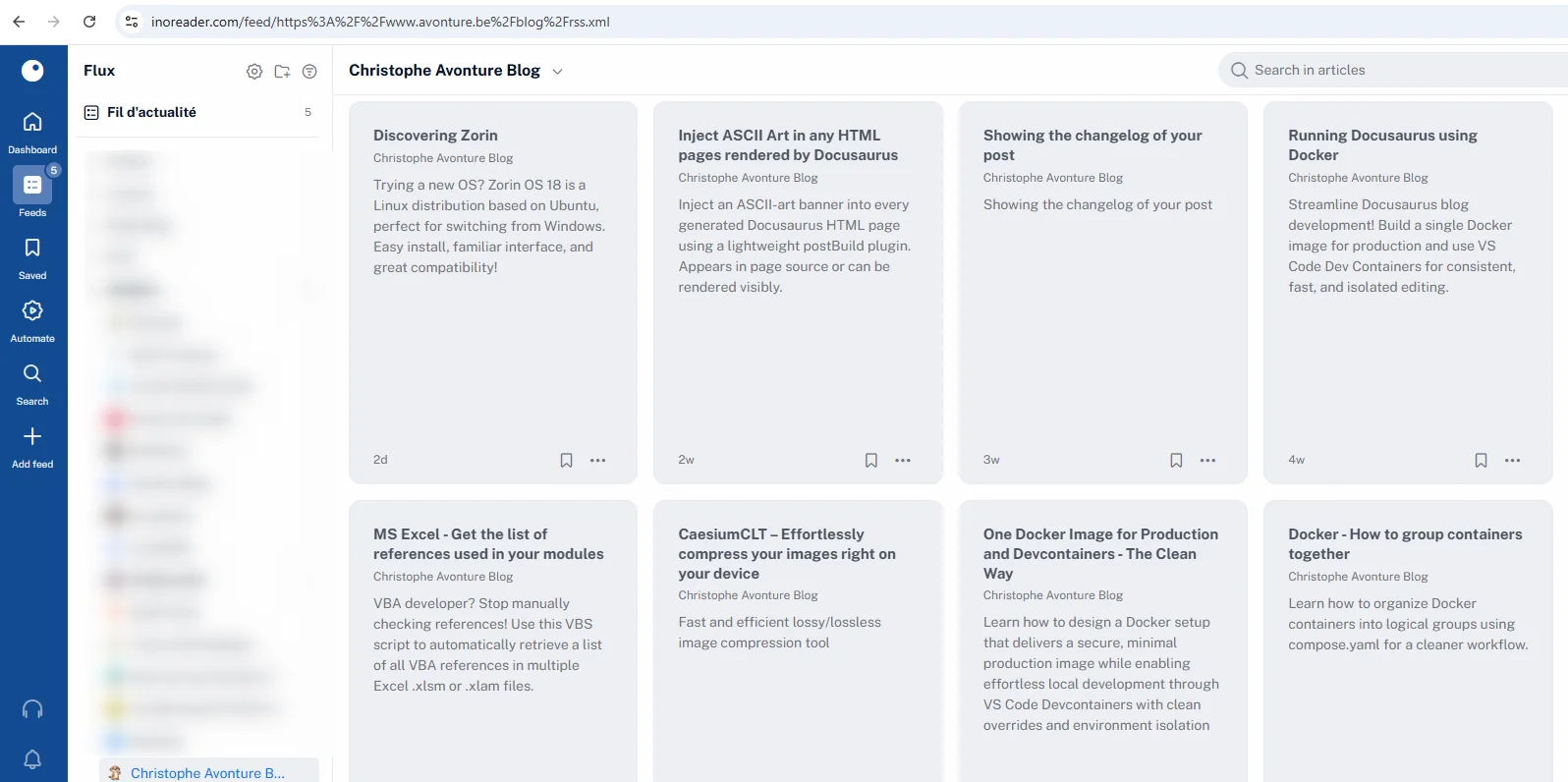
Le fichier rss.xml standard généré par Docusaurus est trop basique pour moi. En effet, quand j'ouvre mon lecteur RSS, il me manque le contenu complet de l'article et l'image d'introduction.
Si vous maintenez un blog avec Docusaurus, votre RSS se trouve à l'emplacement blog/rss.xml. Pour mon site, c'est https://www.avonture.be/blog/rss.xml.
C'est un fichier XML, mais vous verrez une jolie page HTML grâce à un XSLT (une transformation du XML en HTML).
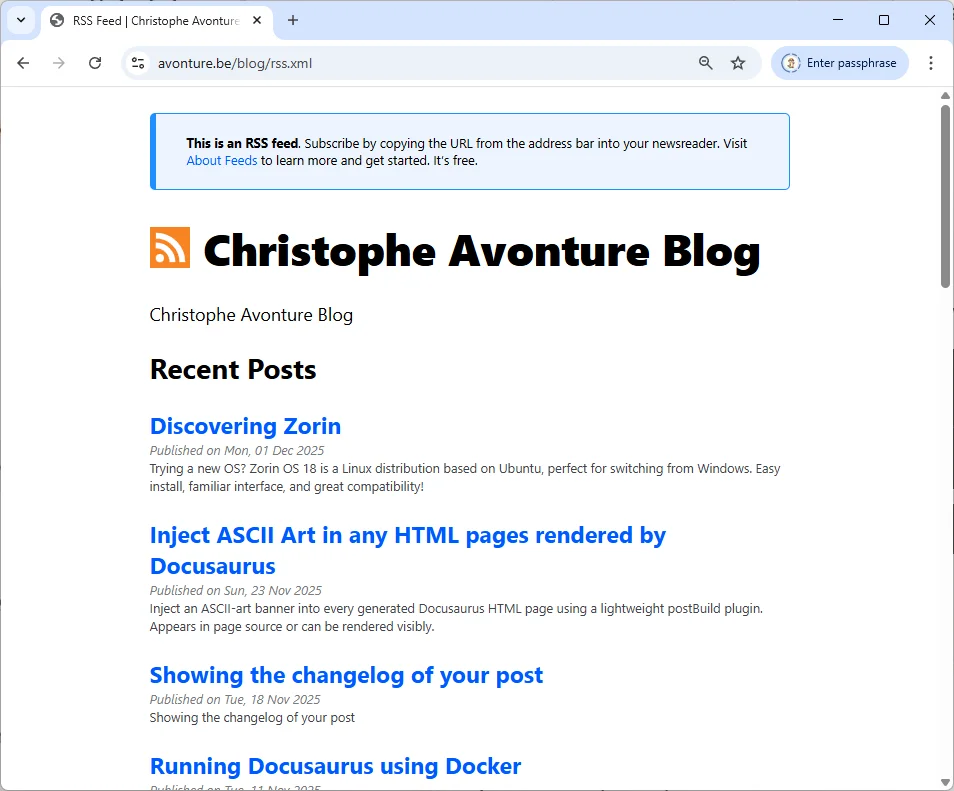
Voir la source
Appuyez simplement sur CTRL+U pour voir le code source XML si ça vous intéresse.
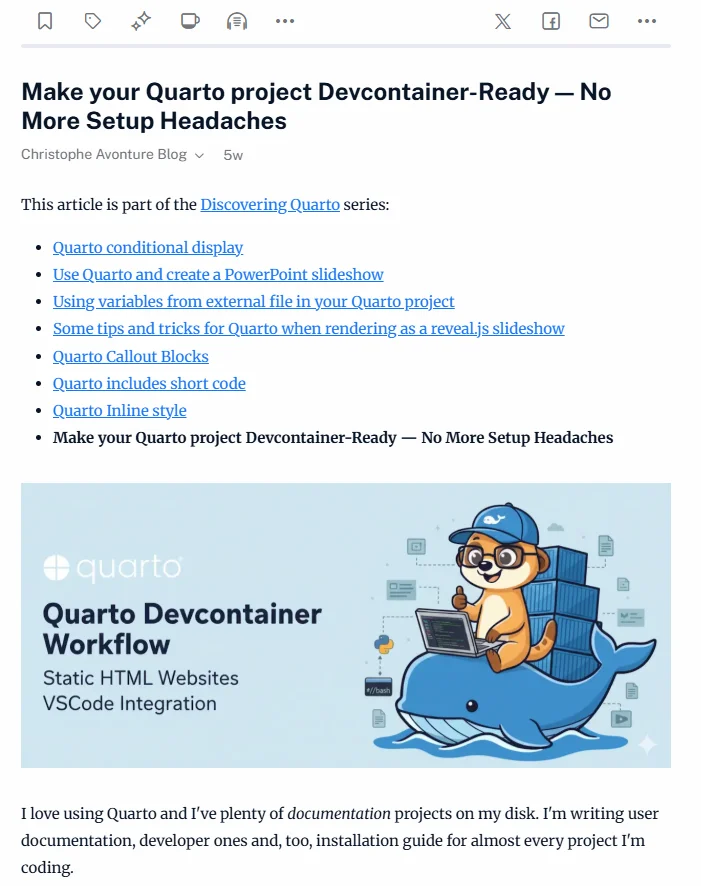
Visualiser le RSS avec Inoreader
Ci-dessous, ce que je voyais dans Inoreader :
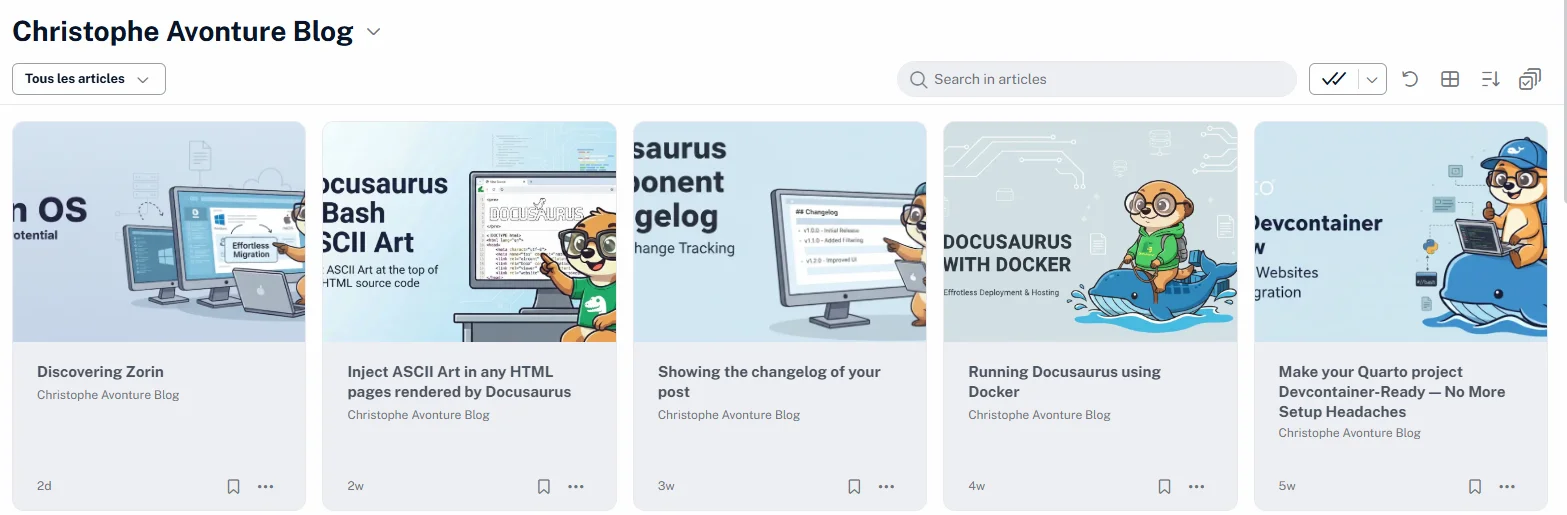
Dans les chapitres suivants, nous allons voir comment améliorer notre rss.xml. Une fois fait, vous obtiendrez ceci :
Et en ouvrant un article, nous obtiendrons ceci :
Comment Docusaurus gère les flux
La génération des flux est définie par l'élément feedOptions du fichier docusaurus.config.js.
J'ai essayé la documentation officielle (https://docusaurus.io/docs/api/plugins/@docusaurus/plugin-content-blog) mais je n'ai pas réussi à maîtriser l'élément createFeedItems : on est censé pouvoir définir quelles informations (auteur, catégories, description, contenu, images, ...) on veut dans le flux mais, je dois l'avouer, toutes mes tentatives ont échoué.
C'est pourquoi, après des heures, j'ai créé mon propre plugin avec l'aide de l'IA.
Optimisons tout ça
Préparer votre système
Ouvrez une console et ajoutez les quelques dépendances nécessaires au plugin que nous allons créer.
Créer le plugin
Créez le fichier plugins/blog-feed-plugin/index.js avec le code ci-dessous
/** * @fileoverview Docusaurus Blog Feed Plugin (RSS 2.0) * * Generates an optimized RSS feed (blog/rss.xml) from the final HTML in the Docusaurus build output. * Extracts and cleans article content to avoid leaking UI elements, respects front matter metadata, * and includes optional <enclosure> image support with MIME type detection. * * Key features: * - Robust article extraction with selector fallbacks. * - Critical selectors always stripped (header, svg). * - Configurable cleaning via options.stripSelectors (user-defined). * - Properly normalized slugs and POSIX-safe permalinks. * - Absolute URLs for links and images (siteConfig.url + baseUrl + paths). * - Optional image injection to descriptions and enclosure tags. * - Safe character cleanup to prevent invalid XML characters. * * Options: * - maxItems?: number (default: 20) — items in the site-wide feed * - includeContent?: boolean (default: true) * - includeImages?: boolean (default: true) * - stripSelectors?: string[] (default: curated list, merged with critical) * - ignorePatterns?: string[] * - emitTopicFeeds?: boolean (default: true) — per-tag and per-series feeds * - topicMaxItems?: number (default: 10) — items in each per-topic feed * - minPostsPerTagFeed?: number (default: 1) — a tag below this gets no feed * * Usage: * const blogFeedPlugin = require("./plugins/blog-feed-plugin/index.js"); * * module.exports = { * // ... * plugins: [ * [blogFeedPlugin, { * maxItems: 20, * includeContent: true, * includeImages: true, * stripSelectors: [ * ".custom-ads", * ".share-buttons" * ], * }], * ], * }; * * Output: * - The RSS file is written to: <outDir>/blog/rss.xml (served at /blog/rss.xml). * - Per-tag feeds: <outDir>/blog/tags/<slug>/rss.xml (served at /blog/tags/<slug>/rss.xml). * - Per-series feeds: <outDir>/series/<slug>/rss.xml (served at /series/<slug>/rss.xml). * * @license MIT — free to use, modify, and contribute. */
const yaml = require("js-yaml");const fs = require("fs-extra");const path = require("path");const frontMatter = require("front-matter");const glob = require("glob");const cheerio = require("cheerio");// Which posts land in which per-topic feed. Split out because it is pure and// self-contained; this file keeps the serializing and the writing.const { groupItemsByTag, groupItemsBySeries } = require("./topic-feeds.cjs");
// --- Utilities ---------------------------------------------------------------
/** * Join URL segments with POSIX semantics and ensure leading slash consistency. * @param {string[]} parts * @returns {string} */function posixJoin(...parts) { const joined = path.posix.join(...parts); return joined.startsWith("/") ? joined : `/${joined}`;}
/** * Resolve an absolute URL from site config components. * @param {string} siteUrl * @param {string} baseUrl * @param {string} relPath * @returns {string} */function absoluteUrl(siteUrl, baseUrl, relPath) { const base = baseUrl || "/"; const rel = relPath || "/"; const fullPath = posixJoin(base, rel); return `${siteUrl.replace(/\/+$/g, "")}${fullPath}`;}
/** * Determine the MIME type from an image URL. * @param {string} url * @returns {string} */function getMimeTypeFromUrl(url) { const ext = path.extname(url).toLowerCase(); switch (ext) { case ".jpg": case ".jpeg": return "image/jpeg"; case ".png": case ".avif": return "image/png"; case ".gif": return "image/gif"; case ".webp": return "image/webp"; case ".svg": return "image/svg+xml"; default: return "application/octet-stream"; }}
/** * Remove control/non-printable characters that can break XML parsers. * @param {string} s * @returns {string} */function cleanProblemChars(s) { return ( String(s) .replace(/\u00a0/g, " ") .replace(/\u200b/g, "") // eslint-disable-next-line no-control-regex .replace(/[\x00-\x09\x0B\x0C\x0E-\x1F\x7F]/g, "") .trim() );}
// --- Strip selectors ---------------------------------------------------------
const CRITICAL_STRIP_SELECTORS = ["header", "svg"];
const DEFAULT_STRIP_SELECTORS = [ 'h3:contains("Related posts")', "div.row:has(div.col.col--4)", "footer.docusaurus-mt-lg", ".blueSkyContainer", 'p:contains("Loading comments")', ".scrollBtn_Pv66",];
function getStripSelectors(userSelectors = []) { return [...CRITICAL_STRIP_SELECTORS, ...DEFAULT_STRIP_SELECTORS, ...userSelectors];}
// --- Article extraction ------------------------------------------------------
/** * Locates a built page from its permalink. * * `outDir` is ALREADY the locale's output directory (`build/` for the default locale, * `build/fr/` for `fr`), while `permalink` already carries the locale's baseUrl * (`/fr/blog/<slug>`). Joining them naively produces `build/fr/fr/blog/<slug>` — a path that * never exists, so every article silently lost its body and the French feed came out empty * with a green build. Strip the baseUrl prefix before joining. See TODO 0119. */async function getArticleHtml(permalink, outDir, stripSelectors = [], baseUrl = "/") { const normalizedBase = baseUrl.endsWith("/") ? baseUrl : `${baseUrl}/`; const relativePermalink = normalizedBase !== "/" && permalink.startsWith(normalizedBase) ? permalink.slice(normalizedBase.length - 1) : permalink;
const htmlFilePath = path.join(outDir, relativePermalink, "index.html"); if (!fs.existsSync(htmlFilePath)) { console.warn( `[BlogFeedPlugin] HTML file not found for ${permalink} at: ${htmlFilePath}`, ); return null; }
const htmlContent = await fs.readFile(htmlFilePath, "utf8"); const $ = cheerio.load(htmlContent);
// Attempt to find the main article container using multiple fallbacks let articleContainer = $("article").first(); if (!articleContainer.length) { articleContainer = $(".theme-doc-content, .theme-doc-markdown").first(); } if (!articleContainer.length) { console.warn(`[BlogFeedPlugin] Could not find article container for ${permalink}.`); return null; }
// Remove elements based on strip selectors const selectorsToRemove = getStripSelectors(stripSelectors); selectorsToRemove.forEach((sel) => { articleContainer.find(sel).remove(); });
// Handle Docusaurus code snippet wrapper cleanup for cleaner RSS content articleContainer.find(".snippet_block_pySp").each((_, element) => { const $snippet = $(element); const $codeBlock = $snippet.find(".codeBlockContainer_Ckt0").first(); if ($codeBlock.length) { $snippet.replaceWith($codeBlock); } else { $snippet.remove(); } });
const contentHtml = articleContainer.html(); if (!contentHtml) return null; return cleanProblemChars(contentHtml);}
// --- Slug computation --------------------------------------------------------
function computeSlug(attributes, relativeFilePath) { if (attributes.slug) { const normalized = String(attributes.slug).replace(/^\/|\/$/g, ""); return normalized || null; }
const slugWithDate = relativeFilePath.replace(/\.(md|mdx)$/i, ""); const parts = slugWithDate.split(path.sep); let finalSlug; // Handle index file inside a folder (e.g., folder/index.md) if (parts[parts.length - 1].toLowerCase() === "index" && parts.length > 1) { finalSlug = parts[parts.length - 2]; } else { finalSlug = parts[parts.length - 1]; } if (!finalSlug) return null;
// Normalize slug to lowercase and use hyphens return finalSlug.toLowerCase().replace(/_/g, "-");}
// --- Feed assembly -----------------------------------------------------------
/** * Serialize one RSS 2.0 document — channel header, items, dc:creator injection * and the XSLT processing instruction. * * Extracted from `postBuild` so the same recipe produces the site-wide feed and * every per-topic one. The cheerio pass has to live in here rather than at the * call site: it runs on the serialized XML, so a feed built outside it would * silently ship without its `<dc:creator>` elements. * * @param {object} params * @param {Function} params.Feed - the `feed` package's Feed constructor. * @param {object} params.channel - `{title, description, id, link, language}`. * @param {Array<object>} params.items - items to serialize, newest first. * @param {string} params.siteUrl - site origin, no trailing slash. * @param {string} params.baseUrl - Docusaurus baseUrl. * @param {object} params.authorsData - parsed `blog/authors.yml`. * @param {boolean} params.includeContent - emit `<content:encoded>` bodies. * @param {boolean} params.includeImages - emit `<enclosure>` and inline `<img>`. * @param {boolean} [params.verbose] - per-item logging (site-wide feed only). * @returns {string} the complete RSS 2.0 document. */function buildRssXml({ Feed, channel, items, siteUrl, baseUrl, authorsData, includeContent, includeImages, verbose = false,}) { const feed = new Feed({ title: channel.title, description: channel.description, id: channel.id, link: channel.link, language: channel.language, // Drives <lastBuildDate>. Deliberately the newest post's date rather // than `new Date()`: a wall-clock value rewrote this 1.3 MB file on // every build, so the deploy re-uploaded it even when no article had // changed. The date of the most recent entry is also the more honest // answer to "when did this feed last actually change?". Per-topic feeds // take *their own* newest entry for the same reason — a shared clock // would dirty all of them on every build. updated: items.length ? new Date(items[0].date) : new Date(0), });
// Parallel to `items`: the dc:creator markup each entry needs, consumed by the // cheerio pass below. It used to be smuggled through `feed.addItem()` as a // `customRssData` key and read back off the *source* item — which never // carried it, so the injection silently no-opped and no feed this plugin ever // wrote had a single <dc:creator> in it. Keeping it here, where it is // produced, is what makes the feature actually work. const creatorMarkup = [];
items.forEach((item) => { // Resolve authors const authorKeys = Array.isArray(item.frontMatter.authors) ? item.frontMatter.authors : item.frontMatter.authors ? [item.frontMatter.authors] : [];
const rssAuthors = authorKeys .map((key) => authorsData[key]) .filter(Boolean) .map((a) => ({ name: a.name }));
creatorMarkup.push( rssAuthors .map((a) => `<dc:creator><![CDATA[${cleanProblemChars(a.name)}]]></dc:creator>`) .join(""), );
// Log to confirm data is ready if (verbose && rssAuthors.length > 0) { console.log( `[BlogFeedPlugin] ✍️ Post "${ item.title }" - Found authors: ${rssAuthors.map((a) => a.name).join(", ")}`, ); }
// Handle enclosure image and description injection const postImageUrl = item.frontMatter?.image; const absoluteImageUrl = postImageUrl ? absoluteUrl(siteUrl, baseUrl, postImageUrl) : null; const mimeType = absoluteImageUrl ? getMimeTypeFromUrl(absoluteImageUrl) : null;
let descriptionWithImage = cleanProblemChars(item.description || ""); if (includeImages && absoluteImageUrl) { descriptionWithImage = `<img src="${absoluteImageUrl}" alt="${cleanProblemChars( item.title, )}" style="display:block;max-width:100%;height:auto;">` + descriptionWithImage; }
const itemLink = absoluteUrl(siteUrl, baseUrl, item.permalink);
feed.addItem({ title: cleanProblemChars(item.title), id: item.permalink, link: itemLink, category: Array.isArray(item.frontMatter.tags) ? item.frontMatter.tags.map((t) => ({ name: t })) : item.frontMatter.tags ? [{ name: item.frontMatter.tags }] : undefined, description: descriptionWithImage, content: includeContent ? cleanProblemChars(item.fullContentBody || "") : undefined, date: new Date(item.date), author: rssAuthors, // Add enclosure tag if image is present ...(includeImages && absoluteImageUrl && mimeType && { enclosure: { url: absoluteImageUrl, type: mimeType, length: 0, // Length is often 0 for dynamically generated feeds }, }), }); });
let rssContent = feed.rss2();
// --- CUSTOM XML MANIPULATION (Cheerio) --- // The 'feed' library does not natively support dc:creator with CData, // so we use Cheerio for post-generation injection.
// 1. Load the content const $ = cheerio.load(rssContent, { xmlMode: true });
// 2. Inject the namespace cleanly into the root <rss> element $("rss").attr("xmlns:dc", "http://purl.org/dc/elements/1.1/");
// 3. Get ALL generated XML items // In XML mode, the path is typically rss > channel > item const xmlItems = $("channel > item");
if (verbose) { console.log(`[BlogFeedPlugin] 🔧 Injecting DC tags into ${xmlItems.length} items...`); }
// 4. Inject each item's dc:creator. Positional matching is safe: the feed // library serializes items in the order they were added, which is the // order of `items` — and so of `creatorMarkup`. xmlItems.each((index, element) => { const markup = creatorMarkup[index]; if (markup) $(element).append(markup); });
// 5. Get the final XML content rssContent = $.xml();
// Apply a custom XML declaration and stylesheet reference for better browser // rendering. The href is ABSOLUTE on purpose: a relative "rss.xsl" only // resolves for the feed sitting at /blog/, and would 404 for every per-topic // feed one directory deeper — the browser then shows raw XML. return rssContent.replace( /^<\?xml[^>]+\?>/, `<?xml version="1.0" encoding="utf-8"?>\n<?xml-stylesheet type="text/xsl" href="${posixJoin( baseUrl, "blog/rss.xsl", )}"?>`, );}
// --- Plugin ------------------------------------------------------------------
module.exports = function blogFeedPlugin(context, options = {}) { const { maxItems = 20, includeContent = true, includeImages = true, stripSelectors = [], ignorePatterns = ["**/_archived/**"], emitTopicFeeds = true, topicMaxItems = 10, minPostsPerTagFeed = 1, } = options;
return { name: "blog-feed-plugin",
async postBuild({ siteConfig, outDir, siteDir, i18n }) { try { // AJOUTEZ CETTE LIGNE ICI 👇 const { Feed } = await import("feed");
console.log(`[BlogFeedPlugin] 🚀 Generating RSS feed...`);
const blogDir = path.join(siteDir, "blog"); const baseUrl = siteConfig.baseUrl || "/"; const siteUrl = siteConfig.url?.replace(/\/+$/g, "") || ""; const blogBasePath = posixJoin(baseUrl, "blog");
if (!siteUrl) { console.error( `[BlogFeedPlugin] siteConfig.url is missing. Please set it to your site's origin.`, ); return; }
if (!fs.existsSync(blogDir)) { console.error(`[BlogFeedPlugin] Blog source directory not found: ${blogDir}`); return; }
// --- Load Authors --- const authorsFile = path.join(siteDir, "blog", "authors.yml"); let authorsData = {}; if (fs.existsSync(authorsFile)) { authorsData = yaml.load(fs.readFileSync(authorsFile, "utf8")); console.log(`[BlogFeedPlugin] Loaded authors from ${authorsFile}`); }
// --- Load Tags --- // Only for the human-readable label and description of a per-tag feed's // channel; the grouping itself works off the posts' own front matter. const tagsFile = path.join(siteDir, "blog", "tags.yml"); let tagsData = {}; if (fs.existsSync(tagsFile)) { tagsData = yaml.load(fs.readFileSync(tagsFile, "utf8")) || {}; }
const postFiles = glob.sync("**/*.{md,mdx}", { cwd: blogDir, ignore: ignorePatterns, });
// Collect raw metadata from blog files const rawMetadataItems = await Promise.all( postFiles.map(async (relativeFilePath) => { const fullPath = path.join(blogDir, relativeFilePath); const fileContent = await fs.readFile(fullPath, "utf8"); const contentData = frontMatter(fileContent); const { attributes } = contentData;
// Drafts and unlisted posts get no HTML page in the build, so they // can never feed the RSS body — skip them before we go looking for // a file that is not there. if (attributes.draft === true || attributes.unlisted === true) { return null; }
const date = attributes.date || fs.statSync(fullPath).birthtime; const finalSlug = computeSlug(attributes, relativeFilePath); // Ignore files that map to "index" or have no slug if (!finalSlug || finalSlug === "index") return null;
const permalink = posixJoin(blogBasePath, finalSlug);
return { title: attributes.title || finalSlug, description: attributes.description || "No description", date, permalink, frontMatter: attributes, finalSlug, }; }), );
const metadataItems = rawMetadataItems.filter(Boolean); if (!metadataItems.length) { console.log(`[BlogFeedPlugin] No blog posts found.`); return; }
// Collect full HTML content for each post (required for RSS body) const feedItemsWithContent = await Promise.all( metadataItems.map(async (item) => { const fullContentBody = await getArticleHtml( item.permalink, outDir, stripSelectors, baseUrl, ); return { ...item, fullContentBody }; }), );
// Filter out drafts (published: false) and articles with no content body let publishedFeedItems = feedItemsWithContent .filter((item) => item.frontMatter.published !== false && item.fullContentBody) .sort((a, b) => new Date(b.date) - new Date(a.date));
// In a non-default locale, only articles that really are translated belong in the feed. // Docusaurus's i18n fallback means every English article also has a `/fr/` URL, so // without this the French feed would advertise 257 English posts as French content — // the same duplicate-content problem plugins/i18n-seo-guard solves for the HTML pages. // See TODO 0119. const currentLocale = i18n?.currentLocale ?? siteConfig.i18n?.defaultLocale; if (currentLocale && currentLocale !== siteConfig.i18n?.defaultLocale) { const { collectTranslations, } = require("../translations-manifest-plugin/index.cjs"); const translated = new Set(collectTranslations(siteDir)[currentLocale] ?? []); // `finalSlug` is the item's own slug, already computed upstream — use it rather than // re-deriving one from the permalink, which silently matched nothing and emptied the // whole feed on the first attempt. publishedFeedItems = publishedFeedItems.filter((item) => translated.has(item.finalSlug), ); console.log( `[BlogFeedPlugin] locale ${currentLocale}: ${publishedFeedItems.length} translated article(s) in the feed.`, ); }
const language = currentLocale || siteConfig.i18n?.defaultLocale || "en-US";
// --- Site-wide feed --------------------------------------------------
const finalFeedItems = publishedFeedItems.slice(0, Math.max(1, Number(maxItems)));
const rssPath = path.join(outDir, "blog", "rss.xml"); await fs.ensureDir(path.dirname(rssPath)); await fs.writeFile( rssPath, buildRssXml({ Feed, channel: { title: siteConfig.title, description: siteConfig.tagline || "Personal blog feed", id: siteUrl, link: absoluteUrl(siteUrl, baseUrl, "blog"), language, }, items: finalFeedItems, siteUrl, baseUrl, authorsData, includeContent, includeImages, verbose: true, }), );
console.log( `[BlogFeedPlugin] ✅ RSS feed written to ${rssPath} (${finalFeedItems.length} items).`, );
if (!emitTopicFeeds) return;
// --- Per-topic feeds ------------------------------------------------- // // One feed per tag and per series, so a reader can watch a single subject // instead of the whole blog. Two deliberate differences from the // site-wide feed: // // * no <content:encoded>. The site-wide feed weighs ~45 KB per item // because it carries every article's full HTML; replaying that // across ~75 topic feeds would add tens of megabytes of duplicated // content to build/. Descriptions only keeps each one in atom.xml // territory (tens of KB), and a topic feed's job is to announce a // post, not to replace it. // * a lower item count (`topicMaxItems`), for the same reason. // // The expensive part — reading and cheerio-parsing every post's built // HTML — already happened above for the site-wide feed, so these cost // serialization and I/O only.
const topicFeeds = [];
for (const group of groupItemsByTag(publishedFeedItems).values()) { // Raising this above 1 strands the article action bar: it offers the // feed of the post's own mainTag without knowing how many posts share // it, so a skipped tag becomes a 404 for the reader who clicks. Only // raise it together with a way for the UI to know which feeds exist. // // Thin feeds are cheap and not useless anyway: a subscriber signs up // for what comes next, not for the archive depth, and 49 description- // only tag feeds weigh about as much as one copy of the site-wide one. if (group.items.length < minPostsPerTagFeed) continue;
const meta = tagsData[group.label] || {}; topicFeeds.push({ outPath: path.join(outDir, "blog", "tags", group.slug, "rss.xml"), channel: { title: `${siteConfig.title} — ${meta.label || group.label}`, description: meta.description || `Posts tagged “${meta.label || group.label}” on ${siteConfig.title}`, id: absoluteUrl(siteUrl, baseUrl, `blog/tags/${group.slug}`), link: absoluteUrl(siteUrl, baseUrl, `blog/tags/${group.slug}`), language, }, items: group.items, }); }
for (const group of groupItemsBySeries(publishedFeedItems).values()) { // No threshold for series: a series is by definition a sequence, and // "tell me when the next episode lands" is the strongest reason to // subscribe this blog has to offer. topicFeeds.push({ // Next to the page it belongs to — the series route is /series/<slug>, // not /blog/series/<slug>. outPath: path.join(outDir, "series", group.slug, "rss.xml"), channel: { title: `${siteConfig.title} — ${group.label}`, description: `Every post in the “${group.label}” series on ${siteConfig.title}`, id: absoluteUrl(siteUrl, baseUrl, `series/${group.slug}`), link: absoluteUrl(siteUrl, baseUrl, `series/${group.slug}`), language, }, items: group.items, }); }
await Promise.all( topicFeeds.map(async ({ outPath, channel, items }) => { const feedItems = items.slice(0, Math.max(1, Number(topicMaxItems))); await fs.ensureDir(path.dirname(outPath)); await fs.writeFile( outPath, buildRssXml({ Feed, channel, items: feedItems, siteUrl, baseUrl, authorsData, includeContent: false, includeImages, }), ); }), );
console.log( `[BlogFeedPlugin] ✅ ${topicFeeds.length} per-topic feeds written (tags + series).`, ); } catch (err) { console.error(`[BlogFeedPlugin] RSS feed generation failed:`, err); } }, };};This is a Docusaurus plugin that generates RSS feeds for blog posts. It creates a main site-wide feed plus optional per-tag and per-series feeds, extracting article content from built HTML files, cleaning out UI elements, and injecting author metadata. The plugin respects front matter flags like draft status, handles multi-language sites carefully, and converts relative URLs to absolute ones so feed readers can access linked images and pages.
Mettre à jour votre configuration
Mettez à jour votre docusaurus.config.js et faites deux choses.
- Nous devons désactiver la génération du flux RSS par Docusaurus
- Nous devons implémenter notre propre plugin
Voyez ci-dessous comment procéder :
// [...]presets: [ [ "classic", ({ blog: { // ... feedOptions: { type: ["atom"], }, }), ],],plugins: [ // [...] [ "./plugins/blog-feed-plugin/index.js", { maxItems: 20 }, ],],Ce fichier configure un preset Docusaurus nommé classic avec des options de blog personnalisées, notamment la génération de flux Atom. Il ajoute aussi un plugin personnalisé pour le flux du blog, limité à 20 éléments maximum.
atom peut rester
Dans feedOptions, vous pouvez garder type: ["atom"] si vous l'avez, mais supprimez rss si vous le voyez.
Il existe deux types de flux, l'ancien (rss) et le plus récent (atom).
Lancer le plugin
Une fois fait, lancez simplement yarn run build dans un terminal pour générer la version statique de votre site.
Pendant cette étape, Docusaurus appellera notre plugin pour générer le fichier rss.xml au lieu d'utiliser sa propre fonctionnalité standard.
Une fois terminé, si vous voulez voir le fichier en action sur votre machine, lancez yarn run serve pour démarrer votre site statique Docusaurus puis rendez-vous sur http://localhost/blog/rss.xml (votre URL locale) et vous verrez votre XML.
Visualiser le nouveau rendu
Utilisons un outil en ligne comme https://codebeautify.org/rssviewer/.
Dans la partie gauche, copiez/collez le contenu de votre blog/rss.xml et regardez comment il sera affiché ; pas mal, non ?
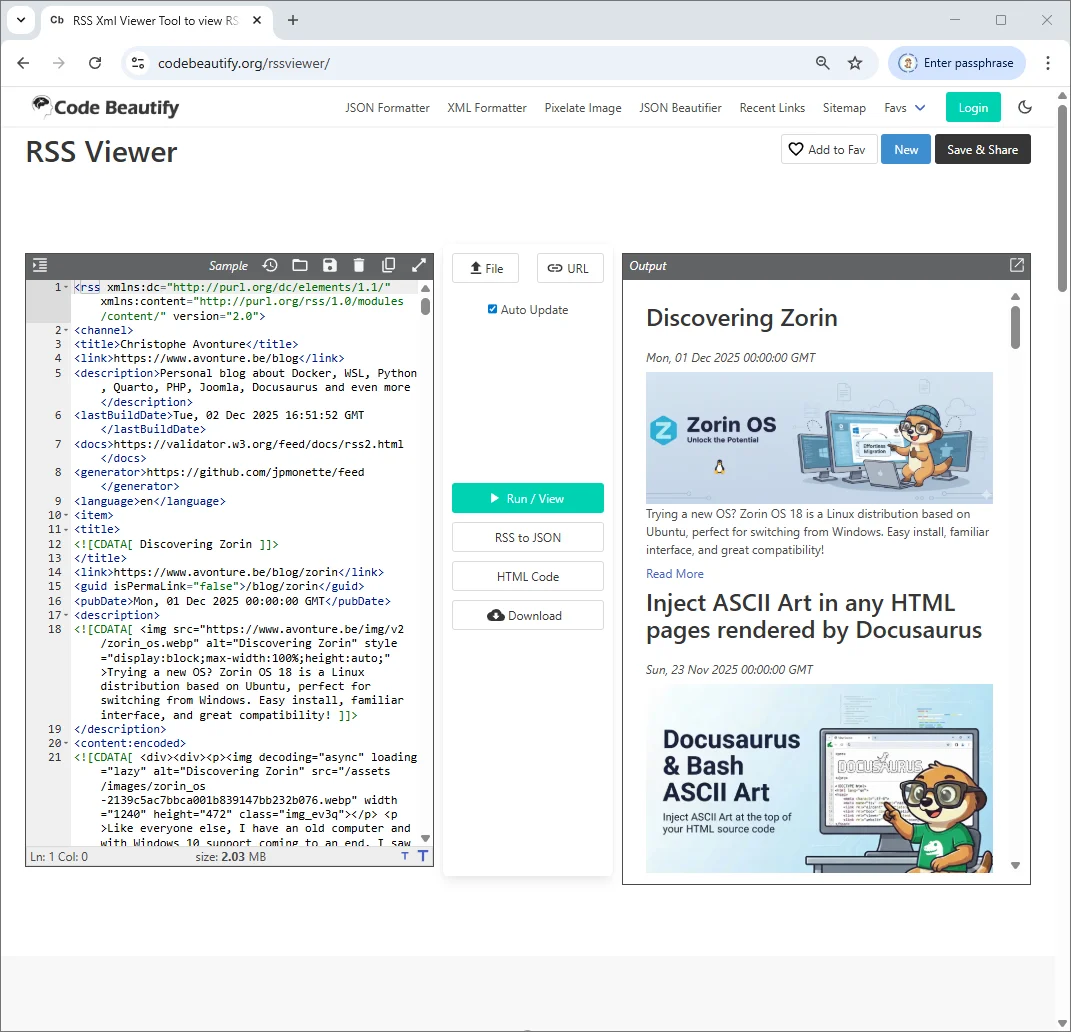
Vous pouvez utiliser un autre outil comme https://rss.app/rss-feed mais ici, vous devez d'abord envoyer votre fichier blog/rss.xml sur votre site de production.
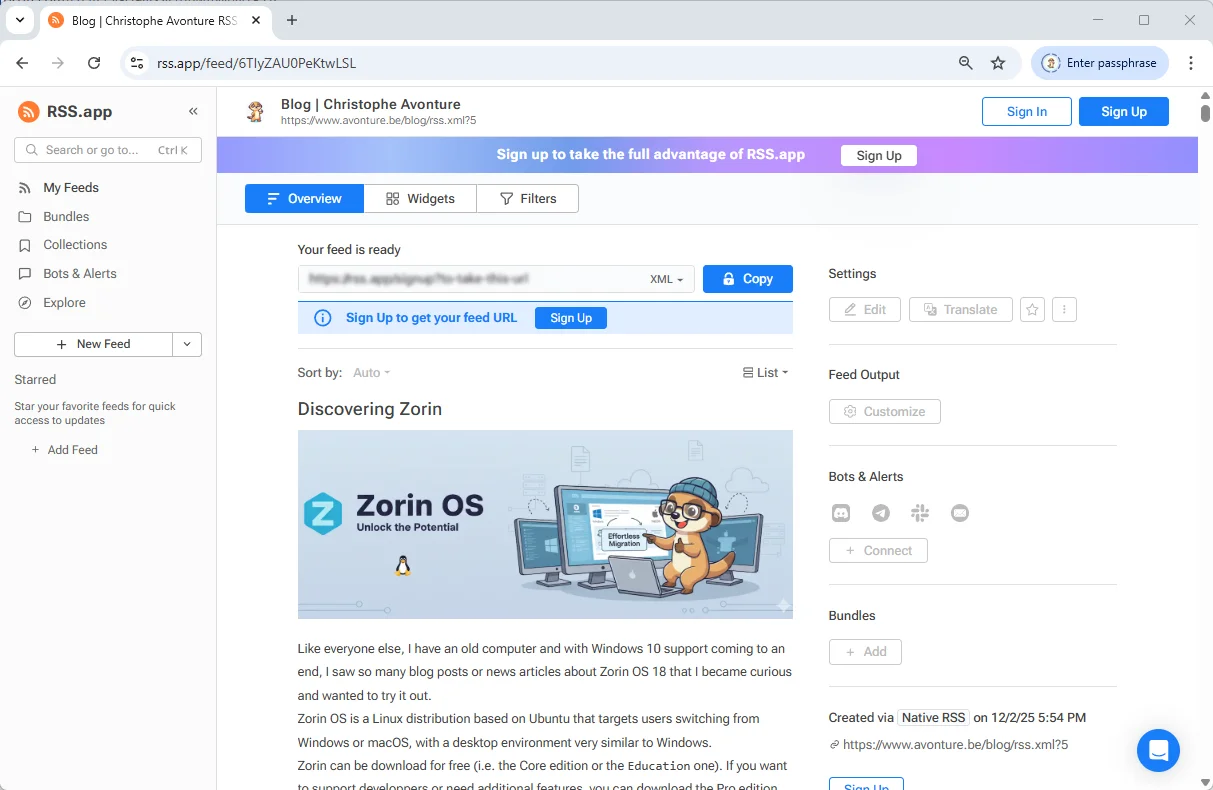
Pourquoi c'est mieux ?
Comme vous pouvez le voir, le nouveau fichier rss.xml exposera maintenant l'image d'introduction, mais pas seulement : vous aurez aussi beaucoup plus d'informations, comme le HTML de votre article.
Voir la source
Pour rappel, appuyez simplement sur CTRL+U pour voir le code source XML.
Les agrégateurs RSS, même les plus anciens, auront accès au contenu complet et pourront donc afficher l'article sans devoir aller le récupérer sur votre site.
Options de configuration du plugin
Le plugin peut être configuré directement dans votre fichier docusaurus.config.js.
Voyez ci-dessous toutes les options facultatives que vous pouvez utiliser :
const config = {
    // ...
    plugins: [
    [ "./plugins/blog-feed-plugin/index.js", {
        maxItems: 20,           // optional
        includeContent: true,   // optional
        includeImages: true,    // optional
        stripSelectors: [       // optional — add any site-specific UI selectors to remove
        ".custom-ads",
        ".share-buttons",
        ".newsletter-signup",
        ],
        ignorePatterns: ["**/_archived/**"], // optional
    }],
    ],
};

export default config;
-
maxItems (nombre, défaut :
20) : limite le nombre d'éléments dans le flux. Par défaut, Docusaurus n'en affiche que 20. Plus ce nombre est élevé, plus le fichier rss.xml sera volumineux. Vous pourriez être tenté de vouloir tous les articles (dans mon cas, près de 215 actuellement), mais ce n'est pas la vocation première d'un fichier RSS. Ce fichier est là pour lister les derniers articles et vous permettre de voir les publications les plus récentes de votre blog. Donc restez... raisonnable. -
includeContent (booléen, défaut :
true) : inclut le corps HTML nettoyé de chaque article dans le champ<content>. Si vous voulez obliger les gens à visiter votre site pour lire le contenu complet, mettez cette option àfalse. -
includeImages (booléen, défaut :
true) : ajoute l'image de l'article en haut de la description et inclut une balise<enclosure>avec le bon type MIME. -
stripSelectors (string[], défaut : fusionné avec les valeurs par défaut) : sélecteurs CSS supplémentaires à supprimer du HTML de l'article. Les sélecteurs critiques (
header,svg) sont toujours supprimés. -
ignorePatterns (string[], défaut : [
"**/_archived/**"]) : motifs glob pour exclure certains fichiers du blog.
Quelques outils
Outils de visualisation
Pendant que vous codez le plugin, utilisez l'un de ces outils de visualisation pour vous assurer que le contenu s'affiche correctement.
Outils de validation
Si vous voulez vous assurer que votre rss.xml est valide :
Cet article fait partie de la série Créer des composants Docusaurus :
- Modifier la façon dont Docusaurus génère les balises img
- Surcharger la génération des balises img avec Docusaurus
- Organisez votre contenu Docusaurus avec un composant Series personnalisé
- Ajouter un bouton « retour en haut » dans les articles Docusaurus
- Créer un plugin de recherche/remplacement pour Docusaurus
- Un composant pour afficher des snippets de code dans un blog Docusaurus
- Un composant Docusaurus qui prévient le lecteur que l'article a plus d'un an
- Afficher le changelog de votre article
- Injecter de l'ASCII art dans toutes les pages HTML générées par Docusaurus
- Best Practice - Personnaliser le flux RSS de Docusaurus pour un contenu complet et des images
- Quelques vérifications sur les images de votre site Docusaurus
- Gestion des tags dans Docusaurus
- Automatiser les résumés TL;DR avec Gemini AI
- Le composant ProjectSetup - Une façon standardisée de partager des structures de projet
- Comment signaler un contenu assisté par IA dans un blog Docusaurus
- Donnez vie à vos tutoriels CLI avec un terminal machine à écrire
- Espiègleries de suricate : semer des easter eggs partout sur mon blog
- Tooltips de code assistés par l'IA dans Docusaurus — Explique-moi comme à un enfant de cinq ans
- Ajouter des réactions de lecteurs à votre blog Docusaurus
- Votre blog est illisible pour une IA. Voici la solution.
- Secouez votre téléphone, surprenez le suricate
- Ajouter un bouton « Copy as Markdown » à votre blog Docusaurus
- Ask My Blog : transformer 259 articles en 2 160 questions cherchables
- La troisième porte : une bulle de chat flottante, et la fonctionnalité que personne ne trouvait
- Dessiner une carte de mon propre blog
- Laissez vos lecteurs signaler les problèmes — un widget de feedback multi-types pour Docusaurus
Chargement des commentaires…
Articles liés

Dessiner une carte de mon propre blog
8 octobre 2026
Ajouter un bouton « Copy as Markdown » à votre blog Docusaurus
10 septembre 2026