Markdown - Convertir du CSV en tableaux Markdown
Convertissez rapidement du contenu CSV en tableaux Markdown propres et bien formatés grâce à l'outil CSV2MD. Découvrez comment utiliser ce convertisseur efficace, avec ses options de délimiteurs et de transposition des tableaux.

Traduction automatique
Journal des modifications

Cet article présente CSV2MD (csv2md.avonture.be, source sur GitHub), un outil en ligne gratuit qui convertit instantanément du contenu CSV collé en un tableau Markdown formaté.
Voyez aussi Markdown - Convertir des plages Excel en tableaux Markdown. Pour un besoin de conversion bien plus large — des documents Word, PDF ou PowerPoint complets plutôt qu'un simple tableau — voyez Markitdown - Convertir des fichiers et des documents MS Office en Markdown.
À côté de mon script XLS2MD, vous pouvez aussi convertir très facilement un fichier CSV en Markdown.
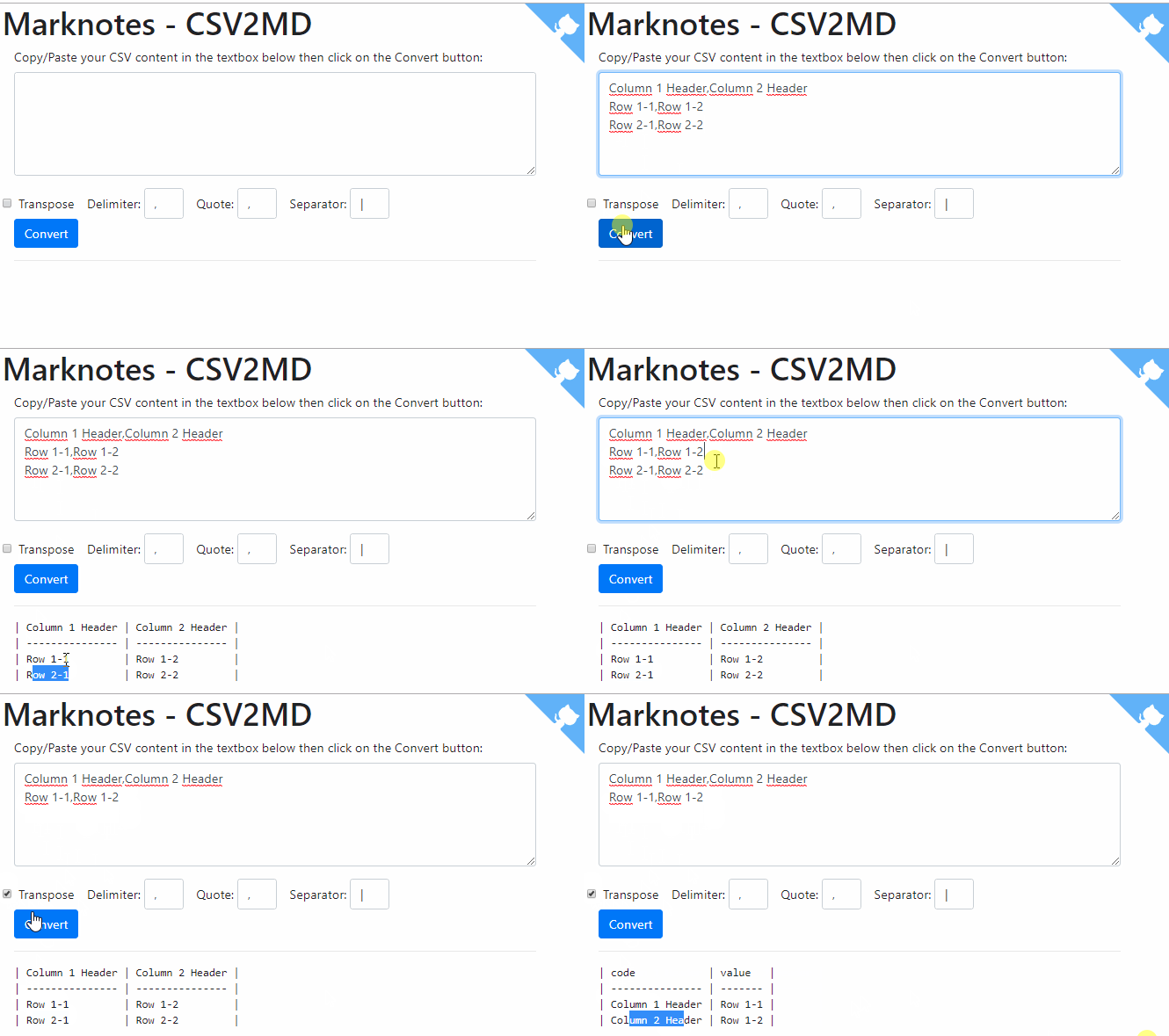
Copiez/collez simplement votre contenu CSV, comme celui ci-dessous, dans la zone de texte principale affichée sur Markdown - Convertir du CSV en tableaux Markdown et profitez.
Column 1 Header,Column 2 Header
Row 1-1,Row 1-2
Row 2-1,Row 2-2
Voici une démo :
Code source
Vous le trouverez aussi sur Github : https://github.com/cavo789/marknotes_csv2md.
<?php
declare(strict_types = 1);
namespace Avonture;
/* * AUTHOR : AVONTURE Christophe * * Written date : 3 october 2018 * * CSV to markdown converter. * Need to be rework for adding a form where we can specify the input string, * delimiters (like "," or ";"), click on a submit button and, thanks to an ajax * request, get the result in a dynamic div; without leaving the form. * * Last mod: * 2019-01-01 - Abandonment of jQuery and migration to vue.js */
define('REPO', 'https://github.com/cavo789/marknotes_csv2md');
require_once 'classes/Csv2Md.php';
// Retrieve posted data$data = json_decode(file_get_contents('php://input'), true);
if ($data !== []) { $task = filter_var(($data['task'] ?? ''), FILTER_SANITIZE_STRING);
if ('convert' == $task) { // Retrieve the CSV content $csv = base64_decode(filter_var(($data['csv'] ?? ''), FILTER_SANITIZE_STRING));
// Delimiters between columns (, or ; or ...) $delim = base64_decode($data['delim'] ?? ''); if ('' == trim($delim)) { $delim = ','; }
// In case of the text are between quotes like, for instance, // "field1","field2", ... If so, mention '"' as value for $enclosure $enclosure = base64_decode($data['enclosure'] ?? '');
// Separator to use in markdown to separate columns ('|' is the standard) $separator = base64_decode($data['separator'] ?? '');
if ('' == trim($separator)) { $separator = '|'; }
// Transpose will works ONLY when there is two records in the // input string. Instead of having a long "horizontal" table, convert // the table vertically. The result table will have two columns and as // many rows that there was columns in the string $bTranspose = boolval(filter_var(($data['transpose'] ?? ''), FILTER_VALIDATE_BOOLEAN));
// Create a new CSV parser $csvParser = new Csv2Md();
$csvParser->setCsv($csv); $csvParser->setDelimiter($delim); $csvParser->setEnclosure($enclosure); $csvParser->setTableSeparator($separator); $csvParser->setTranspose($bTranspose);
// Create a Markdown table from the parsed input header('Content-Type: text/plain'); echo base64_encode($csvParser->getMarkup()); die(); }}
// Get the GitHub corner$github = '';if (is_file($cat = __DIR__ . DIRECTORY_SEPARATOR . 'octocat.tmpl')) { $github = str_replace('%REPO%', REPO, file_get_contents($cat));}?>
<!DOCTYPE html><html lang="en">
<head> <meta charset="utf-8" /> <meta name="author" content="Christophe Avonture" /> <meta name="robots" content="noindex, nofollow" /> <meta name="viewport" content="width=device-width, initial-scale=1.0" /> <meta http-equiv="content-type" content="text/html; charset=UTF-8" /> <meta http-equiv="X-UA-Compatible" content="IE=9; IE=8;" /> <title>Marknotes - CSV2MD</title> <link rel="stylesheet" href="https://stackpath.bootstrapcdn.com/bootstrap/4.1.3/css/bootstrap.min.css"></head>
<body> <?php echo $github; ?> <div class="container"> <div class="page-header"> <h1>Marknotes - CSV2MD</h1> </div> <div class="container" id="app"> <div class="form-group"> <how-to-use demo="https://raw.githubusercontent.com/cavo789/marknotes_csv2md/master/images/demo.gif"> <ul> <li>Copy/Paste your CSV content in the textbox below</li> <li>Update one or more options</li> <li>If you've only two lines, you can select Transpose</li> <li>Click on the Convert button</li> </ul> </how-to-use> <label for="csv">Copy/Paste your CSV content in the textbox below then click on the Convert button:</label> <textarea class="form-control" rows="5" v-model="CSV" name="csv" @paste="doChangeTabByComma"></text area> </div> <div class="row"> <form class="form-inline"> <div class="form-check mr-sm-3"> <input type="checkbox" class="form-check-input" v-model="transpose"> <label class="form-check-label" for="transpose">Transpose</label> </div> <div class=" form-group mr-sm-3"> <label for="delim">Delimiter:</label> <input type="text" style="width:50px;" size="3" maxlength="3" v-model="delim" class="form-control"> </div> <div class=" form-group mr-sm-3"> <label for="enclosure">Quote:</label> <input type="text" style="width:50px;" size="3" maxlength="3" v-model="enclosure" class="form-control"> </div> <div class=" form-group mr-sm-3"> <label for="separator">Separator:</label> <input type="text" style="width:50px;" size="3" maxlength="3" v-model="separator" class="form-control"> </div> </form> </div> <button type="button" @click="doConvert" class="btn btn-primary">Convert</button> <hr /> <div v-if="Markdown!==''"> <h2 id="markdown">Markdown code <small style="font-size:0.4em"><a href="#html">See HTML rendering</a></small></h2> <pre v-html="Markdown"></pre> <hr /> </div> <div v-if="HTML!==''"> <h2 id="html">HTML rendering <small style="font-size:0.4em"><a href="#markdown">See Markdown code</a></small></h2> <pre v-html="HTML"></pre> <hr /> </div> </div> </div>
<script src="https://unpkg.com/vue@2"></script> <script src="https://unpkg.com/axios/dist/axios.min.js"></script> <script src="https://unpkg.com/marked@0.3.6"></script> <script type="text/javascript"> Vue.component('how-to-use', { props: { demo: { type: String, required: true } }, template: `<details> <summary>How to use?</summary> <div class="row"> <div class="col-sm"> <slot></slot> </div> <div class="col-sm"><img v-bind:src="demo" alt="Demo"></div> </div> </div> </details>` });
var app = new Vue({ el: '#app', data: { CSV: "Column 1 Header,Column 2 Header\n" + "Row 1-1,Row 1-2\n" + "Row 2-1,Row 2-2", transpose: false, delim: ',', enclosure: '"', separator: '|', Markdown: '' }, methods: { doConvert() { var $data = { task: 'convert', csv: window.btoa(this.CSV), transpose: this.transpose, delim: window.btoa(this.delim), enclosure: window.btoa(this.enclosure), separator: window.btoa(this.separator) } axios.post('<?php echo basename(__FILE__); ?>', $data) .then(response => (this.Markdown = window.atob(response.data))) .catch(function(error) { console.log(error); }); }, doChangeTabByComma(event) { // By copying/pasting from Excel or SSMS (SQL Server Management Studio), // replace tabs by comma so the conversion is easier. this.CSV = event.clipboardData.getData('Text'); this.CSV = this.CSV.replace(/ /g, ',') event.clipboardData.setData('text/plain', this.CSV); event.preventDefault(); } }, computed: { HTML() { if (this.Markdown == '') { return ''; } // Call marked() to convert the MD string into a HTML table var mdTable = marked(this.Markdown, { sanitize: true }); // Add Bootstrap classes mdTable = mdTable.replace('<table>', '<table class="table table-hover table-striped">'); return mdTable; } } }); </script></body>
</html>Ce script PHP reçoit des données CSV via une requête AJAX, les convertit en tableau Markdown en utilisant la classe Csv2Md, puis retourne le résultat encodé en base64. Le reste du fichier affiche une page HTML interactive avec Vue.js qui permet à l'utilisateur de coller du CSV, configurer les délimiteurs et séparateurs, et visualiser le résultat en Markdown et HTML.
Articles liés

Ajouter un bouton « Copy as Markdown » à votre blog Docusaurus
10 septembre 2026