Markdown - Convertir des plages Excel en tableaux Markdown
Convertissez facilement vos plages Excel en tableaux Markdown propres avec l'outil en ligne XLS2MD. Copiez vos cellules, collez-les et obtenez le code ainsi qu'un aperçu HTML en direct.

Traduction automatique
Journal des modifications

Cet article présente XLS2MD (xls2md.avonture.be, sources sur GitHub), un outil en ligne gratuit qui convertit une plage Excel copiée directement en tableau Markdown : sélectionnez les cellules dans Excel, copiez, collez dans le site et obtenez instantanément la sortie Markdown.
Voyez aussi Markdown - Convertir du CSV en tableaux Markdown. Pour un besoin de conversion beaucoup plus large — des documents Word, PDF ou PowerPoint complets plutôt qu'une simple plage — voyez Markitdown - Convertir des fichiers et des documents MS Office en Markdown.
Je suis un grand fan du Markdown pour ma documentation et, de temps en temps, je dois convertir une plage Excel en tableau pour la copier-coller dans ma documentation. Documentation qui, la plupart du temps, est ensuite rendue avec Quarto.
Il y a des années, j'ai trouvé ce repo https://github.com/jonmagic/copy-excel-paste-markdown et ça a été le déclencheur pour créer une application en ligne en VueJS afin de faire la magie.
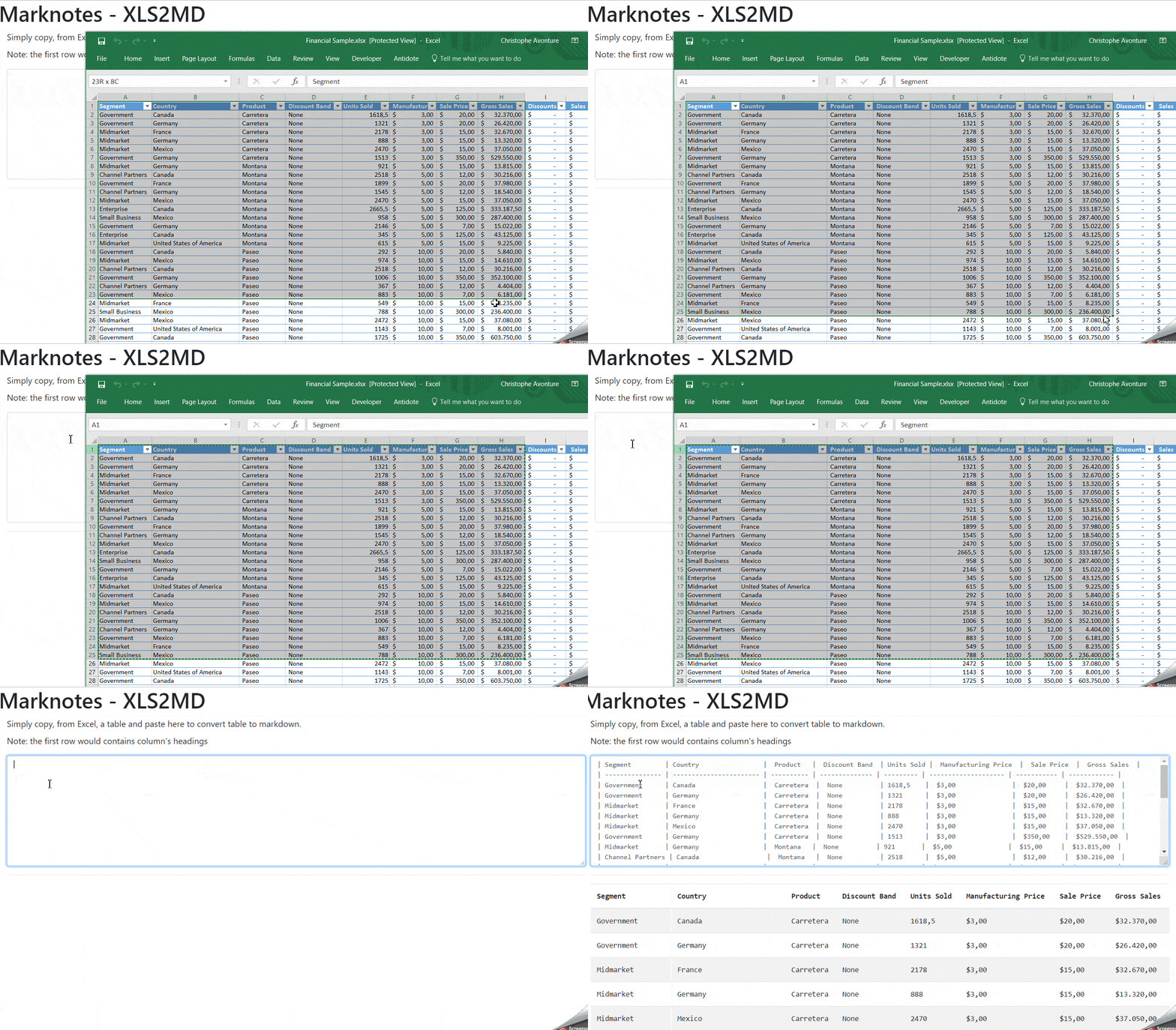
Concrètement, j'ouvre mon fichier Excel, je sélectionne une plage (une série de colonnes et de lignes), par exemple $A$1:$J$50, j'appuie sur CTRL+C au clavier, je passe sur mon site Markdown - Convertir des plages Excel en tableaux Markdown, j'appuie sur CTRL+V et le tableau est converti.
C'est ... magique
Voici une démo :
Code source
Vous le trouverez aussi sur Github : https://github.com/cavo789/marknotes_xls2md/tree/master.
<?php
// cspell:disable
declare(strict_types = 1);
/* * AUTHOR : AVONTURE Christophe * * Written date : 3 october 2018 * * Excel raw table to markdown converter * Simply copy, from Excel, a table and paste here to convert * table to markdown * * The javascript has been written by `Jonathan Hoyt` and available on GitHub: * https://github.com/jonmagic/copy-excel-paste-markdown. * * JS script updated to: * - Call marked.js (https://www.npmjs.com/package/marked) to render the table from markdown * to html * - Add bootstrap class to the rendered table * * Last mod: * 2019-01-01 - Abandonment of jQuery and migration to vue.js */
define('REPO', 'https://github.com/cavo789/marknotes_xls2md');
// Get the GitHub corner$github = '';if (is_file($cat = __DIR__ . DIRECTORY_SEPARATOR . 'octocat.tmpl')) { $github = str_replace('%REPO%', REPO, file_get_contents($cat));}?>
<!DOCTYPE html><html lang="en"> <head> <meta charset="utf-8"/> <meta name="author" content="Christophe Avonture" /> <meta name="robots" content="noindex, nofollow" /> <meta name="viewport" content="width=device-width, initial-scale=1.0" /> <meta http-equiv="content-type" content="text/html; charset=UTF-8" /> <meta http-equiv="X-UA-Compatible" content="IE=9; IE=8;" /> <title>Marknotes - XLS2MD - Convert Excel raw table to Markdown table</title> <link rel="stylesheet" href="https://stackpath.bootstrapcdn.com/bootstrap/4.1.3/css/bootstrap.min.css"> <style> textarea { margin-top:10px; font-family:Consolas,Monaco,Lucida Console,Liberation Mono,DejaVu Sans Mono,Bitstream Vera Sans Mono,Courier New, monospace; } details { margin: 1rem; } summary { font-weight: bold; } .form-control { padding: none; font-size: 0.8em; } </style> </head> <body> <?php echo $github; ?> <div class="container"> <div class="page-header"><h1>Marknotes - XLS2MD</h1></div> <div class="container" id="app"> <div class="form-group"> <how-to-use demo="https://raw.githubusercontent.com/cavo789/marknotes_xls2md/master/image/demo.gif"> <ol> <li>In your Excel worksheet, select a range like f.i. $A$1:$H:$25 (first row need to contains column's headings).</li> <li>Press <kbd>CTRL</kbd><kbd>C</kbd></li> <li>In this form, click in the text area here below</li> <li>Press <kbd>CTRL</kbd><kbd>V</kbd></li> </ol> <p>The copied data will be immediately converted to a markdown table and a HTML preview will be rendered.</p> <p>Adjust the markdown syntax if needed and copy/paste into your notes.</p> </how-to-use> <label for="editor">Simply copy, from Excel, a table and paste here to convert table to markdown.</label> <textarea class="form-control" rows="5" v-model="editor" name="editor" @change="onChange" @paste="onPaste"></textarea> </div> <hr/> <div v-if="Markdown!==''"> <h2 id="markdown">Markdown code <small style="font-size:0.4em"><a href="#html">See HTML rendering</a></small></h2> <pre v-html="Markdown"></pre> <hr/> </div> <div v-if="HTML!==''"> <h2 id="html">HTML rendering <small style="font-size:0.4em"><a href="#markdown">See Markdown code</a></small></h2> <pre v-html="HTML"></pre> <hr/> </div> </div> </div> <script src="https://unpkg.com/vue@2"></script> <script src="https://unpkg.com/marked@0.3.6"></script> <script type="text/javascript">
function columnWidth(rows, columnIndex) { return Math.max.apply( null, rows.map(function(row) { return row[columnIndex].length; }) ); }
function getMarkdown(data) { var rows = data.split(/[\n\u0085\u2028\u2029]|\r\n?/g).map(function(row) { return row.split("\t"); });
var columnWidths = rows[0].map(function(column, columnIndex) { return columnWidth(rows, columnIndex); });
var markdownRows = rows.map(function(row, rowIndex) { // | Name | Title | Email Address | // |--------------|-------|----------------| // | Jane Atler | CEO | jane@acme.com | // | John Doherty | CTO | john@acme.com | // | Sally Smith | CFO | sally@acme.com | return ( "| " + row .map(function(column, index) { return ( column + Array(columnWidths[index] - column.length).join(" ") ); }) .join(" | ") + " |" ); row.map; });
markdownRows.splice( 1, 0, "| " + columnWidths .map(function(width, index) { return Array(columnWidths[index]).join("-"); }) .join(" | ") + " |" );
// Get the markdown representation of the pasted info return markdownRows.join("\n"); }
Vue.component('how-to-use', { props: { demo: { type: String, required: true } }, template: `<details> <summary>How to use?</summary> <div class="row"> <div class="col-sm"> <slot></slot> </div> <div class="col-sm"><img v-bind:src="demo" alt="Demo"></div> </div> </div> </details>` });
var app = new Vue({ el: '#app', data: { editor: '', Markdown: '' }, methods: { onChange(event) { this.Markdown = getMarkdown(this.editor); }, onPaste(event) { event.preventDefault(); var clipboard = event.clipboardData; this.editor = clipboard.getData("text/plain").trim(); this.Markdown = getMarkdown(this.editor); } }, computed: { HTML() { if (this.Markdown == '') { return ''; } // Call marked() to convert the MD string into a HTML table var mdTable = marked(this.Markdown, { sanitize: true }); // Add Bootstrap classes mdTable = mdTable.replace('<table>', '<table class="table table-hover table-striped">'); return mdTable; } } }); </script> </body></html>Ce fichier PHP génère une page web qui convertit des tableaux Excel collés en markdown et HTML. Il charge un template GitHub optionnel, puis affiche une interface Vue.js avec une zone de texte où l'utilisateur colle des données Excel; le JavaScript détecte le collage, reformate les données en syntaxe markdown avec les bonnes largeurs de colonnes, et affiche un aperçu HTML rendu avec Bootstrap.
Articles liés


À la découverte de Pentaho, un programme ETL
20 juin 2025

Excel Formula Beautifier
25 mai 2025